

TorchServe is no longer actively maintained. The official project notice states there are no planned updates, bug fixes, new features, or security patches, and that vulnerabilities might not be addressed. For teams that run model inference on TorchServe today, this means security patches stop and compatibility updates with newer versions of PyTorch and CUDA stop. Engineers are left owning the entire dependency chain themselves: choosing compatible versions across the GPU stack, patching vulnerabilities in every layer, and debugging subtle failures when any component drifts out of alignment. This is undifferentiated work that slows model delivery without adding value to the final product.
AWS Deep Learning Containers (DLCs) have long addressed this kind of problem for training workloads. DLCs are pre-built, performance-optimized Docker images that bundle a framework, its dependencies, and the GPU stack into a tested, patched combination you can pull and use immediately. With the launch of the Ray Serve DLC, that same approach now extends to inference. You get a container purpose-built for serving models behind an HTTP endpoint, maintained and tested by AWS, with the full inference stack already assembled.
This post introduces the Ray Serve DLC and walks through deploying a vision-language model on Amazon Elastic Kubernetes Service (Amazon EKS) using this new image. We cover running a model with the Ray Serve DLC, running the serving application with Ray Serve, and deploying it on a single GPU node. The complete code is available in the accompanying repository.
Prerequisites
To follow along with this post, you need:
- An AWS account with billing enabled.
- Sufficient service quotas for
g5.xlargeinstances in your target Region. - The AWS Command Line Interface (AWS CLI),
eksctl, andkubectlinstalled and configured.
Compose Ray Serve application
The Ray Serve DLC for CPU is built on the Amazon Linux 2023 base image. The GPU variant is built on the official NVIDIA Amazon Linux 2023 image, which includes both the OS layer and the CUDA runtime libraries. On top of this foundation, the DLC adds a deep learning framework (PyTorch), the Ray Serve serving layer with FastAPI and Uvicorn, and common utilities for vision, audio, and multimodal workloads. These utilities include FFmpeg compiled with NVIDIA hardware acceleration for video preprocessing. All components are validated and tested together before each release, so there’s no version drift between the CUDA runtime, the framework, and the serving layer. Security patches are applied at build time.
The Ray Serve DLC is published as separate images for Amazon EKS and Amazon Elastic Compute Cloud (Amazon EC2), and for Amazon SageMaker, each with a dedicated entrypoint suited to that environment’s serving contract. Both share the same underlying stack and dependencies. For the current list of available image tags, see the Ray DLC availale images page.
The DLC ships the common inference stack, so many models, including the Qwen3-VL model, run on it without a custom image. For models that need extra libraries, engineers can layer them on the same tested base.
In this post, we use the GPU version of the Ray Serve DLC to serve the Qwen3-VL-2B vision-language model. The application is injected into the container through a ConfigMap, which keeps the deployment flexible so you can change the serving code without rebuilding the image. DLC already provides the GPU stack, PyTorch, Ray Serve, and Transformers.
Write the serving application
With Ray Serve, a model endpoint is a Python class decorated with @serve.deployment. You implement __call__ to handle HTTP requests and call .bind() to register it. There’s no model archiver, no handler class hierarchy, and no properties configuration file. If you’re coming from TorchServe, this replaces the custom handler, the torch-model-archiver step, and the config.properties file.
The following example loads the Qwen3-VL-2B vision-language model onto the GPU and exposes it as an HTTP endpoint. When a request arrives with an image URL and a text prompt, the model generates a natural-language response describing or answering questions about the image:
The entire serving logic in qwen_serve.py is added to a qwen-serve-code ConfigMap. The @serve.deployment decorator with ray_actor_options={"num_gpus": 1} tells Ray to schedule this deployment on a worker with one available GPU. The model loads in float16 to fit within the 24 GB of VRAM available on the A10G GPU used in the next section.
Deploy on Amazon EKS
Deploy the Ray Serve DLC along with the qwen-serve-code ConfigMap created earlier. The following diagram shows the target architecture: an Amazon EKS cluster with a single GPU node running one pod that serves the model over HTTP on port 8000.
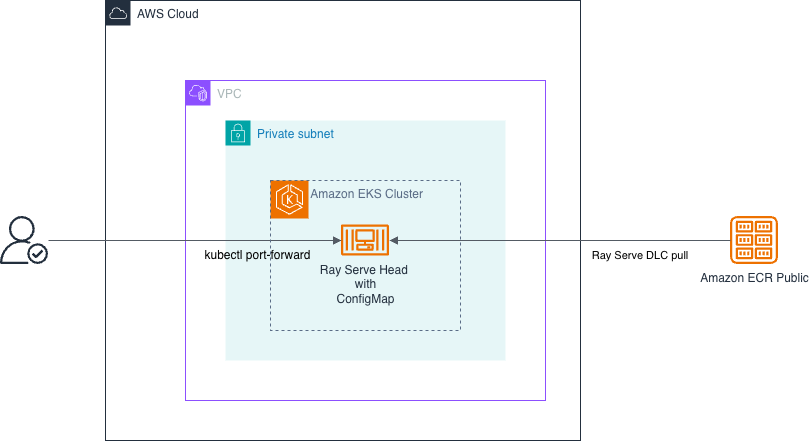
Figure 1: Single-node inference architecture on Amazon EKS, with one GPU pod serving the model over HTTP on port 8000
This deployment uses a single g5.xlarge instance (one NVIDIA A10G GPU, 24 GB VRAM). It’s a single-node inference setup: one pod, one GPU, one machine. For multi-node distributed serving (model parallelism across machines or horizontal autoscaling with multiple replicas), you would build on top of this foundation using KubeRay to orchestrate Ray workers across nodes.
The accompanying repository includes scripts that automate the infrastructure setup:
deploy_cluster.shprovisions an EKS cluster usingeksctl, with virtual private cloud (VPC) networking, an OIDC provider for AWS Identity and Access Management (IAM)-based pod authentication, and core cluster add-ons.deploy_node_group.shadds a managed GPU node group with a singleg5.xlargeinstance labeledrole=gpu-worker.deploy_ray_cluster.shapplies a ConfigMap withqwen_serve.py, deploys a Kubernetes Deployment manifest that schedules the pod on the GPU node, and starts Ray Serve on port 8000.- After running the three scripts, verify that the pod is running and the GPU is allocated:
With the pod reporting ready, port-forward to it so we can test it.
On a new terminal, send a request that asks the Qwen3-VL-2B vision-language model to describe an image:
You should receive a JSON response with the model’s description of the image. To confirm that inference is running on the GPU:
Note: The pod reports Ready a minute or two before Ray Serve starts answering, because the model is still loading. If the first request is refused, wait a minute and try the request again.
Clean up
To avoid ongoing charges, tear down the resources in reverse order:
Conclusion and next steps
At this point you have a working inference endpoint, and you got there without maintaining CUDA compatibility yourself, without writing TorchServe handler boilerplate, and without assembling a multi-stage Dockerfile that stitches the GPU stack together. That’s what the Ray Serve DLC is designed to do: provide a supported, pre-tested container so you can focus on model code rather than infrastructure maintenance.
For teams currently on TorchServe, this is a strong migration path. The DLC eliminates version drift, simplifies upgrades to a tag swap, and provides regular security patches managed by AWS. For workloads that need to scale beyond a single node, KubeRay extends this same foundation to multi-node distributed serving.
To get started, try the accompanying code sample for a complete end-to-end deployment. To browse all available DLC images, including CPU variants and other frameworks, visit the AWS Deep Learning Containers reference.
