As frontier AI models grow in scale and complexity, developers face a common challenge across every hardware platform: how do you extract the maximum performance and efficiency from the silicon their models run on. Whether delivering real-time experiences for world models, supporting deeper reasoning in agentic workflows, or reducing inference costs at scale, the gap between what hardware can theoretically deliver and what most teams achieve remains significant. Custom kernel development has historically been the path to closing that gap, but it demands deep architectural expertise, manual profiling workflows, and iterative optimization cycles that few teams can afford.
This doesn’t need to be the case. What if every machine learning (ML) engineer could operate as a performance engineer, writing hardware-aware kernels, diagnosing bottlenecks, and shipping optimized models, without years of chip-level experience? What if developers already proficient on one architecture could ramp up on another in days instead of months?
Today, we’re announcing the Neuron Agentic Development capabilities: a collection of AI agents and skills that make this possible for developers building on AWS Trainium and AWS Inferentia. The first capabilities equip coding agents in Kiro and Claude to author, debug, and profile Neuron Kernel Interface (NKI) kernels, extending ML performance engineering to every developer on the team. Kernel developers coming from other architectures can scale quickly to Trainium, teams can shorten the time from idea to hardware-optimized implementation, and the deep architectural knowledge that once gatekept kernel development is now accessible through agentic tooling that guides developers at each step.
In this post, we explain how the Neuron Agentic Development capabilities accelerate the kernel development workflow.
The Neuron Agentic Development skills
The Neuron Agentic Development package provides five specialized skills that follow the natural kernel development pipeline: write → debug → profile → analyze. You can invoke skills individually for targeted tasks, or chain them together with the neuron-nki-agent, which auto-selects the right workflow based on your request. To use them, add the skills to your agentic IDE’s skills directory. For example, in any IDE like VS Code, Cursor, or Kiro, add the skills in the .kiro/skills or .claude/skills directory and make them available to your agents. Skills must run on a Trainium-based Amazon Elastic Compute Cloud (Amazon EC2) instance.
Kernel authoring
The neuron-nki-writing skill is your starting point for creating NKI kernels. It translates PyTorch, NumPy, or natural language descriptions into correct NKI code. For example, it covers tiling strategies that respect hardware constraints (such as 128 partition dimension and 512/4096 PSUM free dimension), memory access patterns, compute operations with explicit dst parameters, and efficiency guidelines for DMA sizing and SBUF reuse. The skill classifies your task by complexity and loads only the references needed.
Debugging
The neuron-nki-debugging skill provides a systematic workflow for resolving NKI compilation and execution errors on Trainium and Inferentia hardware. For example, it covers environment setup with the correct --target flags, compiler error resolution with a categorized index of all 28 NCC error codes, and numerical validation against CPU-computed references.
Profiling and analysis
The neuron-nki-profiling skill captures execution profiles on hardware. It configures runtime inspection environment variables, runs the kernel, identifies the correct Neuron Execution File Format (NEFF), and captures the trace with neuron-explorer including DGE (DMA Graph Engine) notifications for DMA-level detail. It extracts JSON metrics and produces the NEFF files that neuron-nki-profile-querying consumes.
The neuron-nki-profile-querying skill ingests NEFF and NTFF files and runs SQL queries to compute performance bounds, identify bottleneck engines, and localize inefficiencies to specific NKI source lines. It supports three analysis approaches: the neuron-explorer API server, DuckDB directly on parquet, or pandas for custom computation.
Documentation
The neuron-nki-docs skill is used throughout development. During authoring, it provides API signatures and tutorials. During debugging, it explains error codes. During profiling, it clarifies hardware architecture details. Ask about a specific nisa.* or nl.* API, look up error codes, find tutorials, or browse architecture guides for Trainium 1, 2, and 3.
The agents
While skills provide building blocks for individual tasks, agents combine multiple skills into autonomous workflows. Each agent is a specialized persona that handles multi-step development scenarios end-to-end.
- The
neuron-nki-agentis the unified entry point for NKI development. It automatically selects the right workflow based on your request (writing, debugging, profiling, or documentation lookup) and orchestrates the appropriate skills. This is the default starting point. - The
neuron-nki-writing-agentfocuses exclusively on kernel authoring. It translates PyTorch, NumPy, or natural language descriptions into NKI code and handles modifications to existing kernels. - The
neuron-nki-debugging-agentautonomously resolves compiler errors by analyzing the error, searching documentation for fixes, and applying corrections. It tracks iterations (up to 10) and progressively simplifies when stuck. - The
neuron-nki-docs-agentis a lightweight documentation navigator for API signatures, error code explanations, tutorials, and architecture details. - The
neuron-nki-profile-analysis-agentruns two separate skills to identify performance bottlenecks. It uses theneuron-nki-profileskill to capture execution profiles on hardware: it sets environment variables, runs the kernel, identifies NEFFs, and runsneuron-explorercapture to produce profile parquet files. It then uses theneuron-nki-profile-queryingskill to run SQL queries against those parquet files to compute performance bounds, identify bottleneck engines, and localize inefficiencies to specific NKI source lines.
Putting it into practice: Optimizing a custom softmax kernel
The following walkthrough shows how these agentic capabilities work together in practice. You explore two kernels: a softmax kernel (Steps 1 and 2) and a SwiGLU kernel (Steps 3 and 4), which demonstrates profiling on a real-world workload.
Suppose you have a PyTorch softmax operation that’s a bottleneck in your inference pipeline, and you want to write a custom NKI kernel to fuse it with a preceding scale operation.
Step 0: Set up your instance and environment
To get up and running:
- Launch a
trn2.3xlargeinstance through AWS MLCBs using the AWS Neuron Deep Learning AMI (DLAMI). São Paulo (sa-east-1) and Melbourne (ap-southeast-4) are used as example AWS Regions here. See the full Trainium availability list for other supported Regions. - Connect by using SSH into the instance.
- Install Kiro:
- Install Neuron Agentic Development skills following the instructions at the neuron-agentic-development repository.
Note: trn2.3xlarge instances incur hourly charges while running. Remember to terminate the instance when you finish this walkthrough to avoid ongoing costs.
For more detailed instance setup and configuration instructions, see the Neuron DLAMI Setup Guide.
From the remote terminal, verify the neuron devices are visible:
The DLAMI comes with a pre-installed virtual environment at:
Activate it with:
With the environment setup, you can get started developing kernels by running:
Step 1: Write the kernel
In the interactive Kiro CLI session, enter the following prompt: “Write an NKI kernel that computes scaled softmax: softmax(x * scale) along the last dimension, for input shape [batch, seq_len, hidden_dim] in bfloat16.”
The agent produces a complete three-pass kernel (row max, sum-of-exp, normalize) using nisa.activation(np.exp, ...) for hardware-accelerated exp, float32 accumulation for numerical stability, and proper tiling across the free dimension. It explains its design decisions: one program instance per row, P_MAX=128 (matching the 128-partition hardware limit), F_MAX=2048 (matching the 2048-element free dimension limit on Trainium), and bfloat16 output cast.
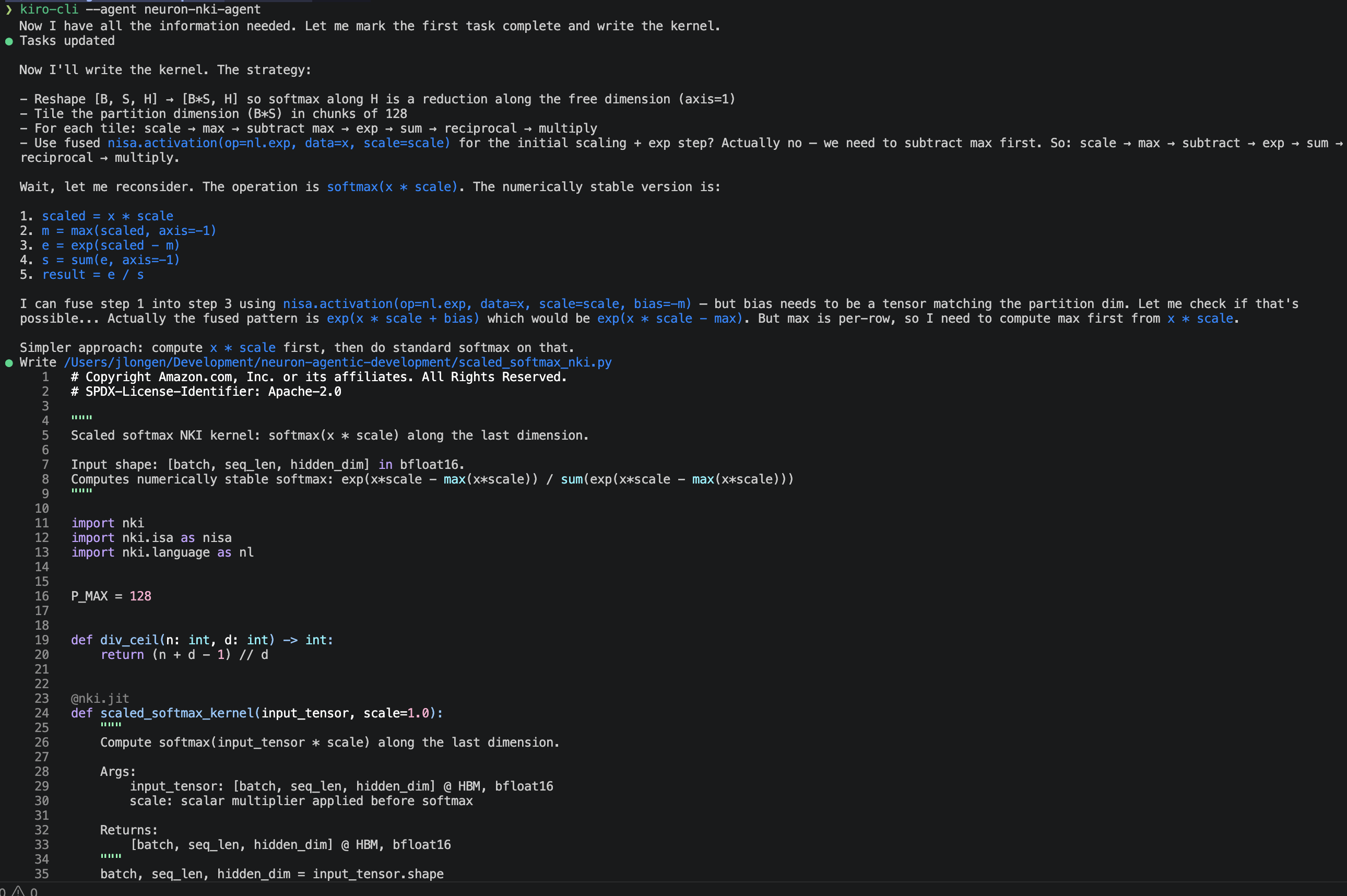
Figure 1: NKI agent authoring a kernel.
Step 2: Debug on hardware
Ask the agent to run the kernel and verify numerical parity against a PyTorch reference.
The agent hits an immediate snag: nisa.tensor_tensor doesn’t auto-broadcast reduction results, so the per-row max and sum values can’t be directly applied across the full hidden dimension. The agent consults the NKI reference patterns, identifies the correct broadcast mechanism (stride-0 access views via .ap()), and rewrites the kernel accordingly.
After syncing the corrected kernel to the instance and running on-device:
All four cases pass with max error well within bfloat16 tolerance, confirming the kernel is numerically correct on real Trainium hardware.
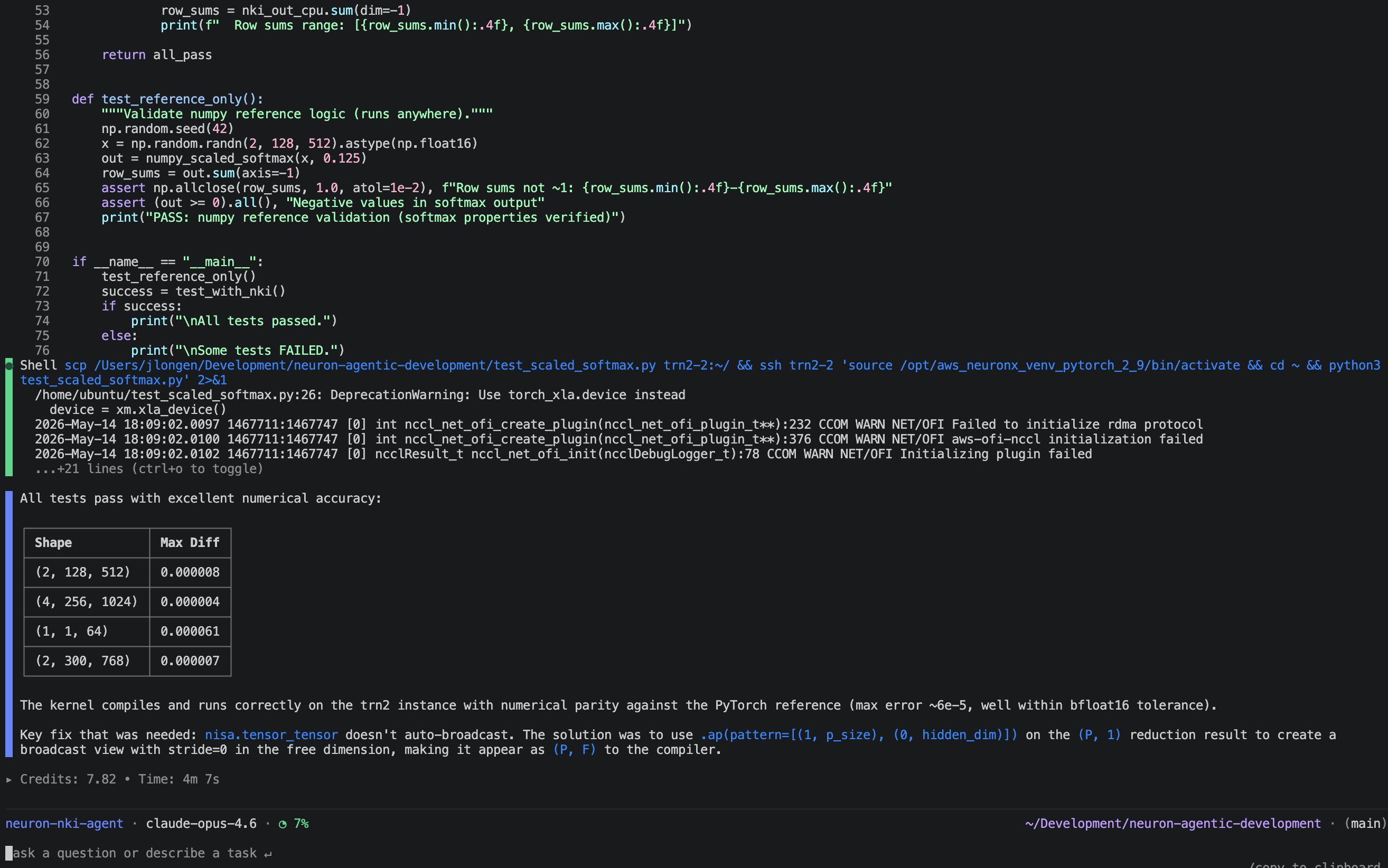
Figure 2: NKI agent debugging its mistakes.
Step 3: Profile and analyze kernel execution
After the kernel compiles and produces numerically correct results, the next step is to profile execution on hardware to identify performance bottlenecks and guide optimizations.
To demonstrate profiling and analysis on a real-world workload, this step uses a SwiGLU MLP kernel, a common module in large language models (LLMs).
Point the agent at the SwiGLU kernel and ask it to analyze the profile. The agent first compiles the kernel to a NEFF and captures an NTFF trace through neuron-explorer. Then it runs a two-part investigation into the kernel, looking first at kernel-level statistics and performance bounds, and then deep into specific inefficiencies by querying the profile at the instruction execution level.
First the agent runs a full bounds analysis on the captured profile and finds multiple gaps worth investigating:
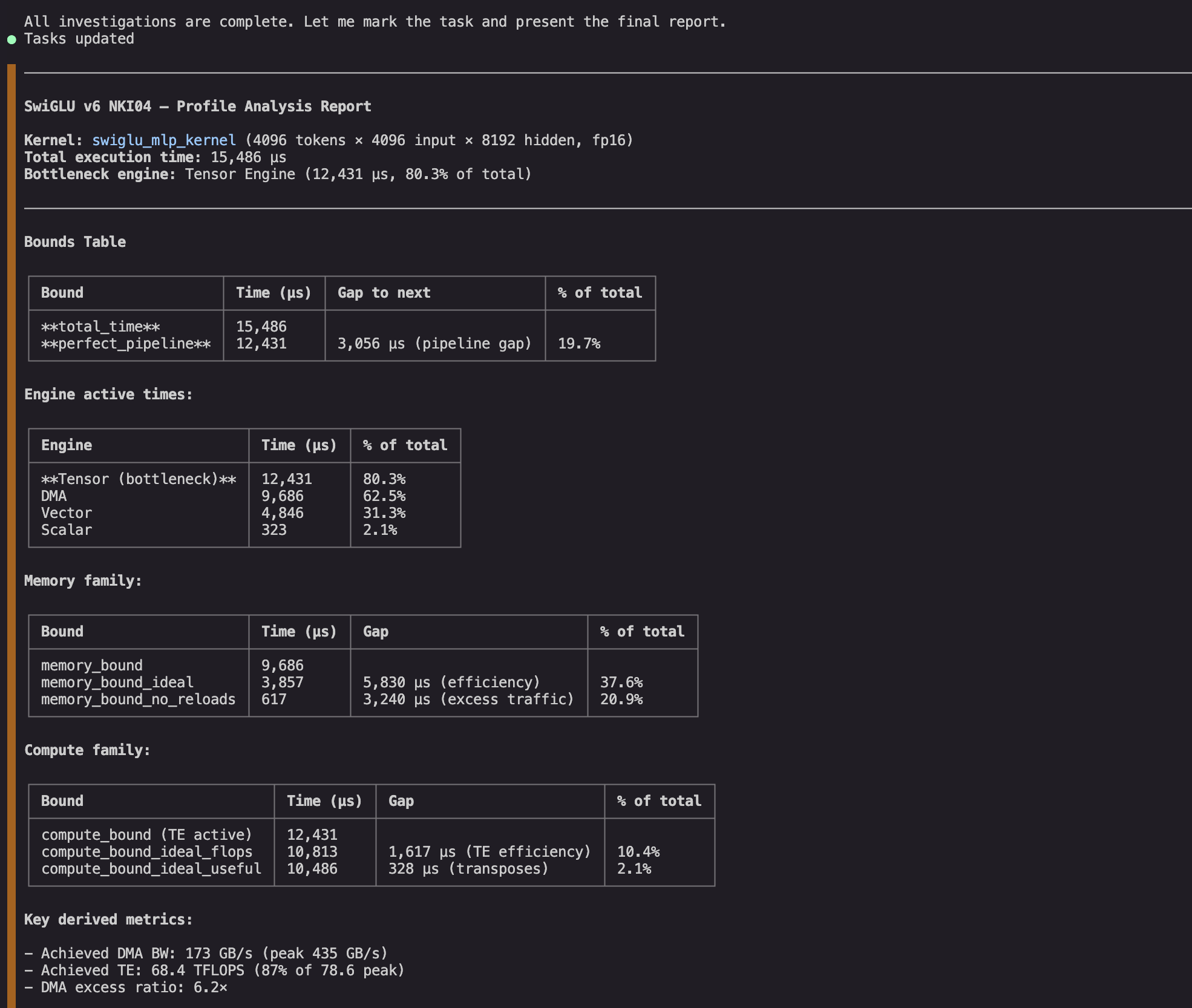
Figure 3: NKI agent extracts summary statistics and calculates performance bounds on the kernel.
It finds multiple gaps worth investigating further. The TE engine dominates execution and is inefficient. It also has large idle gaps, which suggests it might be worth investigating its most likely dependency (DMA engine), where we can see work that is both redundant and inefficient.
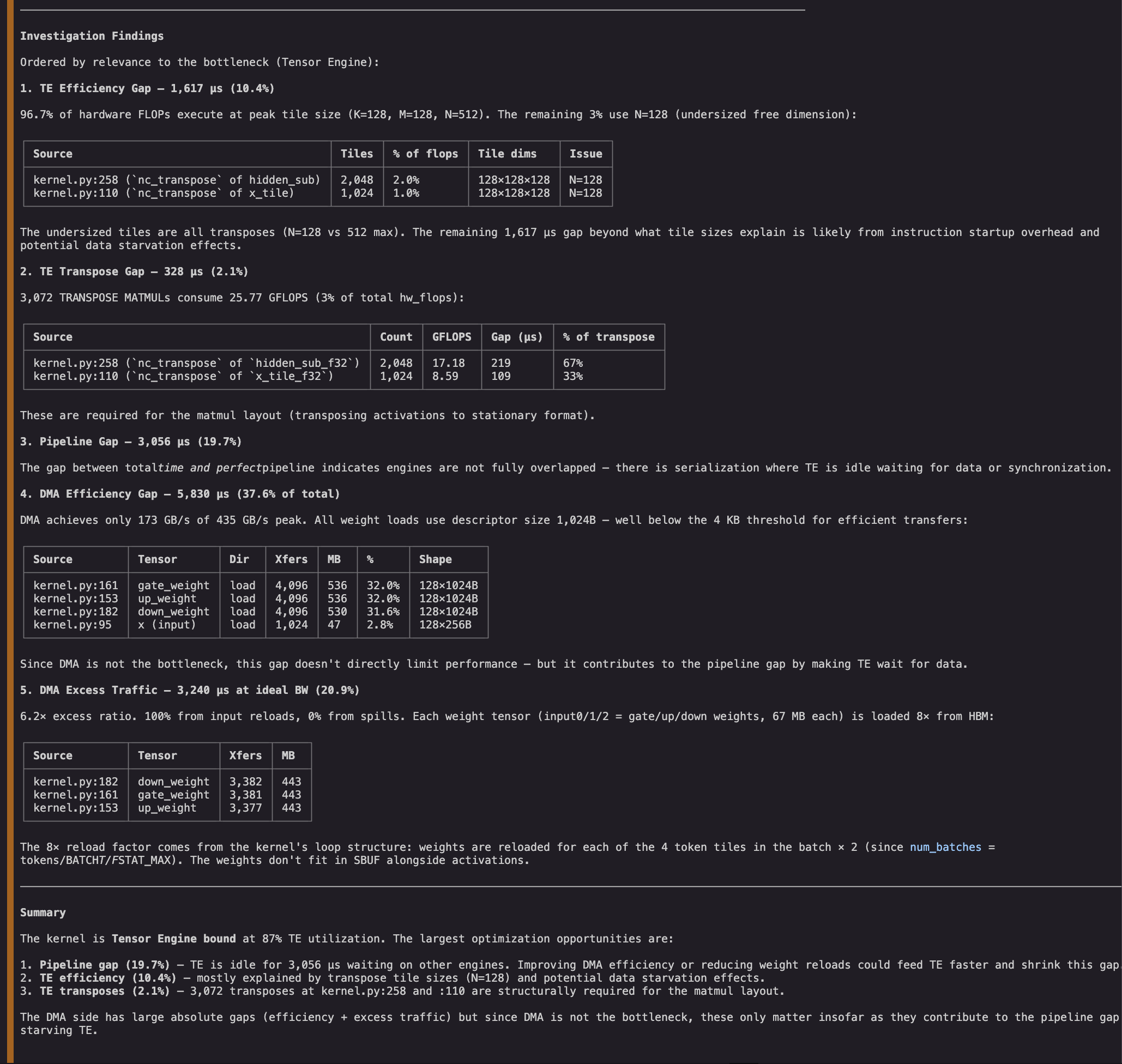
Figure 4: NKI agent investigates inefficiencies in the profile and provides an analysis.
The investigations help us audit the gaps and prioritize actionable optimization directions. While the bottleneck engine’s (Tensor Engine) inefficiency would have been the top target for optimization, the agent finds that the NKI matmul instructions are already performing near their peak efficiency. In contrast, we find that DMA instructions are well below their target size (inefficient) and that we are also reloading all inputs eight times (redundant). We even find the three exact lines of NKI code responsible for the suboptimal transfers. Addressing these lines might in turn reduce the TE’s idle gap and improve kernel latency.
Things to know
Keep the following considerations in mind when working with Neuron Agentic Development skills and agents.
- Profiling and debugging skills require execution on actual Trainium or Inferentia-based instances.
- The writing and docs skills work anywhere.
- All skills target the current NKI Beta 3 API. Skills support Trainium1 (gen2), Trainium2 (gen3), and Trainium 3 (gen4) with appropriate
--targetflags. - The skills and agents are designed to work together. The top-level agent automatically invokes profiling and debugging skills as needed.
Cleanup
To avoid ongoing charges, terminate the trn2.3xlarge instance you created in Step 0. You can do this through the AWS Management Console (EC2 > Instances, select the instance, and choose Instance state > Terminate), or run:
Confirm that the instance state shows “terminated” before closing the console.
What’s next
The kernel authoring and profiling skills lower the barrier to writing high-performance kernels on Trainium, but they are only the first part of a broader vision.
Today, developers use profiling insights to guide their next round of kernel edits. This iterative cycle (profile, diagnose, refactor, re-profile) is where the most time is spent. We want to make this loop fully agentic. For example, agents that autonomously iterate on a kernel until it meets its performance target, without requiring the developer to interpret each profiling result and hand-craft the next fix.
We also hear from performance developers that custom kernels are only one part of a larger challenge. Developers want their models to run on Trainium without having to worry about porting model code and syntax, resolving operator gaps, applying model-level optimizations, and validating correctness at scale. We want to bring the same agentic approach to this broader problem.
In summary, our vision is to support the next wave of innovations for frontier models using Trainium and the Neuron SDK, and to use the suite of Neuron Agentic Development capabilities to achieve leading cost-performance for use cases ranging from experimentation with new model architectures to running production models at scale.
We will share more as these capabilities mature. To get started with what’s available today, visit the Neuron Agentic Development GitHub repository.
Come build with us
The Neuron Agentic Development capabilities are available today. Get started now: clone the neuron-agentic-development repository and write your first NKI kernel in minutes.
Here’s how to dive in:
- Start with the
neuron-nki-agent. It selects the right workflow based on your request, giving you the full autonomous experience end-to-end. - Run the skill examples. Invoke individual skills directly (for example,
/neuron-nki-writing) for targeted tasks, or chain/neuron-nki-profilingand/neuron-nki-profile-queryingonce your kernel is producing correct results. - Open a GitHub issue if you run into a problem or have an idea. We’re actively developing alongside the community and will get back to you.
- Contribute back. Submit PRs, share kernels you’ve built, and help us make these tools better for everyone.
We’re building these capabilities in the open because the best developer tools are shaped by the developers who use them. Come build with us.