

Financial institutions process thousands of documents daily, including tax forms, loan statements, and purchase orders. Each has a unique format, structure, and field names, making it challenging to create automation workflows using optical character recognition (OCR) software. Amazon Bedrock Data Automation (BDA) helps solve these challenges by automating the extraction, validation, and analysis of data from financial documents. BDA goes beyond simple OCR by using foundation models that can:
- Understand document context
- Recognize relationships between different sections
- Extract structured, actionable data
- Validate information across multiple sources
While foundation models like Anthropic Claude can extract content from PDFs, Amazon Bedrock Data Automation offers custom extractions with industry-leading accuracy at a lower cost, along with features such as visual grounding with confidence scores for explainability and built-in hallucination mitigation.
In this post, we explore how Amazon Bedrock Data Automation can accurately extract information from four common types of financial documents: bank statements, W-2 forms, 1099-B tax forms, and vendor contracts. We highlight the complexity in the documents, detail the custom extraction created in Amazon Bedrock Data Automation, and describe the outcomes of the extraction process.
Solution overview
Amazon Bedrock Data Automation lets you configure output based on your processing needs using blueprints. A blueprint in Amazon Bedrock Data Automation is a configuration template that defines how data should be extracted from documents. It specifies:
- The document type being processed
- The data fields to be extracted
- The validation rules for the extracted data
- The structure and format of the output
Think of it as a map that tells Amazon Bedrock Data Automation exactly what information to look for and how to process it. When using a blueprint for extraction, you can use a catalog blueprint or a custom created blueprint. A custom blueprint allows organizations to create extraction patterns for their specific needs. In this post, we created custom blueprints and used the BDA console to generate and validate the output.

How to develop blueprints for 4 types of financial documents
The following sections walk you through creating custom blueprints for bank statements, W-2 forms, 1099-B forms, and vendor contracts.
Prerequisites
- Active AWS account with appropriate IAM permissions (sample policy from BDA workshop)
- Model access must be granted (request access through AWS console)
- Set up Amazon Bedrock Data Automation using the Getting started with Amazon Bedrock guide
- Sample financial documents for testing
If you are not familiar with how custom blueprints are created, follow the instructions from the Amazon Bedrock documentation. For our evaluation, we uploaded the documents on the BDA console, refined the AI-generated prompts, and downloaded the results. Typically, a single custom blueprint suffices for a specific document type when extracting consistent fields. However, if workflow requirements vary or document formats change significantly, multiple custom blueprints might need to be created to accommodate these differences. After a blueprint is created, you can use it as a part of the workflow for consistent downstream processing. For the same blueprint, if the input document has different data, then BDA might return slightly different output (for example, some bank statements might have total debits and credits). However, because BDA output is structured JSON, it is straightforward to create appropriate rules based on downstream processing workflows (for example, discard total if the workflow is to categorize individual debit and credit transactions for accounting).
The following screenshot illustrates the blueprint prompt for one of the document types.
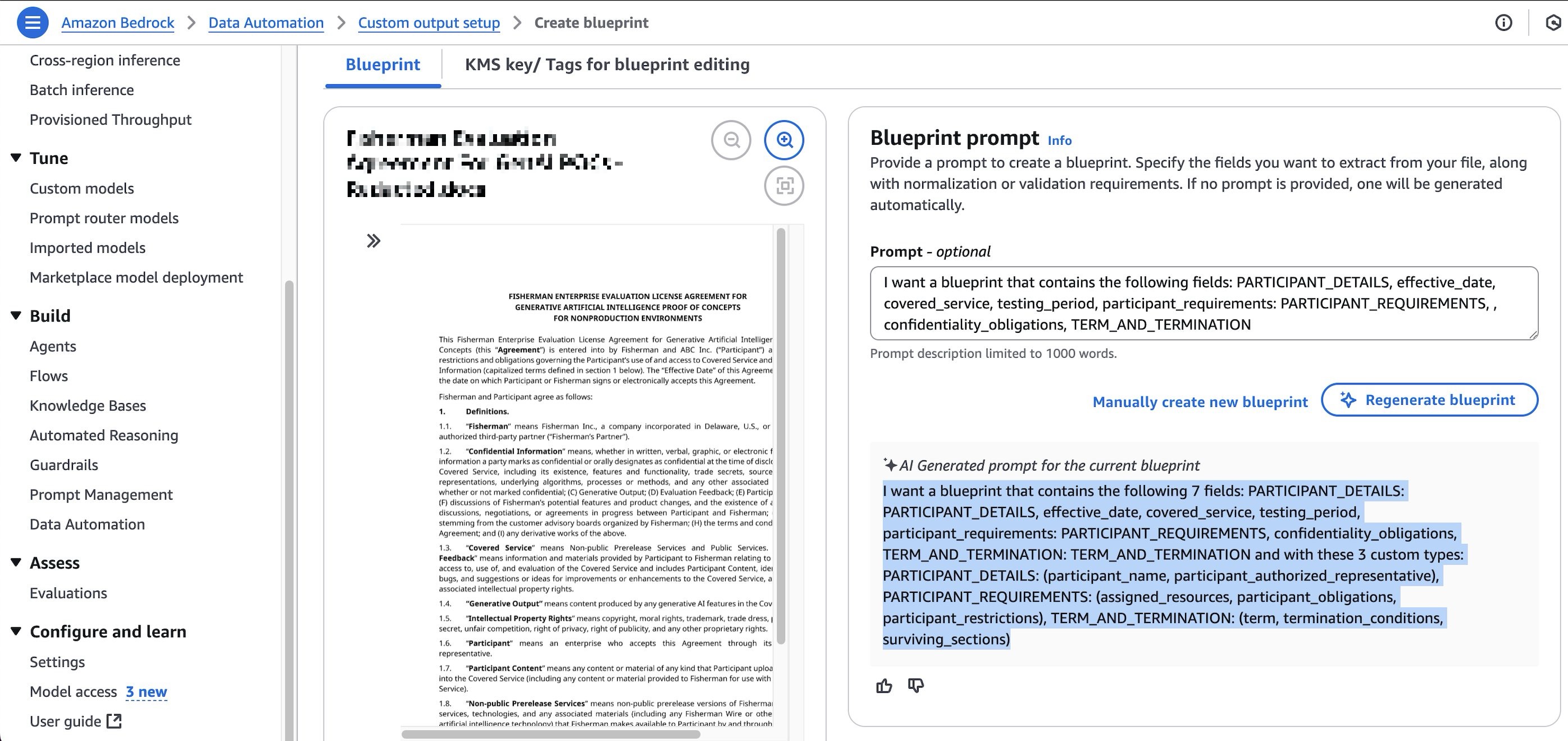
The next section describes the four documents tried as a part of this project and extraction achieved using custom blueprints based on needs. Output is available in JSON, CSV, and raw data formats, highlighting the solution’s adaptability to diverse integration and reporting needs.
Financial document types and custom blueprints
Amazon Bedrock Data Automation provides built-in blueprints for common document types including bank statements and W-2 forms. These built-in blueprints offer comprehensive extraction out of the box. In this post, we use custom blueprints to demonstrate how organizations can tailor extraction to their specific workflow requirements. For example, you can extract only transaction data from bank statements for automated accounting, or group W-2 fields into logical structures (federal tax, state tax, code-amount pairs) that align with downstream tax processing systems. Custom blueprints also serve as the approach for document types that don’t have built-in blueprints, such as 1099-B forms and vendor contracts shown later in this post.
1. Bank Statements – Documents from banks detailing an account’s financial activity, including deposits, withdrawals, and fees, over a specific period, typically a month.
Bank statements present a complex challenge: they contain numerous monthly transactions, often spanning multiple pages, with varying formats and details. In many workflows, the critical task is to precisely capture transaction data, including dates, amounts, descriptions, and reference numbers, which can then feed directly into automated accounting workflows like categorizing transactions in an accounting ledger. This automated extraction minimizes manual data entry errors and streamlines the reconciliation process. As part of our evaluation process, we selected the following bank statement for a trial of the extraction process:
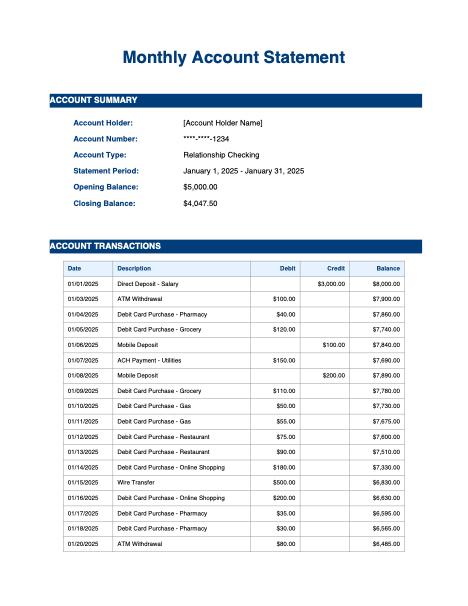
Account Statement generated using Amazon Nova Pro Foundational Model
Tailored blueprint instructions for Amazon Bedrock Data Automation:
Extraction results from table.csv:
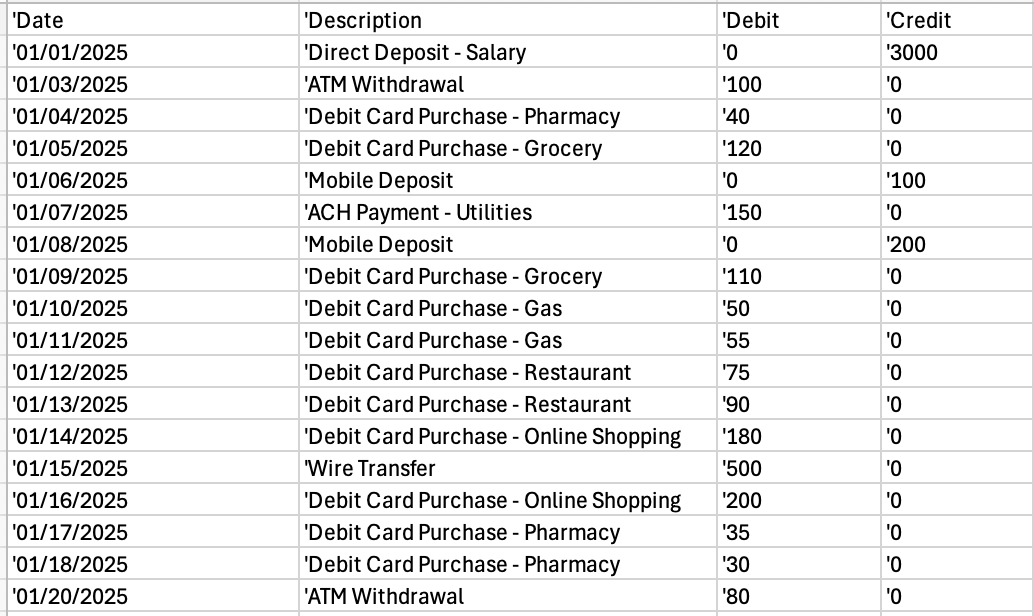
Upon review, we can confirm that the system successfully extracted the transactions accurately.
2. Form W-2 – Reports income and tax withheld for an individual or a business.
W-2 tax forms present unique extraction challenges because of their standardized yet complex structure. As part of our evaluation process, we used the following W-2 for a trial of the extraction process:
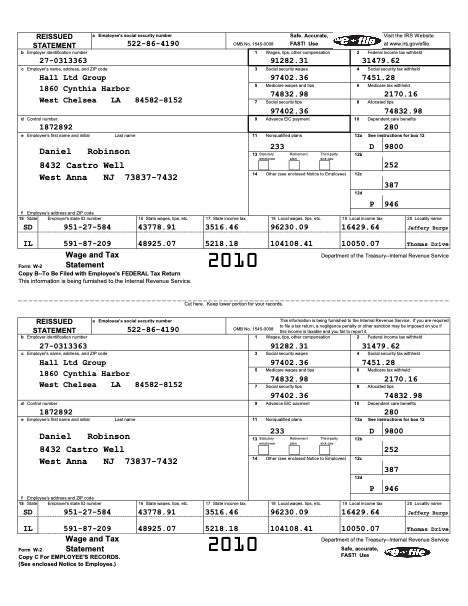
W2 generated using Amazon Nova Pro Foundational Model
Tailored blueprint instructions for Amazon Bedrock Data Automation:
Extraction results from result.json:
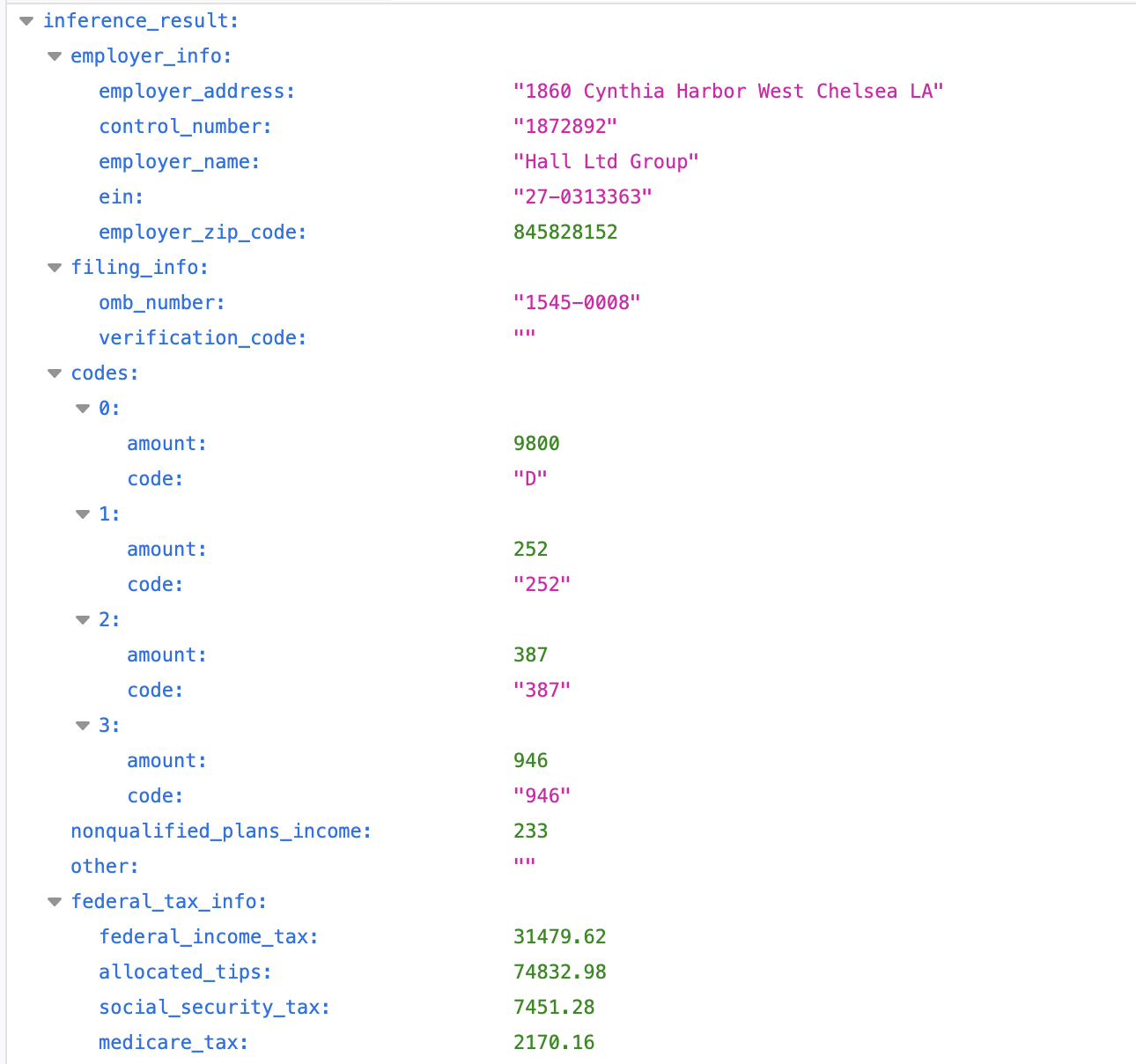
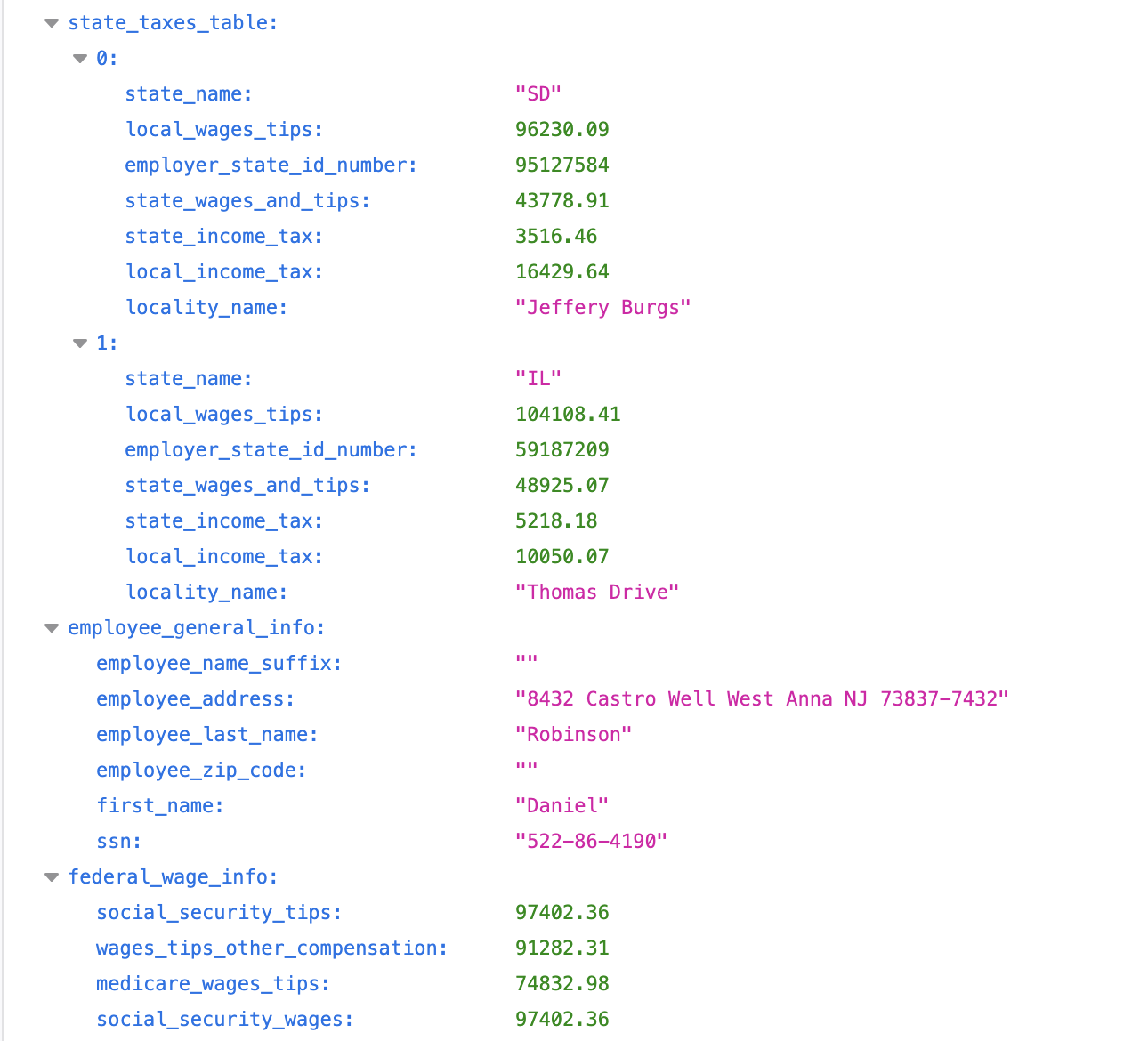
Upon review, we can confirm that the system successfully extracted the transactions accurately. Several extraction complexities were specifically verified in the project:
- There is no specific grouping on the form for Federal Tax and State Tax information but they need to be processed together so extraction results should bring them together.
- In a single Box 12 of W2 there can be up to 26 codes to report certain compensation and benefit amounts. It is important to extract code and value as a pair.
- Employers can put just about anything in box 14. It helps catch items that don’t have their own dedicated box on the W-2, so these should be grouped separately.
3. IRS Form 1099-B: Proceeds from Broker and Barter Exchange Transactions – This tax document tracks:
- Securities trading activity
- Broker-facilitated transactions
- Barter exchange participation
As part of our evaluation process, we used the following 1099-B for a trial of the extraction process:

1099-B statement generated using Amazon Nova Pro Foundational Model
Tailored blueprint instructions for Amazon Bedrock Data Automation:
Extraction results from table.csv:

A significant validation of BDA’s contextual understanding capabilities is that the system accurately identified and extracted ‘TSLA’ as the security descriptor across the stock transactions, even if it appeared as a common descriptor for the transactions. This consistent extraction demonstrates BDA’s ability to maintain contextual accuracy throughout the document processing.
4. Vendor contract – This extraction process is applicable to a wide range of vendor contracts. The specific details to be captured need to be tailored to each company’s unique operational workflows and requirements.
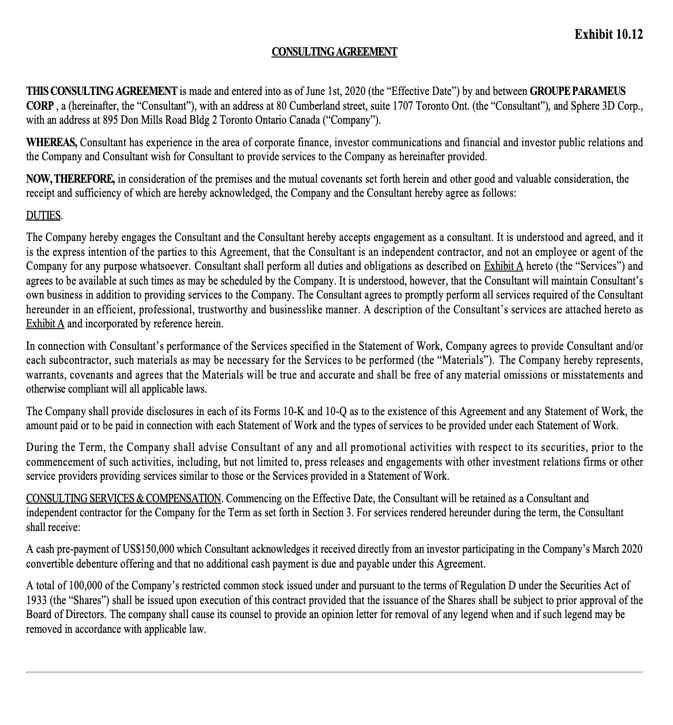
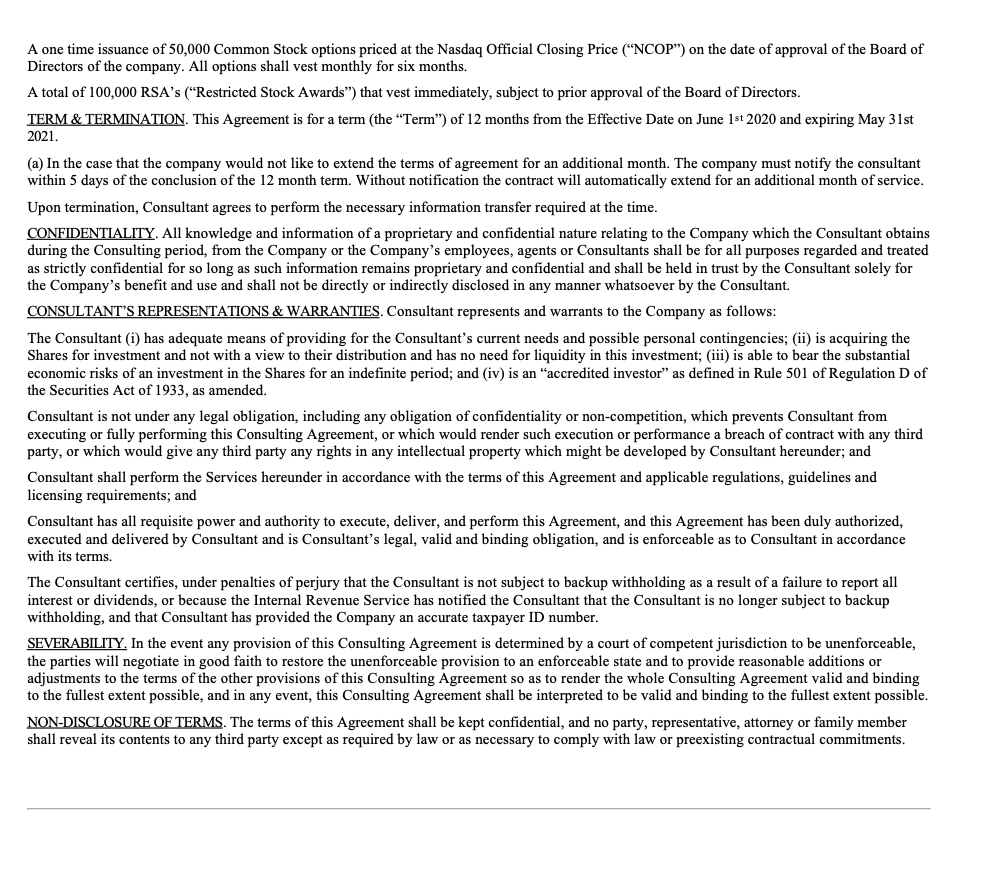
As part of our evaluation process, we selected the following vendor contract for a trial of the extraction process:
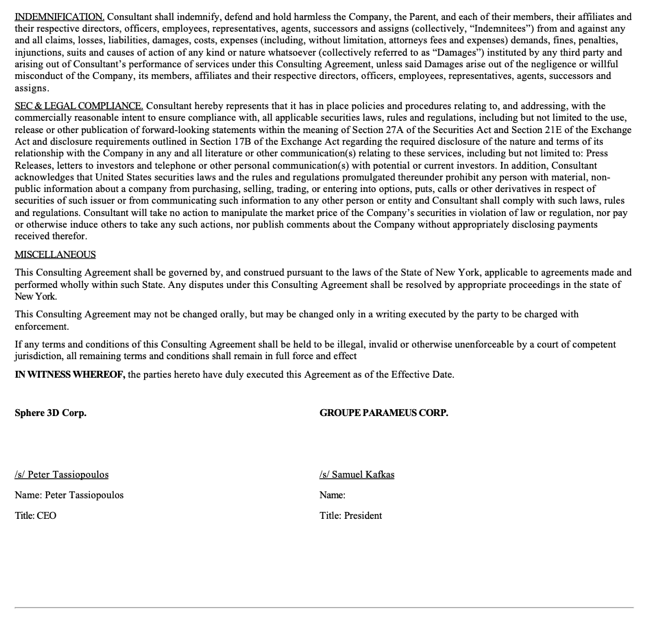
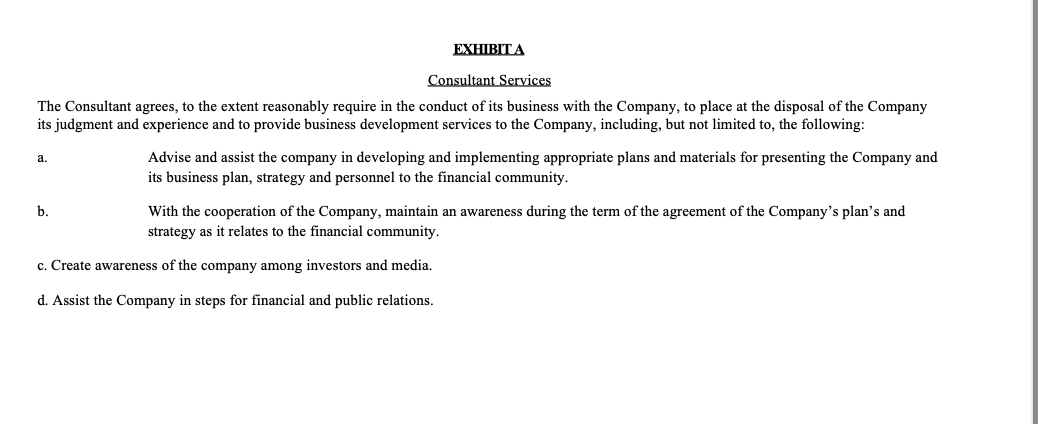
Tailored blueprint instructions for Amazon Bedrock Data Automation:
Extraction results from result.json:
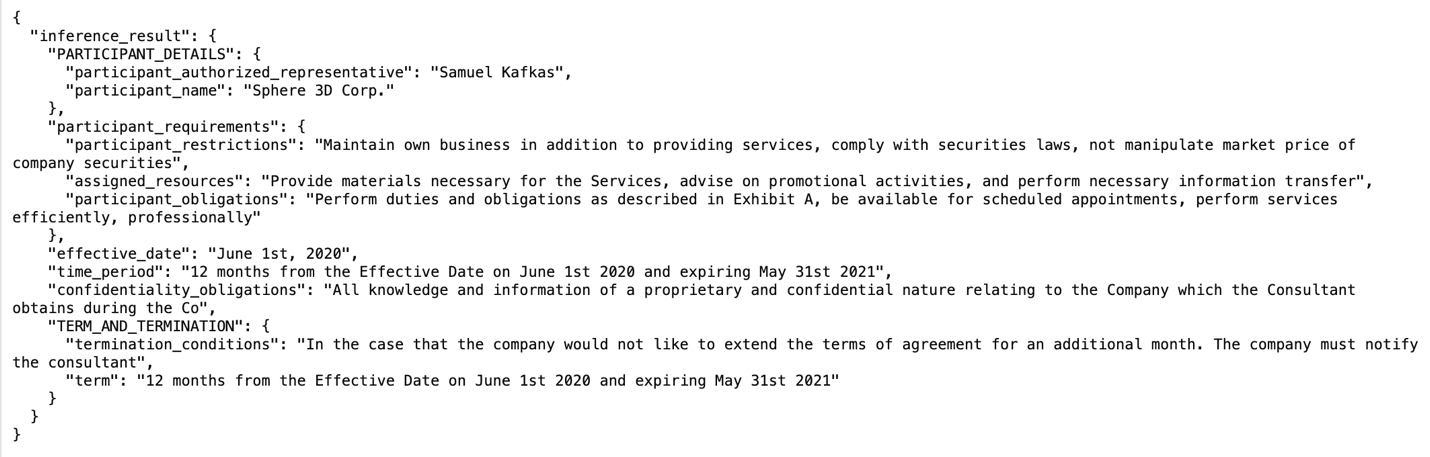
The system successfully identified and extracted the blueprint-specified elements present within the contract.
Conclusion
In this post, we demonstrated how you can use Amazon Bedrock Data Automation to accurately extract key information from financial documents including bank statements, W-2 forms, 1099-B forms, and vendor contracts to automate downstream processing. You learned how to:
- Create custom blueprints for different document types
- Extract structured data from complex financial documents
- Validate Amazon Bedrock Data Automation outputs for downstream processing
To learn more about implementing document processing with Amazon Bedrock, review the Amazon Bedrock Data Automation documentation. For production workflows involving sensitive information, follow your organization’s cybersecurity and legal guidelines to verify compliance with all applicable regulations, including but not limited to GDPR in Europe or any other regional or industry-specific requirements.


