
As large language models (LLMs) grow in size and complexity, maximizing inference throughput while minimizing latency remains a critical challenge for enterprise production deployments. Speculative decoding is one effective strategy to address this, utilizing a lightweight draft model to guess future tokens which are then verified by the target LLM in a single forward pass. While state-of-the-art frameworks like Extrapolation Algorithm for Greater Language-model Efficiency (EAGLE) have achieved impressive speedups, they encounter a hidden architectural ceiling: their draft tokens are generated autoregressively. Because each draft token depends on the output of the previous one, producing K candidates requires K sequential forward passes through the draft head, creating a latency cost that grows linearly with speculation depth. EAGLE-3, the latest iteration, improved upon earlier versions by predicting tokens directly rather than features and by combining representations from multiple layers of the target model, boosting draft accuracy and allowing the method to benefit from larger training datasets. However, even with these gains, the fundamental sequential drafting constraint remains. The deeper you speculate, the more drafting overhead you accumulate, eventually eating into your performance gains.
To overcome this bottleneck, AWS invented Parallel-EAGLE (P-EAGLE) and contributed it to open source, a breakthrough method that transforms speculative decoding from an iterative process into a fully parallelized operation. P-EAGLE completely eliminates the nested sequential drafting phase by predicting all speculative draft tokens simultaneously in a single forward pass. To illustrate: if the target model generates the token “Paris,” EAGLE needs four sequential drafter passes to propose the next four tokens (“, known for its”). P-EAGLE instead fills positions 2–4 with learnable placeholders and predicts all four tokens at once (see Figure in Solution Overview). By decoupling the draft token count from the number of sequential forward passes, P-EAGLE allows for deeper speculation without scaling up latency overhead. On real-world benchmarks running on advanced high-performance hardware, this highly parallelized approach delivers up to a 1.69x throughput speedup over vanilla EAGLE frameworks.
Today, Amazon SageMaker JumpStart now natively supports P-EAGLE for an array of popular foundation models. SageMaker JumpStart provides a curated hub of state-of-the-art open-weight models that can be deployed with a single click or a few lines of code. By combining the model optimization of P-EAGLE with the fully managed environment of Amazon SageMaker AI, developers can now deploy P-EAGLE-accelerated inference endpoints that are up to 1.69x faster than EAGLE-3, without managing complex underlying CUDA kernels or distributed serving setups.
This post walks you through how to use P-EAGLE directly within Amazon SageMaker AI. It will demonstrate how to select a compatible model from the SageMaker JumpStart catalog, configure the parallel drafting specifications, and deploy a highly optimized real-time SageMaker AI endpoint to accelerate your generative AI applications.
Benchmarks
The following benchmarks compare P-EAGLE, EAGLE-3, and standard inference (no speculation) on Qwen3-Coder-30B-A3B-Instruct running on NVIDIA B200 GPUs with FP8 quantization. Results are measured in estimated total output tokens per second (OTPS).
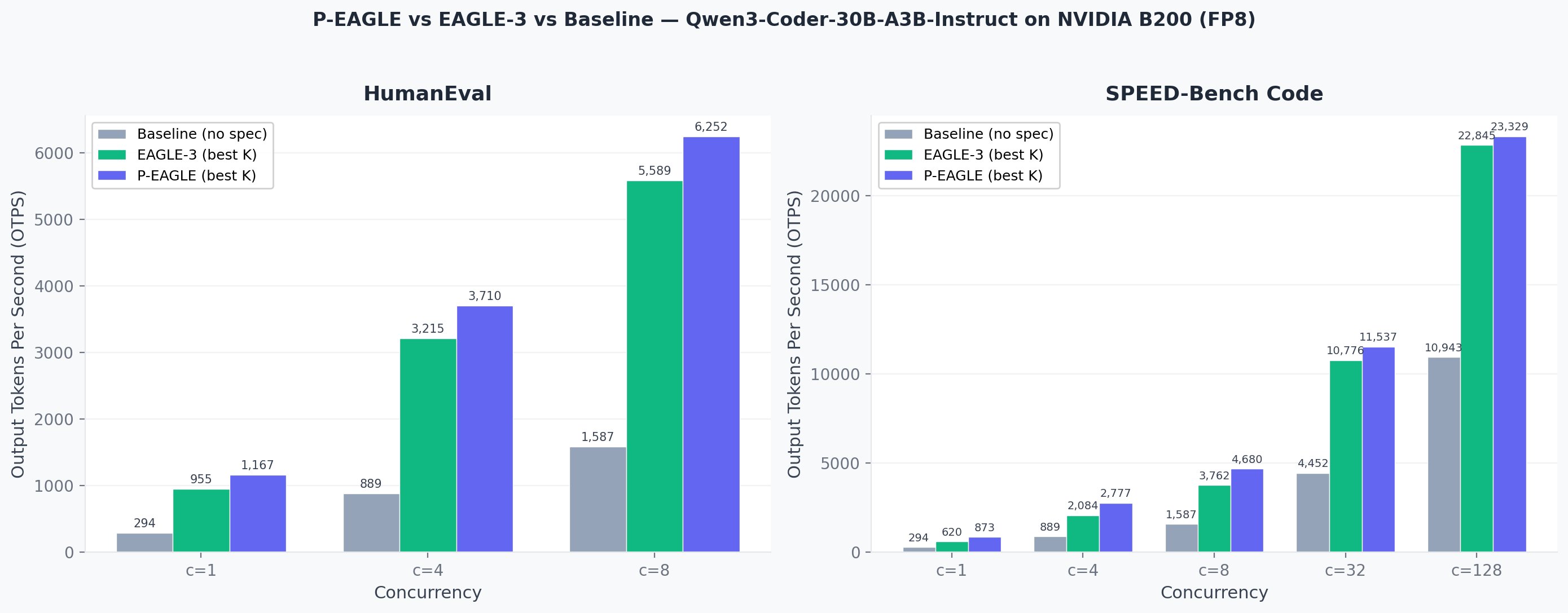
Output tokens per second comparison across concurrency levels. P-EAGLE (best K) consistently outperforms EAGLE-3 and baseline across both benchmarks.
HumanEval: Total output tokens per second
| Concurrency | P-EAGLE K=3 | P-EAGLE K=7 | P-EAGLE K=11 | EAGLE-3 K=3 | EAGLE-3 K=7 | EAGLE-3 K=11 | Baseline | P-EAGLE / EAGLE-3 | P-EAGLE / Baseline |
| 1 | 665 | 1,032 | 1,167 | 651 | 905 | 955 | 294 | 1.22x | 3.97x |
| 4 | 2,205 | 3,313 | 3,710 | 2,198 | 3,044 | 3,215 | 889 | 1.15x | 4.17x |
| 8 | 3,958 | 5,786 | 6,252 | 3,979 | 5,493 | 5,589 | 1,587 | 1.12x | 3.94x |
SPEED-Bench Code: Total output tokens per second
| Concurrency | P-EAGLE K=3 | P-EAGLE K=7 | P-EAGLE K=11 | EAGLE-3 K=3 | EAGLE-3 K=7 | EAGLE-3 K=11 | Baseline | P-EAGLE / EAGLE-3 | P-EAGLE / Baseline |
| 1 | 605 | 828 | 873 | 526 | 620 | 612 | 294 | 1.41x | 2.97x |
| 4 | 2,003 | 2,656 | 2,777 | 1,777 | 2,084 | 2,059 | 889 | 1.33x | 3.12x |
| 8 | 3,596 | 4,638 | 4,680 | 3,218 | 3,762 | 3,579 | 1,587 | 1.24x | 2.95x |
| 32 | 9,748 | 10,643 | 11,537 | 8,796 | 9,607 | 10,776 | 4,452 | 1.07x | 2.59x |
| 128 | 20,337 | 23,329 | 22,191 | 19,313 | 22,845 | 22,255 | 10,943 | 1.02x | 2.13x |
P-EAGLE / EAGLE-3 ratio compares the best P-EAGLE configuration against the best EAGLE-3 configuration at each concurrency level.
Live inference comparison
The following screen recording demonstrates P-EAGLE in action on Qwen3-Coder-30B-A3B-Instruct.
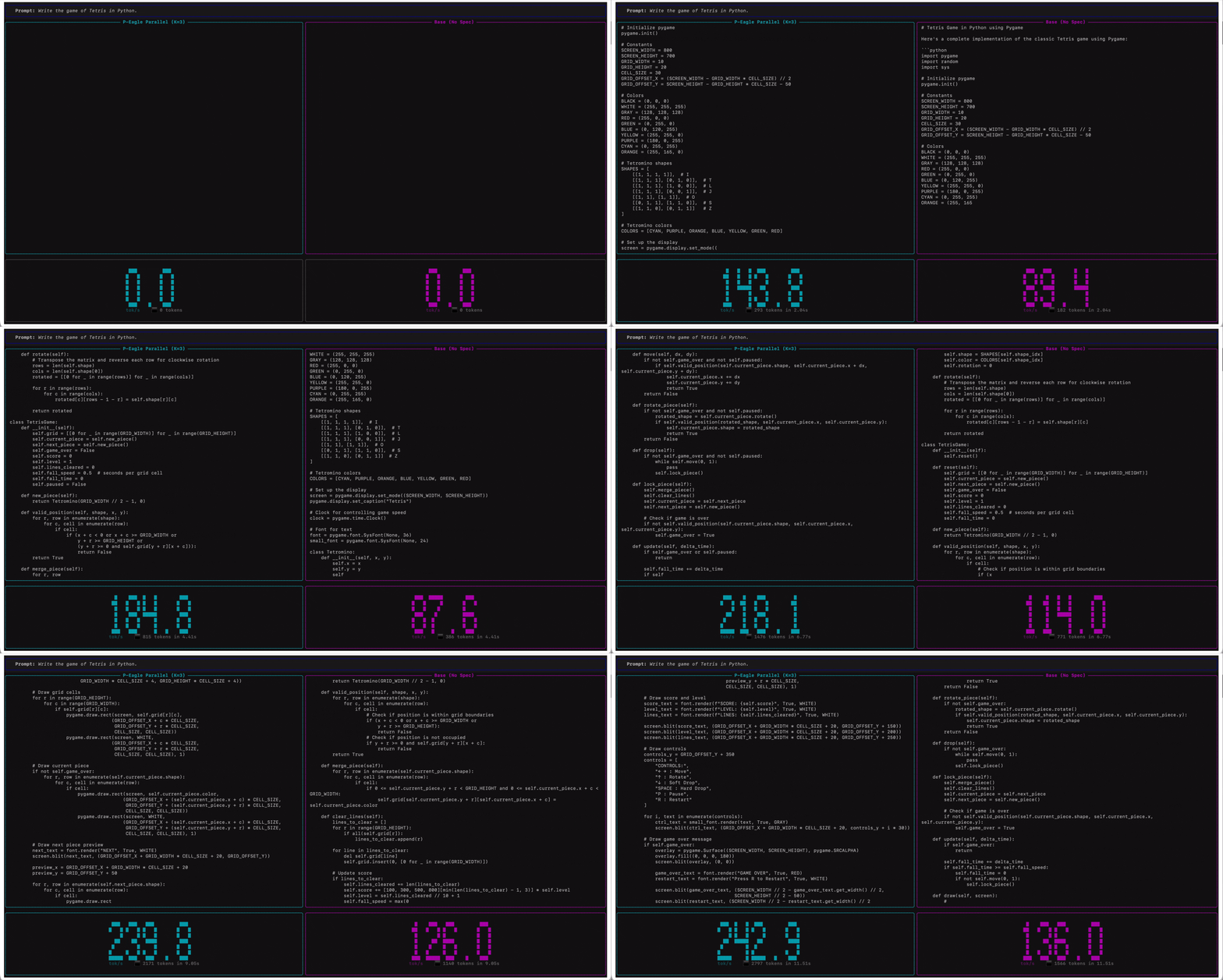
Qwen3-Coder-30B-A3B-Instruct on Amazon SageMaker AI endpoints running on ml.g7e.2xlarge. P-EAGLE Parallel K=3 (left) compared to standard inference (right) in tokens per second.
Getting started with P-EAGLE on SageMaker JumpStart
Amazon SageMaker JumpStart provides a one-click deployment experience for foundation models with P-EAGLE parallel speculative decoding. At launch, the following four models are available with pre-trained P-EAGLE heads:
GPT-OSS-120B.GPT-OSS-20B.Qwen3-Coder-30B-A3B-Instruct.Gemma-4-31B-IT.
You can deploy each of these models directly from the JumpStart model hub with P-EAGLE pre-configured. No manual drafter training, custom containers, or vLLM configuration is required. This walkthrough demonstrates the deployment process using Qwen3-Coder-30B-A3B-Instruct.
Prerequisites
To follow this walkthrough, you need:
- An AWS account with access to Amazon SageMaker AI.
- An Amazon SageMaker AI domain with at least one user profile configured.
- Service quota for
ml.g7e.2xlarge(or equivalent GPU instance) for SageMaker real-time inference endpoints.
Step 1: Open Amazon SageMaker Studio and navigate to JumpStart
- Open the Amazon SageMaker AI console.
- Select your user profile.
- Choose Open Studio.
- In Amazon SageMaker Studio, navigate to JumpStart / Models in the left sidebar.
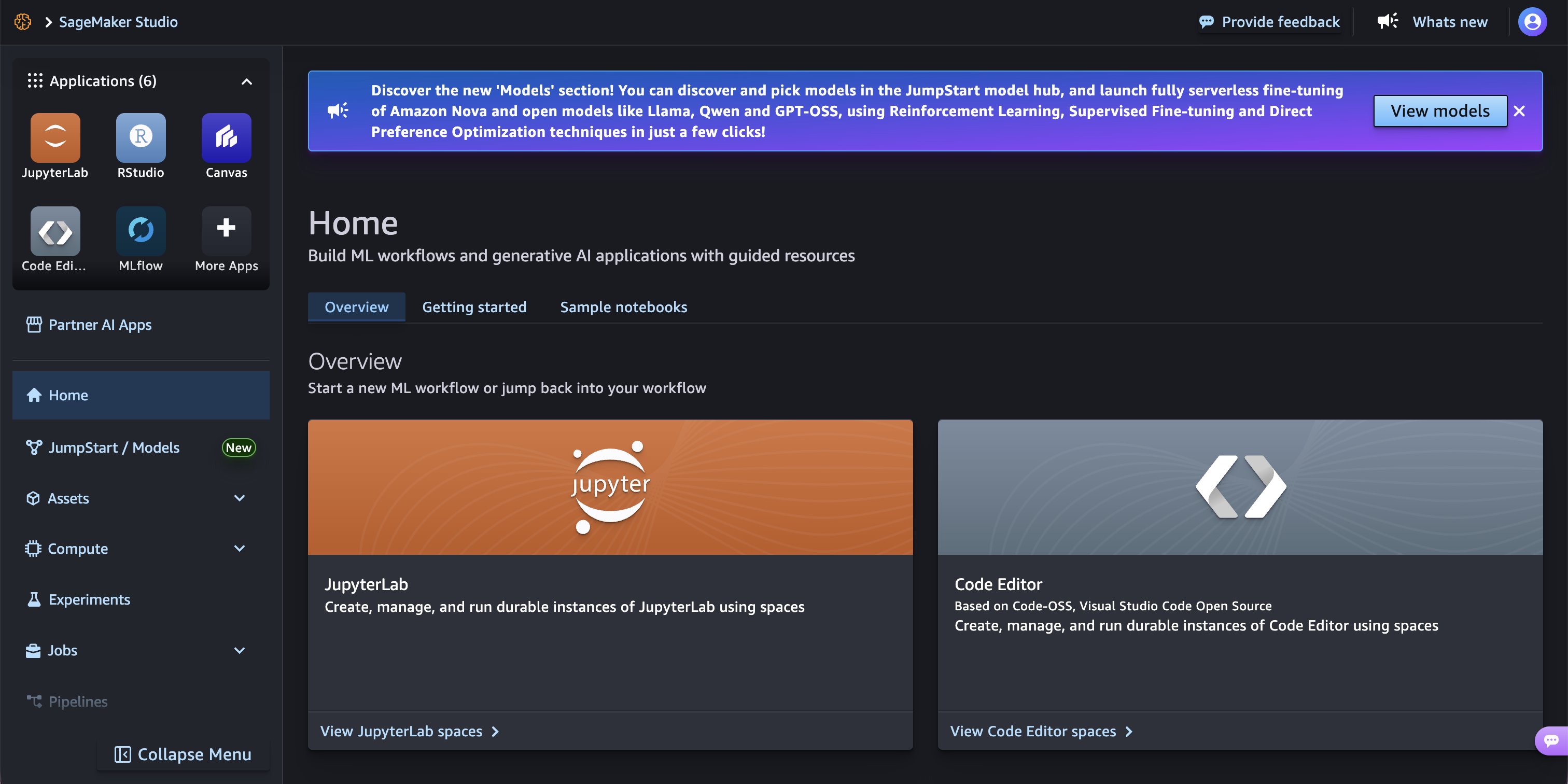
Amazon SageMaker Studio home page with JumpStart / Models in the left navigation.
Step 2: Search for a P-EAGLE compatible model
In the JumpStart model hub, search for Qwen3-Coder-30B-A3B-Instruct. This is a high-performance reasoning model with a 3-billion-parameter active mixture-of-experts configuration, making it a candidate for speculative decoding acceleration.
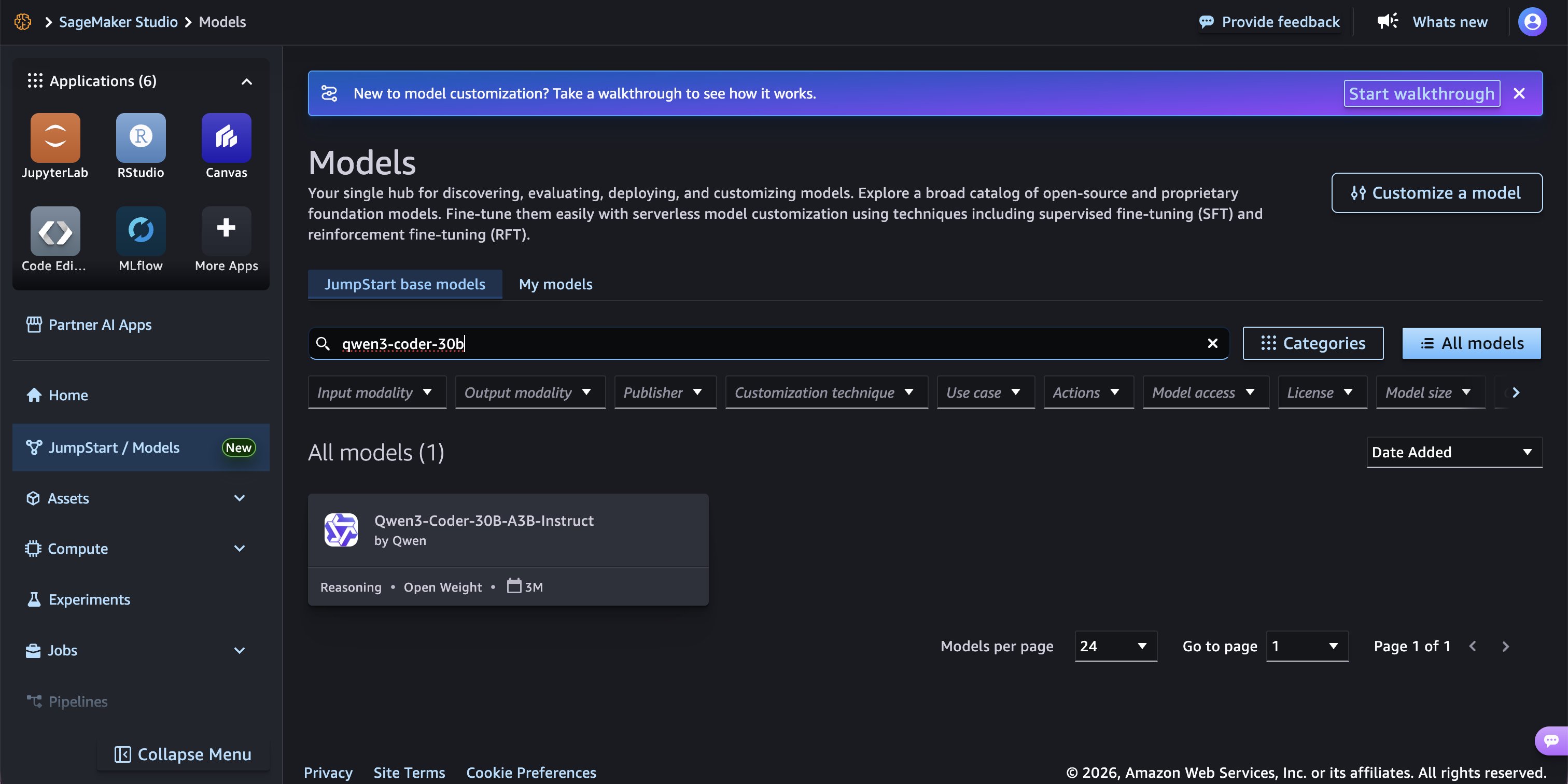
Searching for “qwen3-coder-30b” in the JumpStart model hub.
Step 3: Review the model card
Choose the model to open its card page. Here you can review the model’s highlights, license information, and supported deployment options. Choose the Deploy button in the top-right corner. This opens the one-click deployment flow with P-EAGLE pre-configured.
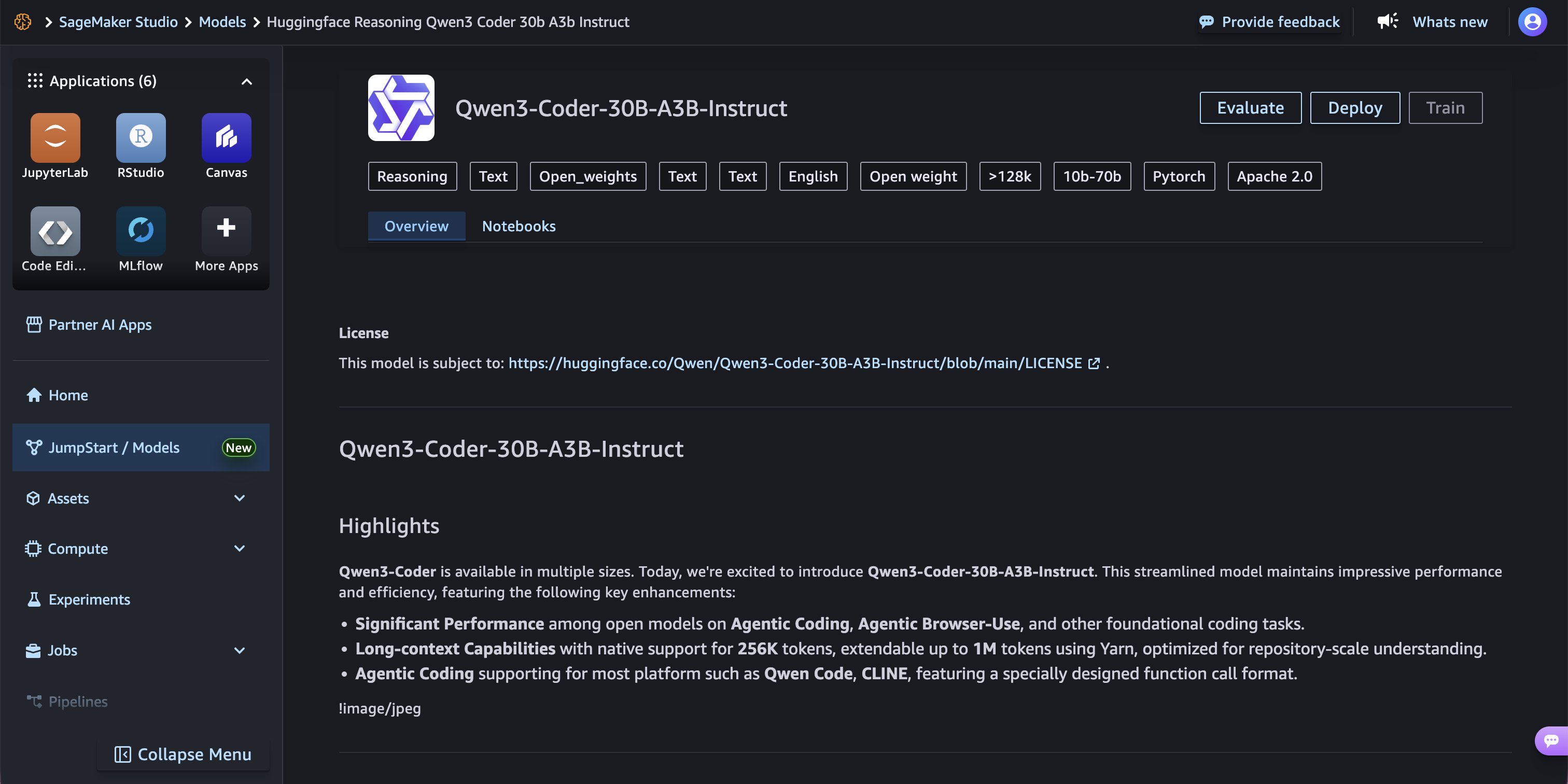
Model card for Qwen3-Coder-30B-A3B-Instruct showing Evaluate, Deploy, and Train actions.
Step 4: Configure the deployment
After choosing Deploy, the endpoint configuration page appears. Under the Models section at the bottom, the model is tagged as Inference Optimized, indicating that P-EAGLE speculative decoding is pre-configured. Choose the right arrow next to the model name to expand and view the environment variables.
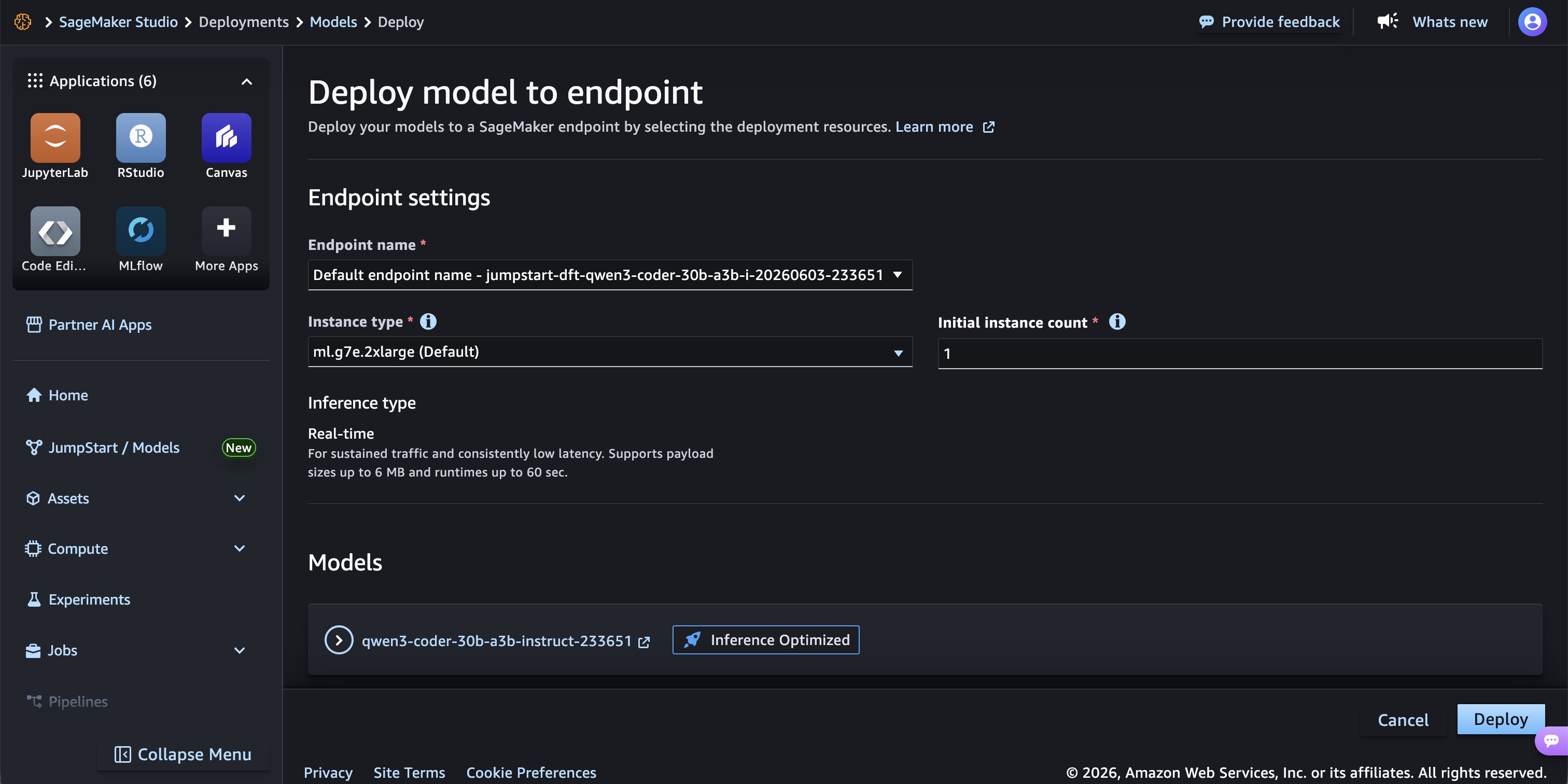
Deployment configuration page with instance type, count, and inference type settings.
Step 5: Verify the P-EAGLE speculative configuration
Scroll down to the Environment variables section. The key configuration for P-EAGLE is the SM_VLLM_SPECULATIVE_CONFIG environment variable, which is pre-populated with the following:
This tells the vLLM inference server to load the pre-trained P-EAGLE drafter head. P-EAGLE is integrated natively as a parallel-drafting extension of the EAGLE-3 architecture. Specifying "parallel_drafting": true activates the P-EAGLE pipeline, which automatically performs parallel multi-token drafting under the hood. The num_speculative_tokens parameter controls how many tokens are drafted in each single forward pass.
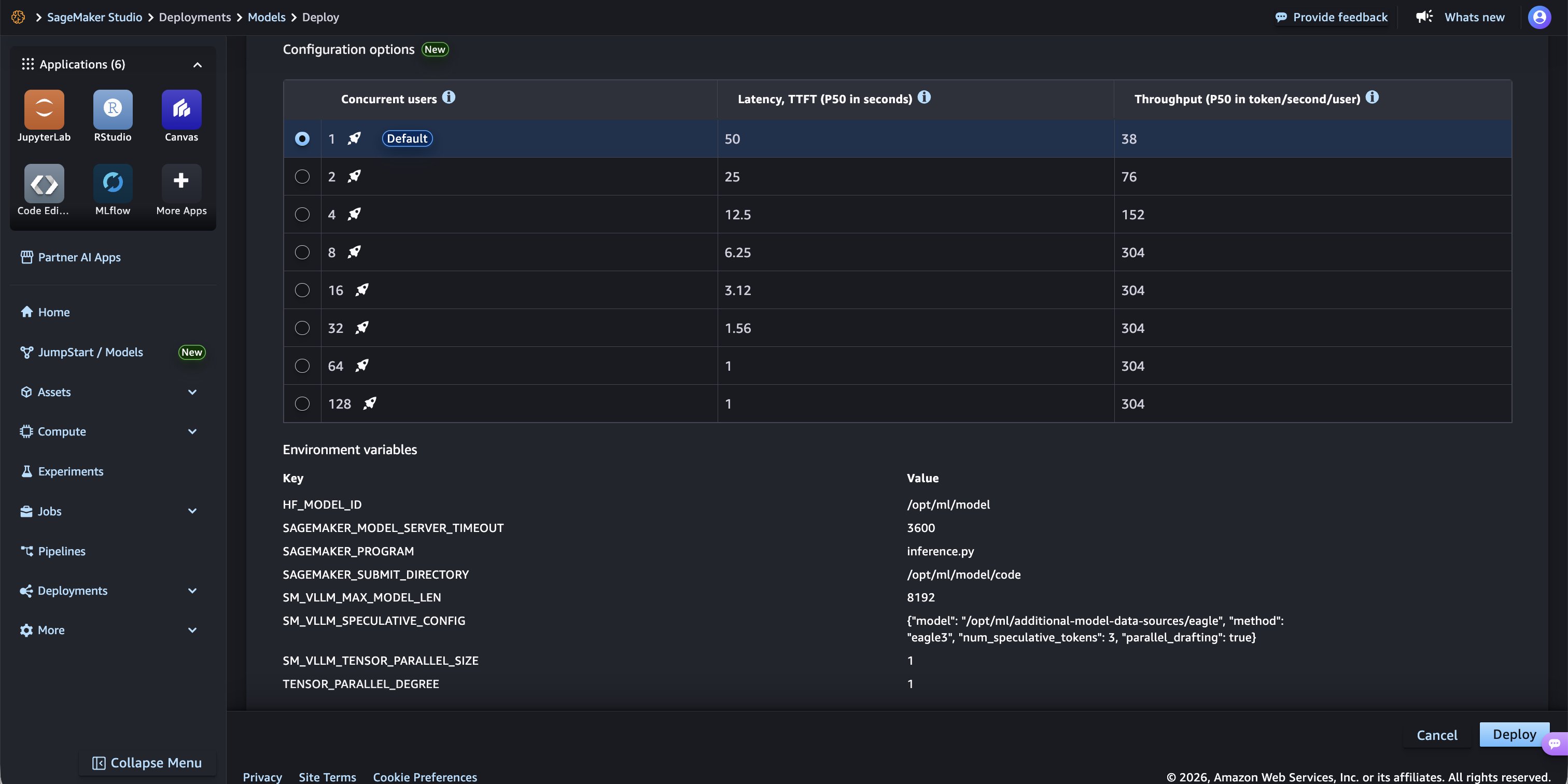
Environment variables showing SM_VLLM_SPECULATIVE_CONFIG with the P-EAGLE drafter configuration.
Step 6: Wait for the endpoint to come in service
Choose Deploy to create the endpoint. SageMaker AI provisions the instance, downloads the model artifacts and P-EAGLE drafter head, and starts the vLLM inference server. After a few minutes, the endpoint status transitions to In service (green), confirming that the model is ready to accept inference requests.
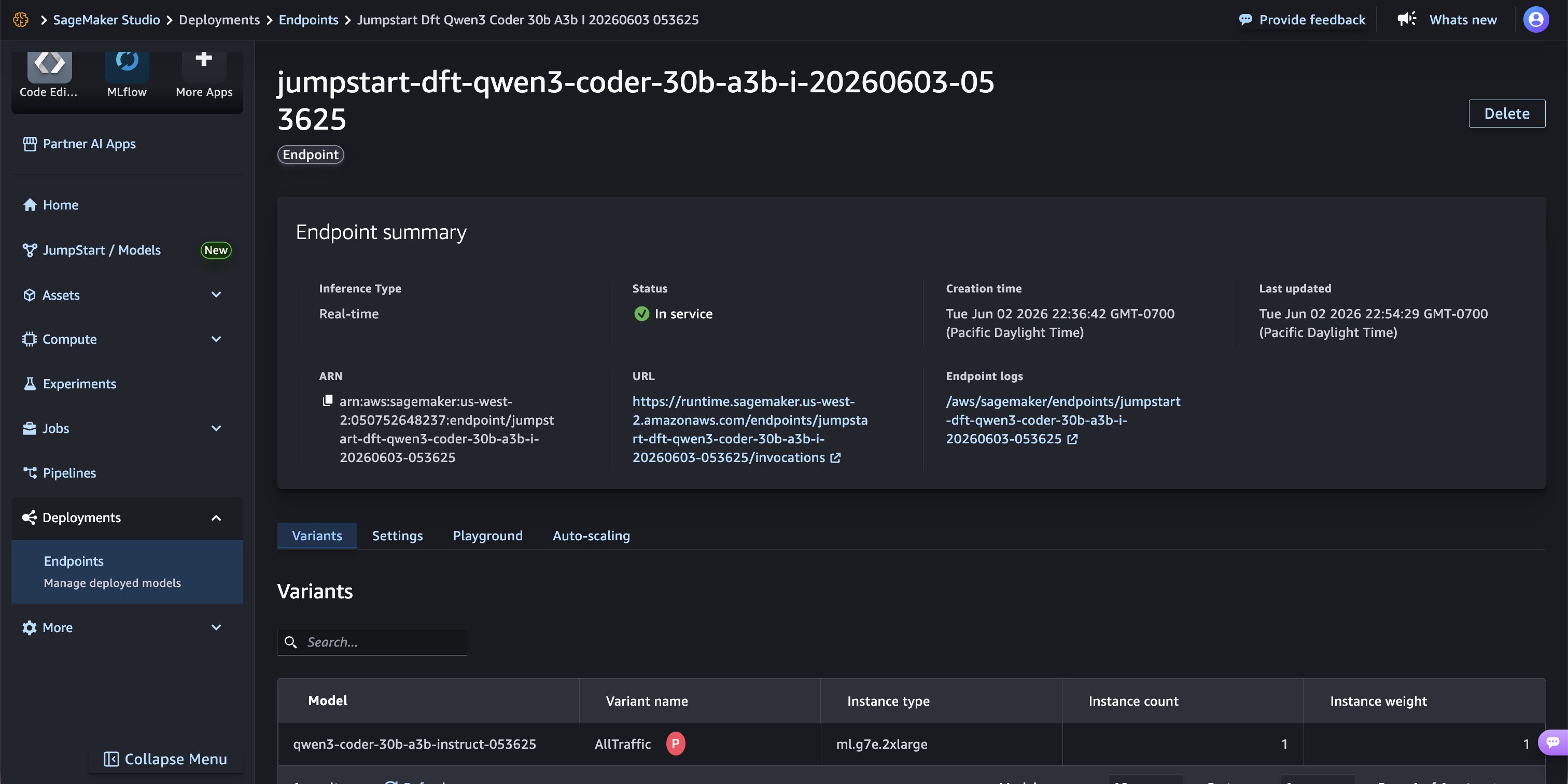
Endpoint summary showing “In service” status on ml.g7e.2xlarge with real-time inference type.
Step 7: Test the endpoint in the playground
Navigate to the Playground tab on the endpoint page to test inference directly from the AWS Management Console. Use a payload that is in vLLM-compatible chat completion format, such as the following:
Choose Send Request to invoke the endpoint. The response appears in the right-hand Inference Result panel, showing the model’s generated completion along with latency metrics.
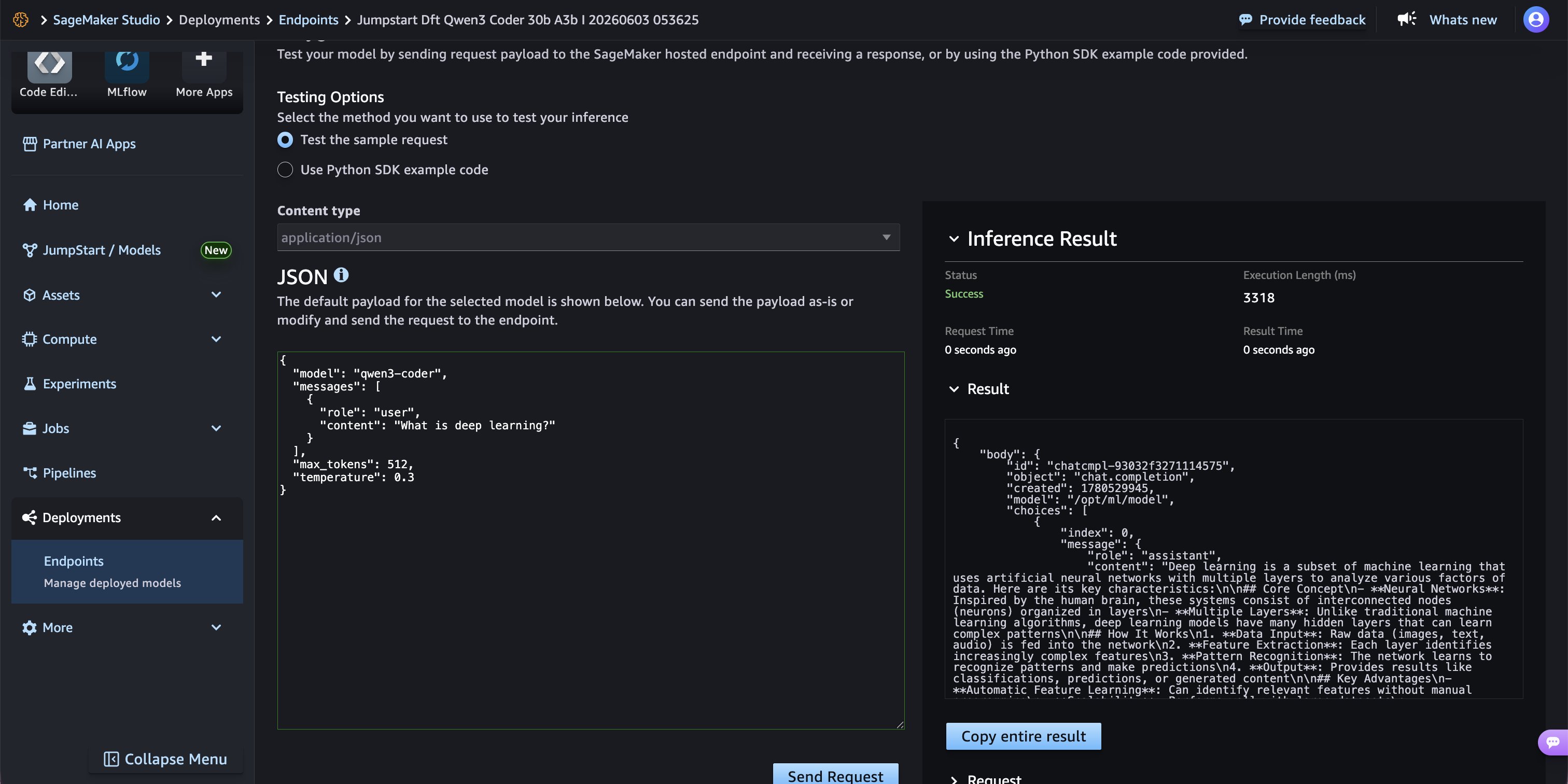
Inference result showing a successful response in 3,318 ms with P-EAGLE speculative decoding active.
The endpoint is now ready to serve production traffic with improved throughput compared to standard autoregressive decoding.
Step 8: Clean up
Important: SageMaker AI real-time inference endpoints incur charges while running, regardless of whether they are actively serving requests. To avoid unnecessary costs, delete the endpoint when it’s no longer needed.
To delete the endpoint, follow these steps.
- Navigate to the Amazon SageMaker Studio console and choose Deployments > Endpoints in the left sidebar.
- Select the endpoint from the list.
- Choose Delete from the top-right actions bar.
- In the confirmation dialog, select “I confirm that I want to delete the endpoint” and choose Delete endpoint.
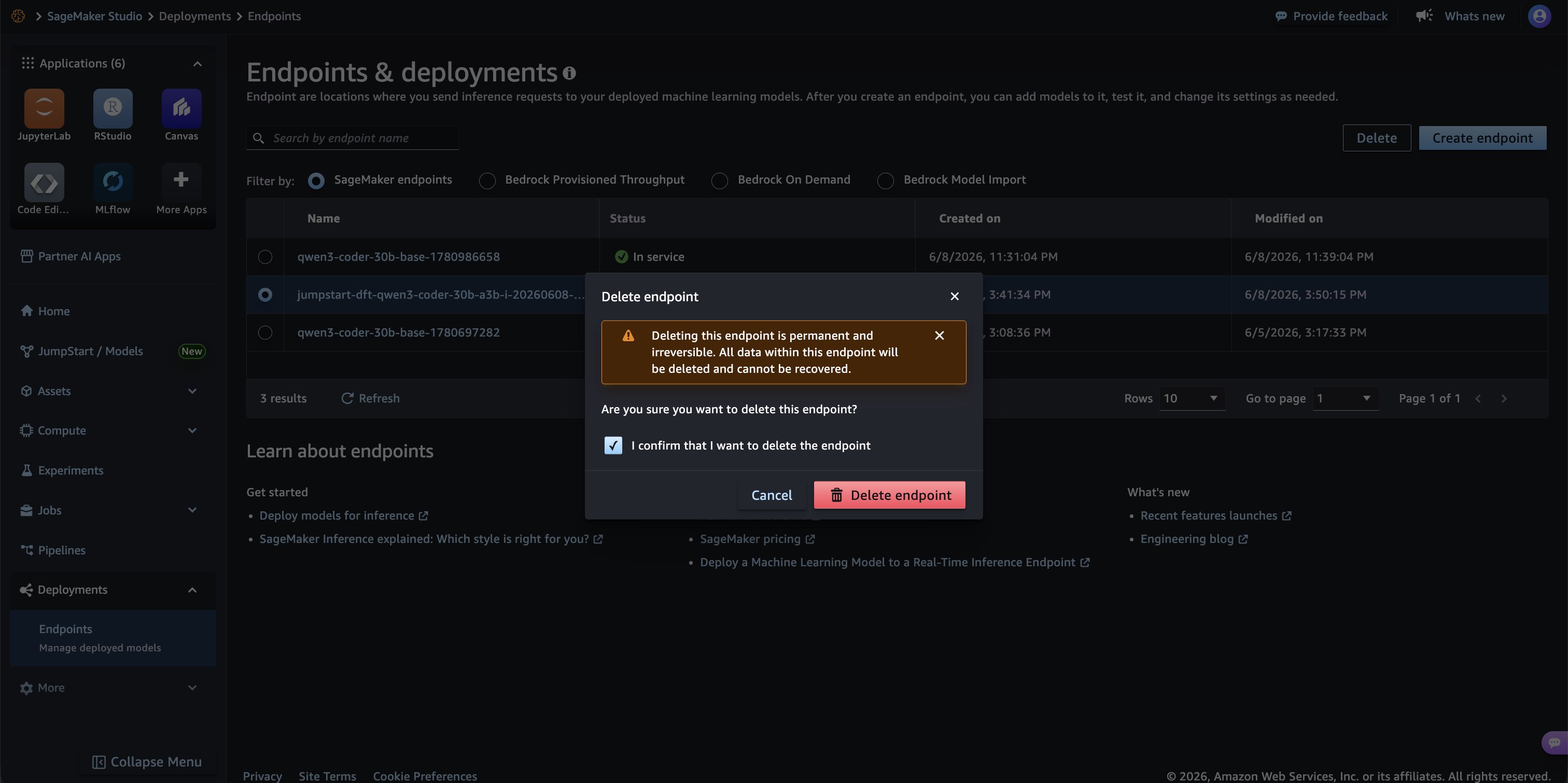
Endpoint delete confirmation dialog in Amazon SageMaker Studio.
Solution overview
P-EAGLE achieves parallel draft generation by replacing the sequential dependency chain in autoregressive EAGLE with learnable placeholder representations. These placeholders let all draft positions be computed at the same time, removing the linear relationship between speculation depth and drafter latency.
The sequential dependency in autoregressive EAGLE
In autoregressive EAGLE, drafting a single token requires two inputs: (1) the token embedding of the previously predicted token, and (2) the hidden state produced by the drafter at the previous position. To predict token t1, the drafter takes the token embedding of the target model’s last generated token and the hidden state the target model produced when generating it. To predict t2, it needs the embedding of t1 and the hidden state used to predict t1, both of which only become available after the first forward pass completes. This chain repeats for each subsequent position. Producing K draft tokens requires K sequential forward passes.
How P-EAGLE breaks the chain
P-EAGLE resolves this dependency by introducing two learnable parameters that stand in for the missing inputs at future positions:
- Mask token embedding (
embmask) – A learned vector that substitutes for the unknown previous-token embedding at positions 2 through K. It acts as a neutral “I don’t know what token came before me” signal that the model learns to interpret during training. - Shared hidden state (
hshared) – A single learned hidden-state vector shared across all multi-token prediction (MTP) positions. It substitutes for the drafter’s previous-position hidden state that would normally require a prior forward pass to compute. Theoretical analysis from the P-EAGLE paper shows that attention alone provides sufficient positional information, removing the need for position-specific hidden states.
With these placeholders, all K draft positions can be constructed in parallel and processed through the drafter’s transformer layers in a single forward pass.
Step-by-step drafting process
Each P-EAGLE drafting iteration proceeds in two steps.
Step 1 – Target model forward pass. The target model processes the current context and generates a new token (standard autoregressive generation). During this pass, P-EAGLE captures hidden states from multiple layers of the target model (layers 2, L/2, and L−1, concatenated to 3d dimensions). These hidden states encode the target model’s contextual understanding at the most recently generated position.
Step 2 – Parallel draft generation. The drafter constructs K input positions at the same time:
- Position 1 (next-token prediction) – Uses the actual token embedding of the just-generated token concatenated with the captured hidden state from the target model. This position is identical to standard autoregressive EAGLE: it has real context to work with.
- Positions 2–K (multi-token prediction) – Each position uses the mask token embedding (
embmask) concatenated with the shared hidden state (hshared). These learned placeholders break the sequential dependency. No position needs to wait for the output of the position before it.
All K positions pass together through N transformer layers (the drafter uses 4 layers in practice, comprising only 2–5 percent of target model parameters), and then through the language model head to produce K draft token predictions at the same time. The target model then verifies all K candidates in a single verification pass using standard speculative decoding acceptance criteria.
Practical benefits of parallel drafting
The shift from sequential to parallel drafting has several practical implications for deployment:
- Deeper speculation has no extra cost: In autoregressive EAGLE, increasing K from 3 to 7 triples the drafter latency. In P-EAGLE, K=3 and K=7 cost the same: one forward pass. P-EAGLE achieves peak throughput at K=7, while autoregressive EAGLE-3 peaks at K=3.
- Consistent gains at scale: On NVIDIA B200 GPUs, P-EAGLE delivers 1.05×–1.69× speedup over EAGLE-3 across MT-Bench, HumanEval, and SPEED-Bench, with gains sustained even under high concurrency (c=64).
- Optimized for reasoning workloads: Modern large language models produce long outputs (median approximately 3,900 tokens, P90 approximately 10,800 tokens). P-EAGLE’s training framework uses a sequence partition algorithm that supports training on sequences up to 20K tokens. This makes sure the drafter matches the context lengths seen at inference time, a critical factor that causes up to 25 percent acceptance rate degradation in methods trained on shorter sequences.
- No quality compromise: Because speculative decoding verifies all draft tokens against the target model, the final output is mathematically identical to what the target model would produce on its own. P-EAGLE accelerates generation without altering model behavior.
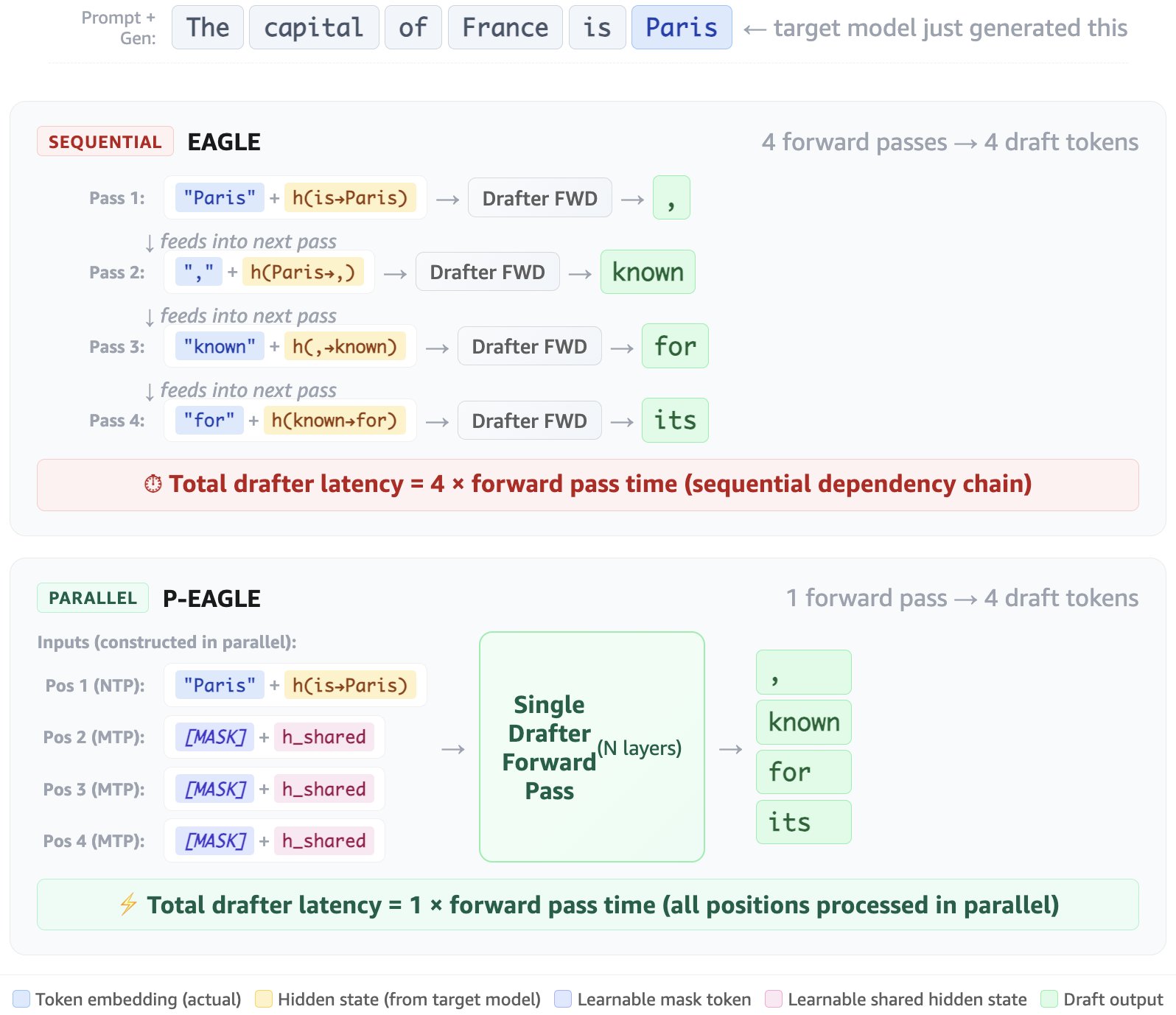
EAGLE compared to P-EAGLE architecture. In EAGLE (top), each draft position requires the token embedding and hidden state from the previous position, creating a sequential dependency chain that requires K forward passes to produce K=4 draft tokens. P-EAGLE (bottom) breaks this chain by substituting learnable placeholders ([MASK] token embedding and a shared hidden state h_shared) at positions 2–K. All draft tokens are generated in a single forward pass with no sequential dependencies.
Conclusion
P-EAGLE represents a fundamental shift in how speculative decoding handles draft generation. By replacing the sequential autoregressive drafting pipeline with parallel multi-token prediction, P-EAGLE removes the linear relationship between speculation depth and drafter latency. This supports deeper, more aggressive speculation at no additional cost. The result is up to 1.69× throughput improvement over EAGLE-3 on production workloads, with no compromise to output quality.
With native support in Amazon SageMaker JumpStart, deploying P-EAGLE-accelerated models is now a one-click experience. The combination of a lightweight drafter architecture, scalable long-context training, and SageMaker AI integration makes P-EAGLE a practical path to faster inference for production AI applications. To get started, open the Amazon SageMaker AI console, navigate to JumpStart, and deploy one of the supported P-EAGLE models. For more information on the P-EAGLE architecture and training methodology, see the P-EAGLE paper on arXiv and the vLLM integration blog post. To learn more about model deployment on Amazon SageMaker AI, see the Amazon SageMaker AI documentation. To train an EAGLE head on your own data, Amazon SageMaker AI also supports that capability, which launched last year.
Acknowledgments
We would like to acknowledge the contributions and collaboration from Kyle Ulrich, Hemant Singh, Ashish Khetan, Evan Kravitz, Mike James, Xu Deng, and Kareem Syed-Mohammed.