
AI agents are changing how organizations find and act on information, but they share one structural limitation: their knowledge is frozen at training time. When you ask an agent that relies only on its training data about today’s stock price, a sports score, or a release that shipped an hour ago, it can’t respond.
Web Search on Amazon Bedrock AgentCore, now generally available, addresses that gap. This fully managed, Model Context Protocol (MCP)-compatible web search capability lets your agents get information from the web without infrastructure overhead. It’s available as a managed target or connector that you connect to your AgentCore Gateway. Agents discover it with a standard tools/list call and invoke it like other MCP tools. There are no search APIs to provision, no outbound credentials to manage, and no result-parsing glue to maintain.
Behind that single connector sits a purpose-built web index maintained by Amazon, spanning tens of billions of documents. Amazon refreshes the index continually, reflecting new content within minutes. The privacy model makes sure that queries don’t leave AWS. Retrieval can combine a knowledge graph with semantic snippet extraction tuned for model context.
In this post, we walk through what makes Web Search on Amazon Bedrock AgentCore different, why it matters, and how to wire it in with a few lines of code.
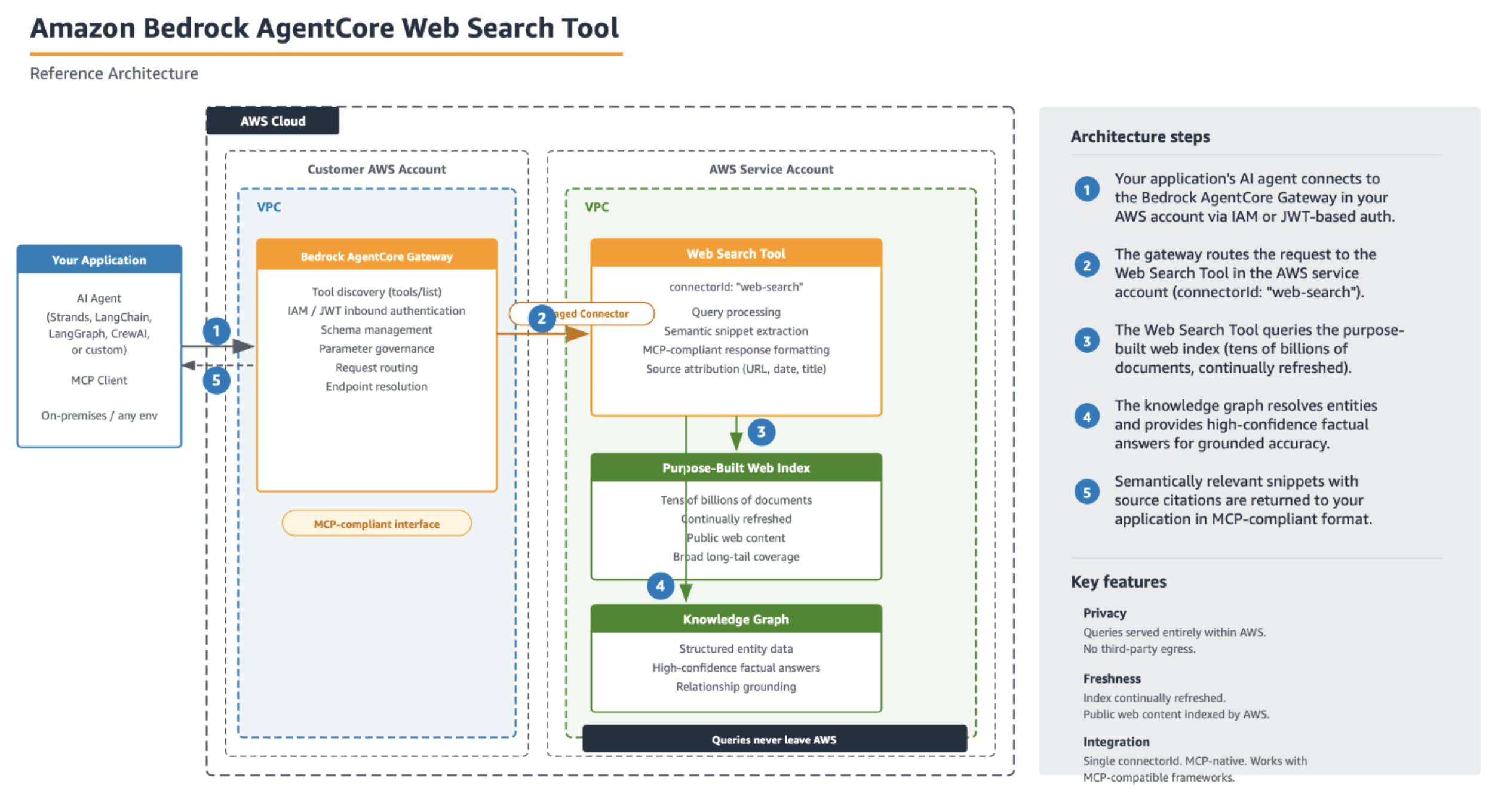
Figure 1: Your application connects to the AgentCore Gateway (AWS Identity and Access Management (IAM) or JSON Web Token (JWT) inbound auth), which routes queries through a managed connector to the Web Search tool in the AWS service account. Query traffic stays within AWS.
Grounding agents in the web is the fix for stale knowledge, but it’s also where many teams get stuck. Building it yourself means:
- Procuring a third-party search API and managing keys, quotas, and rate limits.
- Parsing inconsistent result formats across providers.
- Reasoning about where customer queries travel and how that data might be retained or reused.
- Building snippet extraction logic, so models get relevant passages, not raw HTML.
- Maintaining freshness, coverage, and quality over time.
Each of these is a project in itself. Web Search on Amazon Bedrock AgentCore addresses all of them.
A purpose-built web index
Many “add web search to your agent” solutions are wrappers around a third-party search engine. Web Search on Amazon Bedrock AgentCore is backed by a web index that Amazon operates directly, spanning tens of billions of documents. That scale matters for coverage. For example, the long-tail question about a niche library or an obscure product spec can be answered more effectively when the index is broad rather than limited to the most popular pages.
Updated continually
Amazon refreshes the index on an ongoing basis, reflecting new content within minutes. For agents that respond to questions about price movements or recently published announcements, that recency window is the difference between a grounded response and a confidently wrong one. When your agent searches for “what happened today,” the results reflect what actually happened today.
Knowledge graph for high-confidence facts
Web Search on Amazon Bedrock AgentCore includes a built-in knowledge graph that grounds entities and their relationships. For factual questions (like who holds a role or when something was founded), the knowledge graph provides high-confidence responses rather than leaving the model to infer them from extracted page text. This reduces the kind of subtle factual drift that creeps in when an agent stitches together a response from snippets alone.
Semantic snippet extraction optimized for model context
Rather than handing the model a raw HTML dump or a full page and hoping it finds the relevant part, the tool performs semantically relevant snippet extraction. It pulls the passages from each web page that bear on the query, then returns them in a form optimized for a model’s context window. The model sees the parts that matter, with fewer tokens spent on boilerplate and navigation chrome. This can help improve the precision of cited responses.
Private by design
For many enterprises, the question that stalls a web search rollout isn’t “does it work.” It’s “where do my users’ queries go, and what happens to them?” Web Search on Amazon Bedrock AgentCore is built so the answers to those questions are simple.
Queries don’t leave AWS
When your agent issues a search, the query is served entirely within AWS infrastructure. Customer queries don’t get sent to a third-party search engine or leave AWS. The Gateway authenticates to the connector owned by AWS and routes the request internally, so the data path stays inside AWS end to end. For teams with data-residency or third-party egress concerns, this removes an entire category of review.
Walkthrough
To get started with the Web Search Tool, you create an AgentCore Gateway (if you don’t want to use an existing one), add the web search tool target, and invoke it from an agent using MCP.
Prerequisites
To follow along with the setup steps in this post, you need the following:
- An AWS account with permissions to create IAM roles and Amazon Bedrock AgentCore resources.
- The AWS Command Line Interface (AWS CLI) v2 installed and configured, or access to the AWS Management Console.
- Python 3.10 or later (for the SDK and Strands examples).
- The
boto3SDK updated to the latest version. - An Amazon Bedrock AgentCore Gateway. You can add the Web Search Tool as a target to an existing Gateway, or create a new one. For instructions on creating a Gateway, see Create an Amazon Bedrock AgentCore gateway in the Developer Guide.
Note: Following these steps creates AWS resources that incur charges. The Amazon Bedrock AgentCore Gateway and Web Search invocations are billable. See the Pricing section that follows for details, and remember to clean up resources when finished to avoid ongoing charges.
Setup
Adding web search to an agent comes down to attaching a Web Search Tool target to your Gateway using connectorId: "web-search". The Gateway snapshots the tool schema, provisions the integration, and handles schema management, parameter governance, endpoint resolution, and service authentication for you.
Verify that you added the target by calling describe_gateway_target or list_gateway_targets and confirming that Web Search-tool appears in the response.
The outbound role and permissions
Notice the preceding credentialProviderConfigurations. This is the whole outbound-authorization story: instead of you provisioning API keys or managing search credentials, the Gateway authenticates to the Web Search backend using its own IAM service role.
That role needs a trust policy (so AgentCore can assume it, scoped to your account and Region) and a permissions policy with two actions:
The InvokeWebSearch resource ARN is owned by AWS (account = aws). Authorization is enforced per invocation against that ARN, so granting bedrock-agentcore:InvokeWebSearch on it is what lets the Gateway call web search on your behalf.
A couple of boundaries to keep clear:
- This role is for outbound auth only (Gateway reaching the Web Search backend). Inbound auth (who can call your Gateway) is handled separately, typically with an OAuth or JWT authorizer such as Amazon Cognito.
- The role doesn’t include
bedrock:InvokeModel. Model access belongs to whatever identity runs your agent, not to the Gateway service role.
Invoking from MCP-compatible frameworks
Because Web Search is exposed over MCP, an MCP-compatible framework like Strands, LangChain, LangGraph, CrewAI, or your own can discover and invoke it. The agent calls tools/list, finds WebSearchTool, and uses it automatically whenever it needs current information:
The agent determines it needs fresh information, invokes WebSearchTool with an appropriate query, and composes a grounded response with source citations. No tool-specific code on your side.
Response format
Results come back in the standard MCP tools/call envelope. The tool returns a single content block of type text that contains a serialized JSON document with the results. Parse that inner text and you get an id plus a results array of observations:
Each web index observation (always returned) carries title, url, publishedDate, and text. Knowledge-graph observations (optional, for entity queries) have null title and url plus structured key/value facts in the text field.
Where the Web Search Tool fits
If you need to ground an agent in your own enterprise data, Amazon Bedrock Knowledge Bases and Amazon Bedrock Managed Knowledge Bases are the right tools. They ingest, index, and retrieve over content you own. The Web Search Tool is the complement. It grounds agents in the public web, for questions whose responses live outside your organization and change by the minute. Many production agents use both: a knowledge base for “what do our documents say” and web search for “what’s true in the world right now.”
Pricing
At $7 per 1,000 queries, you can run a web-search agent for less than a cent per question with a pay-as-you-go model.
Clean up resources
If you created resources while following along, you can remove them to avoid ongoing charges:
- Delete the Gateway target: call
delete_gateway_targetwith yourgatewayIdentifierandtargetId. - If the Gateway was created solely for this walkthrough, delete it with
delete_gateway.
There is no persistent infrastructure on the AWS side beyond these resources. After they are removed, you stop incurring charges.
Conclusion
The Amazon Bedrock AgentCore Web Search Tool gives your agents current web knowledge through a single connectorId. There are no search APIs to provision and no result-parsing to maintain. Underneath that simplicity is a web index that AWS builds itself (tens of billions of documents, refreshed within minutes), a privacy model where queries don’t leave AWS, and retrieval that can combine a knowledge graph with semantic snippet extraction tuned for model context. The result is an agent that responds to timely questions accurately, cites its sources, and keeps your data where it belongs.
Because Amazon operates the full search stack, improvements to freshness, coverage, relevance, and snippet quality flow to your agents automatically through the same managed connector. No version upgrades or migrations are needed on your side.
You can access the Web Search Tool connector today in us-east-1 (US East (N. Virginia)).
To get started, see the Web Search Tool documentation.