First, separate 2 ideas: containers vs. quantization methods
Most confusion comes from mixing 2 layers.
A container defines how tensors are stored on disk. A quantization method defines how weights are squeezed into fewer bits.
- Containers: safetensors, GGUF, PyTorch pickle (
.bin/.pt). - Methods: GPTQ, AWQ, bitsandbytes NF4, llama.cpp K-quants and I-quants.
- Both at once: EXL2 and EXL3 are a method plus a storage layout tied to one inference library.
A quick memory rule of thumb
Weight memory ≈ parameters × bits-per-weight ÷ 8.
| Model | 16-bit | ~4.5 bits per weight |
|---|---|---|
| 8B | ~16 GB | ~4.5 GB |
| 70B | ~140 GB | ~39 GB |
This is arithmetic, not a vendor benchmark. It covers weights only. The KV cache and runtime overhead add more on top.
1. Full precision: safetensors and PyTorch .bin
Unquantized models usually ship as 16-bit weights, in either pytorch_model.bin or model.safetensors.
The older .bin / .pt files use Python pickle. Loading a pickle file can execute arbitrary code, which makes untrusted checkpoints a security risk.
Safetensors, created at Hugging Face, removes that risk. A file is a small JSON header plus raw tensor buffers, with nothing executable inside. Tensors can be memory-mapped and loaded one at a time without reading the whole file. Safetensors is now listed as a PyTorch Foundation project.
Important nuance: most GPTQ, AWQ, EXL2, EXL3, and MLX models are also stored in .safetensors files. The quantization lives in the tensor contents and a config file, not in a new container.
2. GGUF (llama.cpp)
What it is
GGUF is a binary format for running models with GGML and GGML-based executors such as llama.cpp. It was created by Georgi Gerganov, who also leads llama.cpp (Hugging Face docs). It was introduced on August 21, 2023 as the replacement for the older GGML format.
Why it replaced GGML
The older GGML, GGMF, and GGJT files could not say which architecture a model belonged to. Adding a new hyperparameter broke every existing file. GGUF switched to typed key-value metadata, so new fields can be added without breaking old files.
Design goals
The spec lists 5 goals: single-file deployment, extensibility, mmap compatibility, easy loading, and complete information inside the file. Unlike tensor-only formats, GGUF can carry the tokenizer, special tokens, and a Jinja chat template alongside the weights.
Reading GGUF quant names
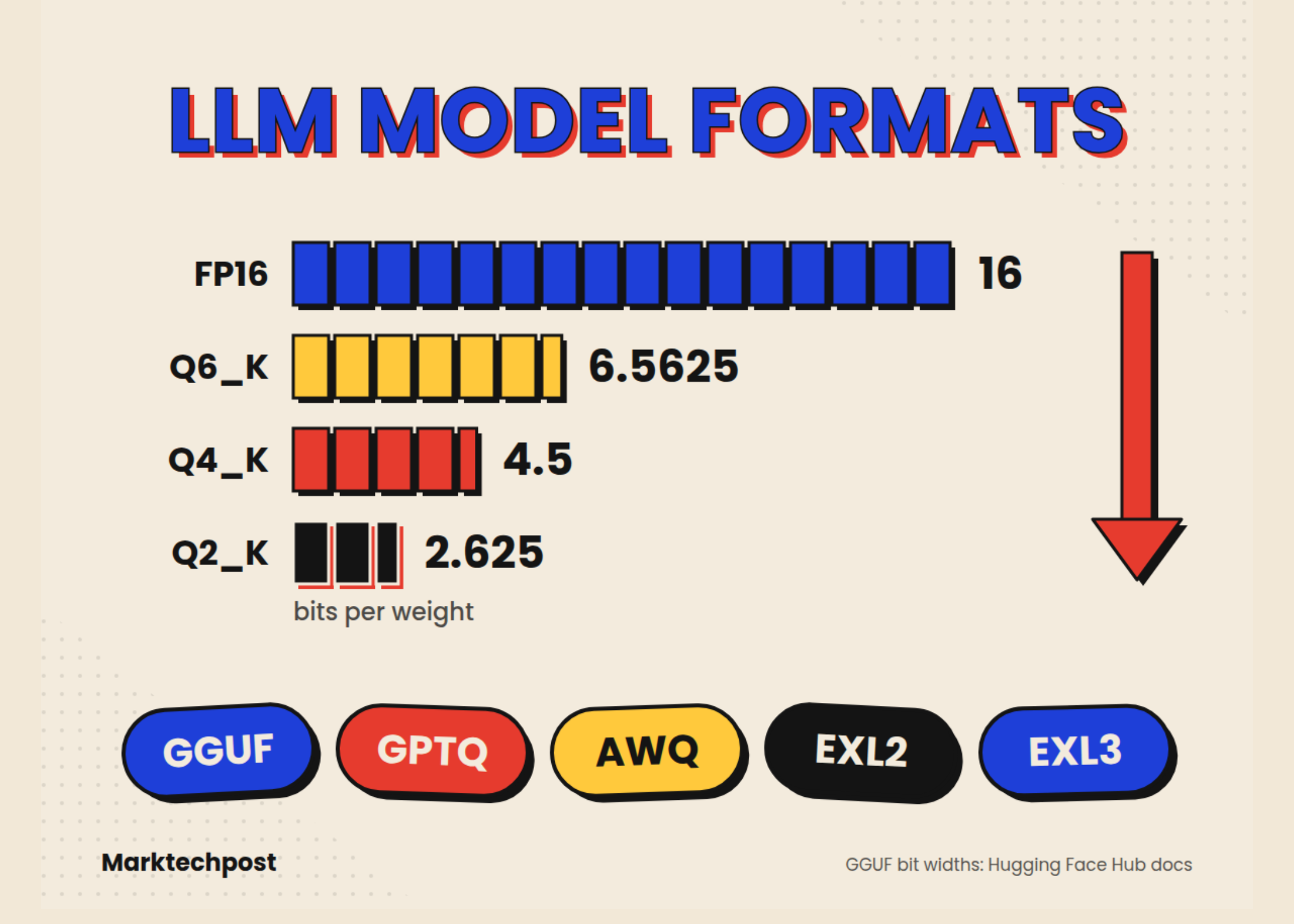
The suffix in a name like Q4_K_M.gguf tells you the scheme. Figures below come from the Hugging Face GGUF docs.
| Type | How it works | Bits per weight |
|---|---|---|
| Q4_0 / Q4_1 (legacy) | 4-bit round-to-nearest in 32-weight blocks; Q4_1 adds a block minimum | 4.5 / 5.0* |
| Q8_0 (legacy label) | 8-bit round-to-nearest in 32-weight blocks | 8.5* |
| Q2_K | 16 blocks × 16 weights per super-block, 4-bit scales and mins | 2.625 |
| Q3_K | 16 blocks × 16 weights, 6-bit scales | 3.4375 |
| Q4_K | 8 blocks × 32 weights, 6-bit scales and mins | 4.5 |
| Q5_K | 8 blocks × 32 weights, 6-bit scales and mins | 5.5 |
| Q6_K | 16 blocks × 16 weights, 8-bit scales | 6.5625 |
| IQ4_XS | 256-weight super-blocks, uses an importance matrix | 4.25 |
| IQ3_XXS | Same I-quant family | 3.06 |
| IQ2_XXS | Same I-quant family | 2.06 |
| IQ1_S | Same I-quant family | 1.56 |
*Derived by hand, not listed in the HF table: 32 weights plus a 16-bit scale (and a 16-bit minimum for Q4_1).
Checking the Q4_K math: A super-block holds 256 weights. 256 × 4 bits = 1,024 bits. Add 8 blocks × 12 bits of scales and minimums (96 bits). Add a 16-bit super-scale and 16-bit super-minimum (32 bits). Total: 1,152 ÷ 256 = 4.5 bits per weight.
What _S, _M, _L mean: These are mixes, not new types. For example, llama.cpp describes Q4_K_M as using Q6_K for half of the attention.wv and feed_forward.w2 tensors and Q4_K elsewhere (Unsloth docs). That is why a Q4_K_M file averages above 4.5 bits per weight.
Newer types: The HF table also lists TQ1_0 and TQ2_0 for ternary weights, plus MXFP4, a 4-bit microscaling floating-point type.
A labeling quirk: Hugging Face files Q8_0 under “legacy” types. In practice, Q8_0 remains the standard near-lossless GGUF choice.
Quality vs. size
Hugging Face’s reference table for a Llama-2-7B-class model shows the trade-off:
| Quant | Perplexity | Change vs FP16 | Size |
|---|---|---|---|
| FP16 | 5.9565 | baseline | 13.0 GB |
| Q8_0 | 5.9584 | +0.03% | 7.0 GB |
| Q6_K | 5.9642 | +0.13% | 5.5 GB |
| Q5_K_M | 5.9796 | +0.39% | 4.8 GB |
| Q4_K_M | 6.0565 | +1.68% | 4.1 GB |
Illustrative only. These numbers come from a 2023-era 7B model; newer models can react differently.
Importance matrix (imatrix)
GGUF quantization can use calibration data. llama.cpp’s llama-imatrix computes an importance matrix from a text file. llama-quantize --imatrix then uses it to improve quality. For 1-bit and 2-bit mixes, llama-quantize warns if no imatrix is supplied.
Naming convention
The spec defines filenames as base name, size label, fine-tune, version, encoding, type, and shard. Shards use a 5-digit counter such as 00003-of-00009. Optional mmproj- and mtp- prefixes mark vision projectors and multi-token-prediction draft modules.
Where GGUF runs
GGUF is native to llama.cpp and its ecosystem. Hugging Face documents use with llama.cpp, LM Studio, GPT4All, and Ollama.
vLLM support exists but is limited. vLLM calls it highly experimental and under-optimized, and GGUF now needs the out-of-tree vllm-gguf-plugin.
3. GPTQ
GPTQ was written by Elias Frantar (IST Austria), Saleh Ashkboos and Torsten Hoefler (ETH Zurich), and Dan Alistarh (IST Austria & Neural Magic). It first appeared on arXiv on October 31, 2022. It was published at ICLR 2023.
How it works
GPTQ is a one-shot, post-training weight quantization method. It uses approximate second-order (Hessian) information to decide how to round weights. Rounding error in one column is compensated by adjusting weights not yet quantized. It needs a small calibration dataset but no retraining.
Main results
- Quantized 175B-parameter models in about 4 GPU hours, down to 3 or 4 bits per weight (arXiv).
- Reported negligible accuracy loss at those bit widths.
- End-to-end speedups over FP16 of about 3.25x on NVIDIA A100 and 4.5x on A6000 (HF paper page).
Reading GPTQ names
GPTQ repos often include GPTQ or tags like 4bit-128g in the name.
- Group size (
128g): one scale per 128 weights. Smaller groups improve accuracy but add a little size. - Act-order (
desc_act): quantizes columns in order of importance, usually improving accuracy.
Tooling status in 2026
The original AutoGPTQ library is no longer maintained.
- GPTQModel states it has fully supplanted AutoGPTQ and AutoAWQ for Transformers, Optimum, and PEFT. Its output runs in Transformers, vLLM, and SGLang.
- llm-compressor also implements GPTQ, but saves results in the
compressed-tensorsformat. - Hugging Face estimates GPTQ calibration for an 8B model at about 20 minutes on 1 A100.
4. AWQ
AWQ (Activation-aware Weight Quantization) comes from Song Han’s group at MIT. It first appeared on arXiv on June 1, 2023. It won the MLSys 2024 Best Paper Award.
Core idea
Not all weights matter equally. Protecting roughly 1% of ‘salient’ weights sharply reduces quantization error.
The twist: AWQ finds those salient channels by looking at activation magnitudes, not the weights themselves.
It does not store those channels at higher precision. Instead, it scales them up through a mathematically equivalent transformation, keeping a uniform, hardware-friendly format. AWQ uses no backpropagation or reconstruction, so it is less likely to overfit its calibration set.
Speed and cost
- The paper’s TinyChat runtime ran more than 3x faster than the Hugging Face FP16 implementation on desktop and mobile GPUs.
- Hugging Face estimates AWQ calibration for an 8B model at about 10 minutes on 1 A100, roughly half of GPTQ’s estimate.
Tooling status in 2026
- AutoAWQ is officially deprecated. Its last tested setup was Torch 2.6.0 and Transformers 4.51.3.
- vLLM adopted the functionality into llm-compressor, now the recommended AWQ workflow.
- MLX-LM also supports AWQ on Apple Silicon.
5. EXL2 (ExLlamaV2)
What it is
EXL2 is the native format of ExLlamaV2, an inference library by turboderp for consumer GPUs. It uses the same optimization method as GPTQ and supports 2, 3, 4, 5, 6, and 8-bit quantization.
What makes it different
- Any average bitrate from 2 to 8 bits per weight: Quantization levels can be mixed across and within layers.
- Column-level mixing: More important columns inside a layer can get more bits.
- Automatic allocation: The converter quantizes each matrix several ways and measures error against calibration data. It then picks settings that minimize the worst-case error while hitting the target bitrate.
That is why EXL2 files carry names like 4.65bpw instead of 4-bit.
Runtime
TabbyAPI is the official recommended server, providing an OpenAI-compatible API. EXL2 renames some tensors so every model looks like a Llama variant internally. That makes EXL2 hard to reuse in other frameworks.
6. EXL3 (ExLlamaV3)
What it is
EXL3 is the successor format, built on QTIP from Cornell RelaxML. QTIP uses trellis-coded quantization with incoherence processing and was published at NeurIPS 2024.
EXL3 keeps QTIP’s procedural codebook and trellis encoding. It changes how tensors are regularized and packed.
Why it matters
- Simple conversion: You supply a Hugging Face model and a target bitrate. Hessians are computed on the fly during conversion (README).
- Reasonable cost: Conversion takes minutes for small models and a few hours for 70B+ on 1 RTX 4090-class GPU. For contrast, the README says AQLM on a 70B model takes about 720 A100 GPU-hours.
- Very low bitrates: Llama-3.1-70B stays coherent at 1.6 bits per weight. With a 3-bit output layer and a 4,096-token cache, it fits in under 16 GB of VRAM.
- Portable layout: EXL3 largely keeps the original tensor structure, unlike EXL2.
Features
ExLlamaV3 adds 2–8 bit KV-cache quantization, tensor- and expert-parallel inference, speculative decoding, multimodal support, and a Transformers plugin. Recent releases add CPU offloading for large MoE models.
Hardware note: ExLlamaV3 requires CUDA 12.4 or later. Its README has listed ROCm support as a to-do item.
7. bitsandbytes (NF4 / INT8): quantize at load time
bitsandbytes is usually not something you download pre-quantized. You load a 16-bit model and quantize it on the fly.
Its 4-bit mode comes from QLoRA:
- NF4 (4-bit NormalFloat): a data type designed for normally distributed weights.
- Double quantization: the quantization constants themselves are quantized to save more memory.
- Result: fine-tuning a 65B model on a single 48 GB GPU while matching 16-bit fine-tuning performance.
- No calibration dataset needed.
- Inference speedup is not guaranteed.
- It remains the standard path for QLoRA fine-tuning via PEFT.
8. MLX (Apple Silicon)
MLX-LM is a Python package for running and fine-tuning LLMs on Apple Silicon with MLX. MLX comes from Apple Machine Learning Research.
MLX models are safetensors with MLX-specific quantized weights. mlx_lm.convert with -q quantizes a Hugging Face model and can upload it to the mlx-community organization.
On a Mac, both GGUF (via llama.cpp) and MLX are strong options.
9. Other names you will meet
- compressed-tensors / FP8: The on-disk format written by llm-compressor. It covers FP8, INT4/INT8 weight-only schemes, NVFP4, and sparsity. FP8 needs newer hardware such as NVIDIA H100/H200/B100 or AMD MI300 to deliver its full benefit (concept guide).
- HQQ: Fast, calibration-free quantization from 8 down to 1 bit. Accuracy can drop sharply below 4 bits.
- SINQ: Another calibration-free, on-the-fly method now listed in Transformers.
- AQLM, SpQR, VPTQ, HIGGS: Research methods pushing below 2 bits per weight.
Comparison table
| Format | What it is | Calibration | Best hardware | Main runtimes |
|---|---|---|---|---|
| Safetensors (16-bit) | Container | None | GPUs with enough VRAM | Transformers, vLLM, SGLang |
| GGUF | Container + quant types | Optional (imatrix) | CPU, Apple Silicon, CPU+GPU split | llama.cpp, Ollama, LM Studio |
| GPTQ | Method (in safetensors) | Required | GPUs | vLLM, SGLang, Transformers |
| AWQ | Method (in safetensors) | Required | GPUs | vLLM, SGLang, Transformers |
| EXL2 | Method + layout | Required | Consumer NVIDIA GPUs | ExLlamaV2, TabbyAPI |
| EXL3 | Method + layout | Built into conversion | Consumer NVIDIA GPUs | ExLlamaV3, TabbyAPI |
| bitsandbytes NF4 | On-the-fly method | None | NVIDIA (and Intel) GPUs | Transformers, PEFT |
| MLX | Method (in safetensors) | None by default | Apple Silicon | MLX-LM |
Which should you pick?
- Mac, CPU-only, or a model bigger than your VRAM: GGUF. Start at Q4_K_M; move to Q5_K_M or Q6_K if memory allows.
- Serving many users on data-center GPUs: AWQ or GPTQ in vLLM/SGLang, or FP8 on Hopper/Blackwell-class cards.
- One user, consumer NVIDIA GPUs, maximum tokens per second: EXL3 via TabbyAPI (EXL2 for older setups).
- Fine-tuning on a budget: bitsandbytes NF4 with QLoRA.
- Apple Silicon with a Python workflow or fine-tuning: MLX.
Key Takeaways
- A file format (GGUF, safetensors) is not the same thing as a quantization method (GPTQ, AWQ).
- GGUF is the default for CPU, Apple Silicon, and mixed CPU+GPU local inference.
- GPTQ and AWQ are the 4-bit workhorses for GPU serving in vLLM, SGLang, and Transformers.
- EXL2 and EXL3 target fast single-user inference and fine-grained bitrates on consumer GPUs.
- AutoGPTQ and AutoAWQ are unmaintained; use GPTQModel or llm-compressor instead.
Sources:
Specs and official docs
- GGUF specification — https://github.com/ggml-org/ggml/blob/master/docs/gguf.md
- Hugging Face Hub: GGUF — https://huggingface.co/docs/hub/gguf
- llama.cpp imatrix README — https://github.com/ggml-org/llama.cpp/blob/master/tools/imatrix/README.md
- llama.cpp quantize README — https://github.com/ggml-org/llama.cpp/blob/master/tools/quantize/README.md
- Qwen docs: llama.cpp quantization — https://qwen.readthedocs.io/en/latest/quantization/llama.cpp.html
- Unsloth docs: saving to GGUF — https://unsloth.ai/docs/basics/inference-and-deployment/saving-to-gguf
- Hugging Face skills: quantization reference — https://github.com/huggingface/skills/blob/main/skills/huggingface-local-models/references/quantization.md
- vLLM: GGUF — https://docs.vllm.ai/en/latest/features/quantization/gguf/
- vLLM: AutoAWQ — https://docs.vllm.ai/en/stable/features/quantization/auto_awq/
- vLLM RFC #30136 (legacy quantization formats) — https://github.com/vllm-project/vllm/issues/30136
- llm-compressor — https://github.com/vllm-project/llm-compressor
- llm-compressor: saving a model — https://docs.vllm.ai/projects/llm-compressor/en/latest/guides/saving_a_model/
- Transformers: selecting a quantization method — https://huggingface.co/docs/transformers/quantization/selecting
- Transformers: quantization concepts — https://huggingface.co/docs/transformers/quantization/concept_guide
- Safetensors — https://github.com/safetensors/safetensors
- PyTorch Foundation: Safetensors — https://pytorch.org/projects/safetensors/
- Hugging Face Hub: MLX — https://huggingface.co/docs/hub/en/mlx
Papers
- GPTQ (arXiv 2210.17323) — https://arxiv.org/abs/2210.17323
- GPTQ official code (ICLR 2023) — https://github.com/ist-daslab/gptq
- AWQ (arXiv 2306.00978) — https://arxiv.org/abs/2306.00978
- AWQ (MLSys 2024) — https://proceedings.mlsys.org/paper_files/paper/2024/hash/42a452cbafa9dd64e9ba4aa95cc1ef21-Abstract-Conference.html
- QLoRA (arXiv 2305.14314) — https://arxiv.org/abs/2305.14314
- QTIP (arXiv 2406.11235) — https://arxiv.org/abs/2406.11235
Libraries
- ExLlamaV2 — https://github.com/turboderp-org/exllamav2
- ExLlamaV3 — https://github.com/turboderp-org/exllamav3
- EXL3 format notes — https://github.com/turboderp-org/exllamav3/blob/master/doc/exl3.md
- GPTQModel — https://github.com/ModelCloud/GPTQModel
- AutoAWQ (deprecated) — https://pypi.org/project/autoawq/
- MLX-LM — https://github.com/ml-explore/mlx-lm
Community discussion
- r/LocalLLaMA thread on model formats — https://www.reddit.com/r/LocalLLaMA/comments/1ayd4xr/for_those_who_dont_know_what_different_model/
The post GGUF vs GPTQ vs AWQ vs EXL2: LLM Model Formats Explained (2026) appeared first on MarkTechPost.