
Organizations are racing to deploy generative AI models into production to power intelligent assistants, code generation tools, content engines, and customer-facing applications. But deploying these models to production remains a weeks-long process of navigating GPU configurations, optimization techniques, and manual benchmarking, delaying the value these models are built to deliver.
Today, Amazon SageMaker AI supports optimized generative AI inference recommendations. By delivering validated, optimal deployment configurations with performance metrics, Amazon SageMaker AI keeps your model developers focused on building accurate models, not managing infrastructure.
We evaluated several benchmarking tools and chose NVIDIA AIPerf, a modular component of NVIDIA Dynamo, because it exposes detailed, consistent metrics and supports diverse workloads out of the box. Its CLI, concurrency controls, and dataset options give us the flexibility to iterate quickly and test across different scenarios with minimal setup.
“With the integration of modular components of the open source NVIDIA Dynamo distributed inference framework directly into Amazon SageMaker AI, AWS is making it easier for enterprises to deploy generative AI models with confidence. AWS has been instrumental in advancing AIPerf through deep collaboration and technical contributions. The integration of NVIDIA AIPerf demonstrates how standardized benchmarking can eliminate weeks of manual testing and deliver validated, deployment-ready configurations to end users.”
– Eliuth Triana, Developer Relations Manager of NVIDIA.
The challenge: From model to production takes weeks
Deploying models at scale requires production inference endpoints that satisfy clear performance goals, whether that is a latency service level agreement (SLA), a throughput target, or a cost ceiling. Achieving that requires finding the right combination of GPU instance type, serving container, parallelism strategy, and optimization techniques, all tuned to the specific model and traffic patterns.
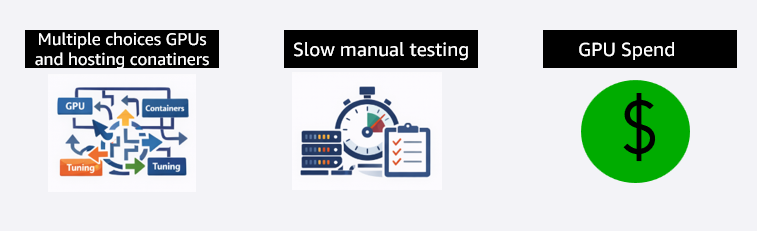
Figure 1: The three core challenges teams face when deploying generative AI models to production
The decision space is impossibly large. A single deployment involves choosing from over a dozen GPU instance types, multiple serving containers, various parallelism degrees, and a growing set of optimization techniques such as speculative decoding. These all interact with each other, and there is no validated guidance to narrow the search. The only way to find the right configuration is to test, and that is where the real cost begins. Teams provision instances, deploy the model, run load tests, analyze results, and repeat. This cycle takes two to three weeks per model and requires expertise in GPU infrastructure, serving frameworks, and performance optimization that most teams do not have in-house.
Many teams start manually: they pick a few instance types, deploy the model, run load tests, compare latency, throughput, and cost, then repeat. More mature teams often script parts of the process using benchmarking tools, deployment templates, or continuous integration and continuous delivery (CI/CD) pipelines. Even when workloads are scripted, teams still face significant work. They need to test and validate their scripts, choose which configurations to benchmark, set up the benchmarking environment, interpret the results, and balance trade-offs between latency, throughput, and cost.
Teams are often left making high-stakes infrastructure decisions without knowing whether a better, more cost-effective option exists. They default to over-provisioning, choosing more expensive GPU infrastructure than they need and running configurations that do not fully use the compute resources they are paying for. The risk of under-performing in production is far worse than overspending on compute. The result is wasted GPU spend that compounds with every model deployed and every month the endpoint runs.
How optimized generative AI inference recommendations work
You bring your own generative AI model, define your expected traffic patterns, and specify a single performance goal: optimize for cost, minimize latency, or maximize throughput. From there, SageMaker AI takes over in three stages.
Stage 1: Narrow the configuration space
SageMaker AI analyzes the model’s architecture, size, and memory requirements to identify the instance types and parallelism strategies that can realistically meet your goal. Instead of testing every possible combination, it narrows the search to the configurations worth evaluating, across the instance types you select (up to three).
Stage 2: Apply goal-aligned optimizations
Based on your chosen performance goal, SageMaker AI applies the optimization techniques to each candidate configuration such as:
- For throughput goals, it trains speculative decoding models (such as EAGLE 3.0) that allow the model to generate multiple tokens per forward pass, significantly increasing tokens per second.
- For latency goals, it tunes compute kernels to reduce per-token processing time, lowering time to first token.
- Tensor parallelism is applied based on model size and instance capability, distributing the model across available GPUs to handle models that exceed single-GPU memory.
You do not need to know which technique is right for your goal. SageMaker AI selects and applies the optimizations automatically.
Stage 3: Benchmark and return ranked recommendations
SageMaker AI benchmarks each optimized configuration on real GPU infrastructure using NVIDIA AIPerf, measuring time to first token, inter-token latency, P50/P90/P99 request latency, throughput, and cost. The result is a set of ranked, deployment-ready recommendations with validated metrics for each configuration and instance type. Here is what the workflow looks like from your perspective using SageMaker AI APIs.
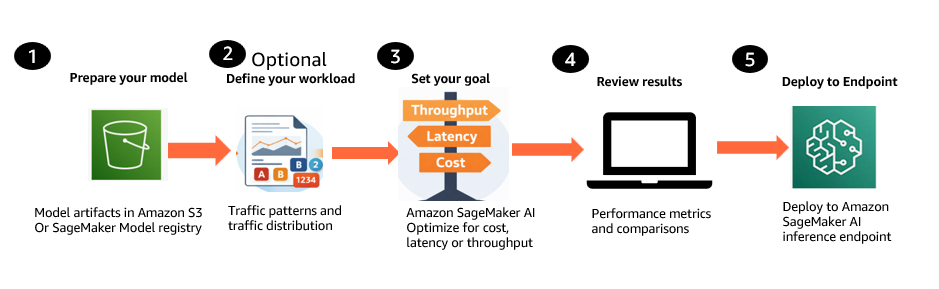
Figure 2: Generative AI inference recommendations workflow
- Prepare your model. Bring your generative AI model from Amazon Simple Storage Service (Amazon S3) or the SageMaker Model Registry, including Hugging Face checkpoint formats with SafeTensor weights, base models, and custom or fine-tuned models trained on your own data.
- Define your workload (optional). Describe expected traffic patterns, including input and output token distributions and concurrency levels. You can provide these inline or use a representative dataset from Amazon S3.
- Set your optimization goal. Choose a single objective: optimize for cost, minimize latency, or maximize throughput. Select up to three instance types to compare.
- Review ranked recommendations. SageMaker AI returns deployment-ready configurations with validated metrics such as Time to First Token, inter-token latency, P50/P90/P99 request latency, throughput, and cost projections. Compare the recommendations and select the best fit.
- Deploy the selected configuration. Deploy the chosen configuration to a SageMaker inference endpoint programmatically through the API.
Additional options: You can also benchmark existing production endpoints to validate current performance or compare them against new configurations. SageMaker AI can use existing machine learning (ML) Reservations (Flexible Training Plans) at no additional compute cost, or use on-demand compute provisioned automatically.
Pricing
There is no additional costs for generating optimized generative AI inference recommendations. Customers incur standard compute costs for the optimization jobs that generate optimized configurations and for the endpoints provisioned during benchmarking. Customers with existing ML Reservations (Flexible Training Plans) can run benchmarking on their reserved capacity at no additional cost, meaning the only cost is the optimization job itself.
Getting started with optimized generative AI inference recommendations requires only a few API calls with SageMaker AI.
For detailed API walkthroughs, code examples, and sample notebooks, see the SageMaker AI documentation and the sample notebooks on GitHub.
Benchmarking rigor built in
Every recommendation from SageMaker AI is grounded in real measurements, not estimates or simulations. Under the hood, SageMaker AI benchmarks every configuration on real GPU infrastructure using NVIDIA AIPerf, an open-source benchmarking tool that measures key inference metrics including time to first token, inter-token latency, throughput, and requests per second.
AWS has contributed to AIPerf to strengthen the statistical foundation of benchmarking results. These contributions include multi-run confidence reporting, enabling you to measure variance across repeated benchmark trials and quantify result quality with statistically grounded confidence intervals. This moves you beyond fragile single-run numbers toward benchmark results you can trust when making decisions about model selection, infrastructure sizing, and performance regressions. AWS also contributed adaptive convergence and early stopping, allowing benchmarks to stop once metrics have stabilized instead of always running a fixed number of trials. This means lower benchmarking cost and faster time to results without sacrificing rigor. For the broader inference community, it raises the quality of benchmarking methodology by focusing on repeatability, statistical confidence, and distribution-aware analysis rather than headline numbers from a single trial.
Optimizations in action
To see what these goal-aligned optimizations look like in practice, consider a real example. A customer deploying GPT-OSS-20B on a single ml.p5en.48xlarge (H100) instance selects maximize throughput as their performance goal. SageMaker AI identifies speculative decoding as the right optimization for this goal, trains an EAGLE 3.0 draft model, applies it to the serving configuration, and benchmarks both the baseline and the optimized configuration on real GPU infrastructure.
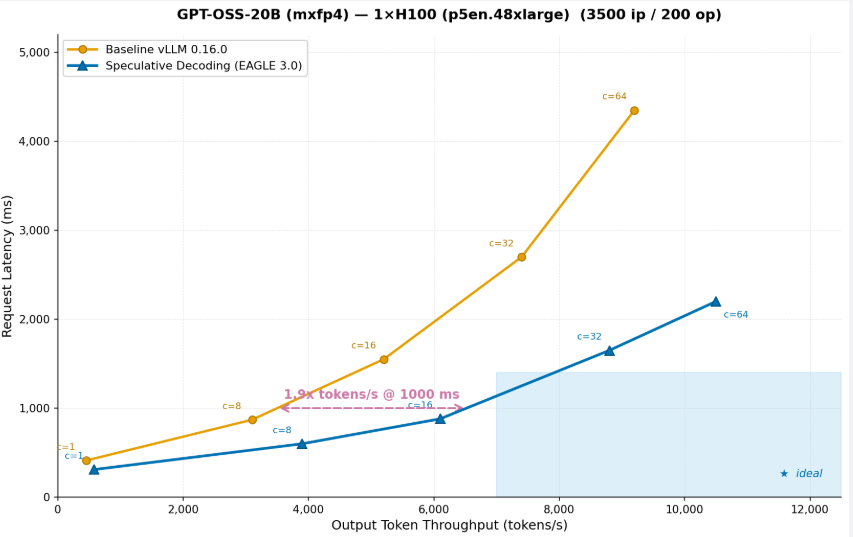
Figure 3: GPT-OSS-20B (mxfp4) on 1x H100 (p5en.48xlarge) (3500 ip / 200 op)
The graph shows that after running throughput optimization on the OSS-20B model, the same instance can serve 2x more tokens at the same request latency. After throughput optimization, the same instance delivers 2x more tokens/s at 1,000ms latency means you can serve twice as many users on the same hardware, effectively cutting inference cost per token in half. This is exactly the kind of optimization that SageMaker AI applies automatically when you select a throughput goal. You do not need to know that speculative decoding is the right technique, or how to train a draft model, or how to configure it for your specific model and hardware. SageMaker AI handles it end to end and returns the validated results as part of the ranked recommendations.
Customer value
Cost efficiency and transparency: Clear price-performance comparisons across instance types of your choice enable right-sizing instead of defaulting to the most expensive option. Instead of over-provisioning because you cannot afford to risk under-performing, you can select the configuration that delivers the performance you need at the right cost. Savings compound with every model deployed and every month the endpoint runs.
Speed to production: Teams iterate faster, test more configurations, and get to production sooner. Every day saved in deployment is a day your generative AI investment is delivering value to customers.
Confidence in production: Every recommendation is backed by real measurements on real GPU infrastructure using NVIDIA AIPerf, not estimates or simulations. Deploy knowing your configuration has been validated against your specific model and workload, at percentile-level precision that matches production conditions.
Use cases
- Pre-deployment validation: Optimize and benchmark a new model before committing to a production deployment. Know exactly how it will perform before you invest in scaling it.
- Regression testing after updates: Validate performance after a container update, framework upgrade, or serving library release. Confirm that your configuration is still optimal before pushing to production.
- Right-sizing when conditions change: When traffic patterns shift or new instance types become available, re-run optimized generative AI inference recommendations in hours rather than restarting a weeks-long manual process.
- Model comparison: Compare the performance and cost of different model variants across instance types to make an informed selection before production deployment.
- Cost optimization: Benchmark existing production endpoints to identify over-provisioned infrastructure. Use the results to right-size and reduce recurring inference spend.
Benchmark inference endpoints
An AI benchmark job runs performance benchmarks against your SageMaker AI inference endpoints using a predefined workload configuration. Use benchmark jobs to measure the performance of your generative AI inference infrastructure before and after optimization. When the benchmark job is completed, the results are stored in the Amazon S3 output location that you specified. Once the benchmark job completes, all results are written to your S3 output path in output folder as shown below screenshot:
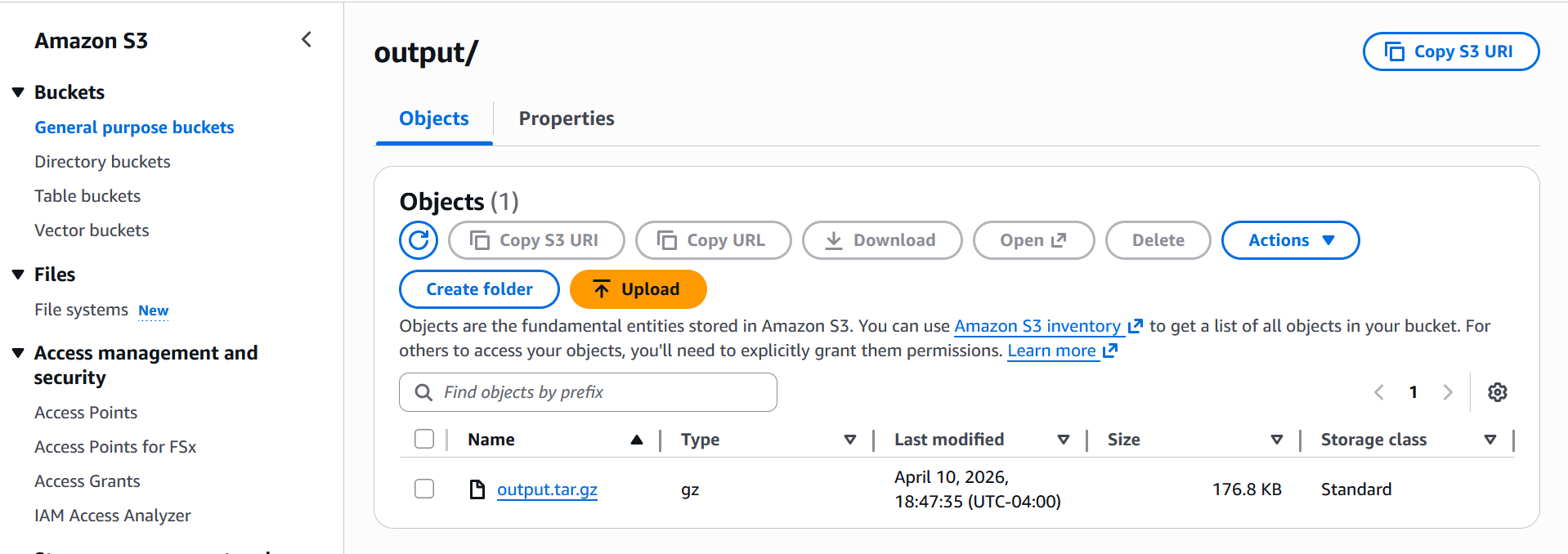
Once you download and extract the zip output file, you will get below files
The main output is profile_export_aiperf.json and its CSV counterpart profile_export_aiperf.csv both contain the same aggregated metrics: latency percentiles (p50, p90, p99), output token throughput, time-to-first-token (TTFT), and inter-token latency (ITL). These are the numbers you’d use to evaluate how the model performed under the simulated load.
Alongside that, profile_export.jsonl gives you the raw per-request data every individual request logged with its own latency, token counts, and timestamp. This is useful if you want to do your own analysis or spot outliers that the aggregated stats might hide.
We have created a sample notebook in Github which benchmarks openai/gpt-oss-20b deployed on a ml.g6.12xlarge instance (4× NVIDIA L40S GPUs), served via the vLLM container as an Inference Component. It simulates a realistic workload using synthetic prompts: 300 requests at 10 concurrent users, with ~500 input and ~150 output tokens per request, to measure how the model performs under that load.
Deploying model from recommendations
After the AI Recommendation Job completes, the output is a SageMaker Model Package which is a versioned resource that bundles all instance-specific deployment configurations into a single artifact.
To deploy, you first convert the Model Package into a Deployable Model by calling CreateModel with the ModelPackageName and the InferenceSpecificationName for the instance you want to target, then create an endpoint configuration and deploy as a standard SageMaker real-time endpoint or Inference Component.
- Pick the recommendation you want to deploy
- Convert Model Package → Deployable Model
- Create endpoint config
- Deploy and wait
Alternatively, if you want to use Inference Components instead of a single-model endpoint, You can follow the notebook for details. This design means a single Recommendation Job produces one Model Package with multiple InferenceSpecifications, one per evaluated instance type. So you can pick the configuration that fits your latency, throughput, or cost target and deploy it directly without re-running the job.
Getting started
This capability is available today in seven AWS Regions: US East (N. Virginia), US West (Oregon), US East (Ohio), Asia Pacific (Tokyo), Europe (Ireland), Asia Pacific (Singapore), and Europe (Frankfurt). Access it through the SageMaker AI APIs.
Conclusion
In this post, we showed how optimized generative AI inference recommendations in Amazon SageMaker AI reduce deployment time from weeks to hours. With this capability, you can focus on building accurate models and the products that matter to your customers, not on infrastructure tuning. Every configuration is validated on real GPU infrastructure against your specific model and workload, so you can deploy with confidence and right-size with clarity.
To learn more, visit the SageMaker AI documentation and try the sample notebooks on GitHub.