
AgentWatch delivers ambient AWS resource monitoring for your DevOps team, moving beyond the reactive cycle of managing Amazon CloudWatch alarms across multiple accounts. CloudWatch alarms trigger too late, AWS Lambda errors accumulate unnoticed, and Amazon Elastic Compute Cloud (Amazon EC2) performance degradation goes undetected until customers report problems. This leaves your team constantly firefighting rather than preventing issues. Every day, you manually check dashboards, triage CloudWatch alarms and investigate issues that have already impacted your users. You have metrics streaming in, logs accumulating across dozens of services, and alarms firing constantly but knowing what matters, when it matters, and what to do about it remains the real challenge.
This reactive monitoring approach creates operational challenges for your team. You’re context-switching between tools, piecing together incident stories from fragmented data sources, and spending hours on post-mortems for problems you could have prevented. By the time you understand what went wrong, your customers have already experienced degraded performance or outages. Your on-call engineers are burned out from alert fatigue, and your team’s productivity suffers as routine monitoring tasks consume time that should be spent on innovation. These challenges lead to missed service level agreement (SLA) targets, customer escalations, and a growing backlog of technical debt as your team focuses on firefighting rather than implementing preventive measures. Current monitoring tools require you to constantly query, analyze, and decide what deserves attention. You need a different approach. This is where AgentWatch, an ambient AWS resource monitoring agent, offers a different approach to infrastructure oversight. The agent works continuously alongside your team to observe your infrastructure, analyze patterns, and surface insights without requiring constant human intervention. It monitors your systems and brings you into the loop only when your judgment or action is truly needed.
In this post, we demonstrate the capabilities of AgentWatch through practical implementation. You will see how the solution performs infrastructure checks every 15 minutes, summarizing CloudWatch metrics, logs, and alarms across multiple AWS accounts. The agent delivers actionable reports directly to Slack and responds to natural language queries about your infrastructure state. Throughout, we explore three human-in-the-loop patterns that maintain appropriate oversight while maximizing automation.
What are ambient agents?
Ambient agents represent a shift toward event-driven, autonomous AI systems. These agents listen to event streams and respond dynamically, processing multiple events simultaneously while reducing human operational burden. They provide continuous monitoring without constant human intervention yet maintain appropriate oversight by involving humans at critical decision points.
Ambient agents can be triggered dynamically in an event-driven way and process multiple tasks in parallel, making them well suited for monitoring scenarios where conditions change rapidly and require continuous attention.Ambient agents work best for specific scenarios. Bringing them into your workflow involves thoughtful consideration of when and how these agents interact with humans and the control that humans have over the workflow as agents execute and notify end-users.
How does this apply to your AWS infrastructure?
For your AWS infrastructure, this means AgentWatch can continuously monitor your resources, identify trends, and deliver actionable intelligence without requiring you to manually query dashboards or sift through logs. Now that you understand the ambient agent concept, let’s explore how AgentWatch implements these principles for AWS infrastructure monitoring.
Introducing AgentWatch
We built AgentWatch as an ambient AWS monitoring agent on Amazon Bedrock’s large language model (LLM) and deploy it using Amazon Bedrock AgentCore Runtime—a secure, serverless hosting environment purpose-built for running AI agents at scale. With AgentCore Runtime, you can deploy agents as HTTP endpoints that you call programmatically. AgentCore Runtime handles authentication, scaling, and infrastructure management automatically so you can focus on agent capabilities rather than operational concerns.
AgentWatch demonstrates how you can implement intelligent infrastructure monitoring that balances automation with human control. We’re building a hybrid ambient agent some tasks it performs are fully autonomous (low-risk activities like monitoring resource utilization and providing information), while other actions require user configuration and approval, such as analyzing alarm causes and implementing fixes.
Your organization might use different communication tools for collaboration. As AI capabilities advance, you will work differently with autonomous workers (or agents) across various communication services like Slack. These agents accomplish tasks faster and more efficiently while maintaining a tighter feedback loop with end users. For this solution, we use Slack as the end-user interface where the ambient agent posts messages and where you interact with the agent on demand.
With this foundation in place, let’s examine how AgentWatch maintains appropriate human oversight through three core patterns.
Human-in-the-loop patterns
Human-in-the-loop (HITL) is fundamental for building trustworthy ambient agents. While ambient agents operate autonomously, they must know when to involve humans in their decision-making process. AgentWatch implements three core HITL patterns that balance autonomy with appropriate human oversight:
- Notify Pattern: The notify pattern alerts you about important events without taking action. This is useful for flagging events you should be aware of, but where the agent is not empowered to act.
- Implementation: Every 15 minutes (parameterized, MonitoringSchedule rate controls the rate; other options are to run it at 5, 10, 30, 60 mins intervals), AgentWatch generates a monitoring report covering CloudWatch alarms, critical issues, and resource health across AWS services. The agent posts these reports to a Slack channel, keeping your team informed without requiring immediate action or approval. We chose 15-minute intervals to balance timely detection of issues with reasonable API usage and notification frequency. This is short enough to catch problems quickly but long enough to avoid alert fatigue.
- Question Pattern: The question pattern allows the agent to ask you for clarification when it encounters uncertainty about how to proceed. This helps prevent the agent from making incorrect assumptions or taking inappropriate actions when faced with ambiguous situations.
- Implementation: If AgentWatch detects a critical alarm but is unclear whether to proceed with automated remediation or escalation to an on-call engineer, it posts a question to Slack asking for guidance. This mimics how a site reliability engineer (SRE) would consult with a senior administrator before making significant changes to production systems.
- Review Pattern: With the review pattern, you can approve, reject, or edit actions before the agent executes them. This is particularly important for sensitive operations where human judgment is required.
- Implementation: When AgentWatch wants to perform potentially impactful actions such as modifying AWS resources, adjusting scaling policies, or changing alarm thresholds, it presents its proposed action to you through Slack, along with relevant context and reasoning. You can then approve the action to proceed, reject it entirely, or edit the parameters before execution.These HITL patterns provide multiple benefits for your team. They lower implementation risks by making sure appropriate human oversight at critical moments. The patterns mimic natural human communication found in engineering teams, making adoption intuitive. Over time, the agent learns from your feedback, continuously improving its decision-making.
Now let’s explore the technical architecture that brings these capabilities to life.
Architecture and implementation
AgentWatch implements a scheduled monitoring system that autonomously collects and summarizes AWS infrastructure data every 15 minutes. This monitoring approach uses AI-powered agents to gather current system information and deliver structured status reports through Slack notifications.
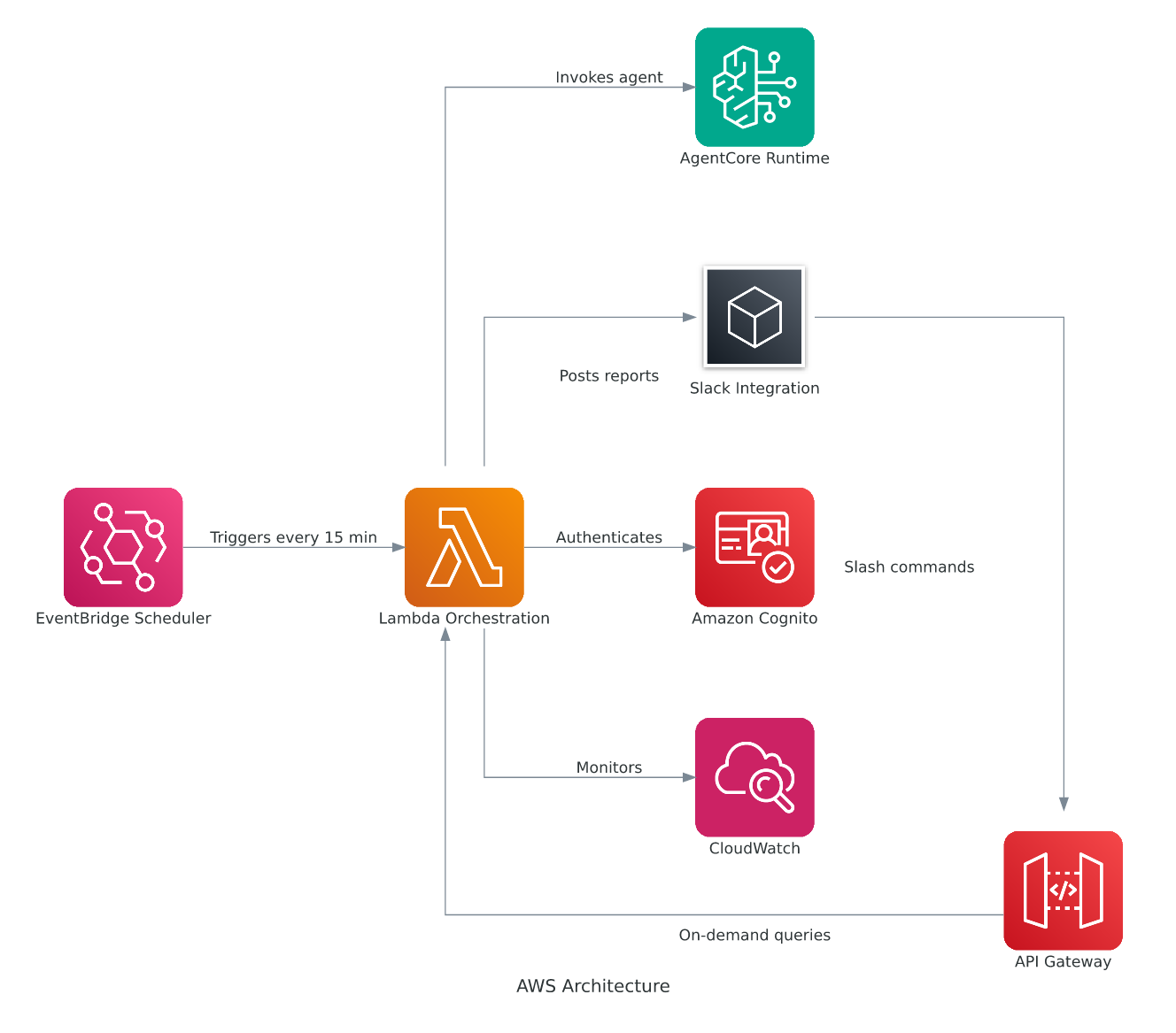
Figure 1: AgentWatch Architecture Diagram
The AgentWatch monitoring cycle begins with Amazon EventBridge triggering an AWS Lambda function every 15 minutes through a cron-based rule. This Lambda function authenticates with Amazon Cognito using Open Authorization 2.0 (OAuth 2.0) client credentials to obtain a bearer token, then calls AgentCore Runtime with the monitoring prompt. AgentCore instantiates a LangChain agent a framework for building applications powered by language models that can use tools and maintain conversation context with access to seven specialized monitoring tools for AWS infrastructure equipped with specialized CloudWatch monitoring tools that systematically collect infrastructure data, including dashboards, log groups, service logs, error patterns, alarm statuses, and cross-account metrics, providing comprehensive visibility across your AWS environment.
After data collection completes, the LangChain agent sends the aggregated CloudWatch data to Amazon Bedrock’s Claude Sonnet model, which processes and transforms raw monitoring information into contextual, human-readable insights. The intelligent summary flows back through the agent to AgentCore Runtime and returns to the Lambda function, which formats the analysis into structured Slack blocks with organized sections for log analysis and alarm status. AgentWatch then delivers the formatted monitoring report to your designated Slack channel via webhook, providing your team with regular, automated health updates about your AWS infrastructure directly in your collaboration workspace these monitoring tasks occur without manual intervention.
We built AgentWatch as a LangChain agent with access to seven specialized monitoring tools for AWS infrastructure. The agent uses the Amazon Bedrock Claude model for natural language understanding and can analyze CloudWatch dashboards, fetch logs, examine alarms, and perform cross-account monitoring. The architecture follows a hybrid ambient model with both scheduled monitoring and on-demand interaction capabilities.Using the LLM’s natural language understanding, AgentWatch analyzes complex AWS monitoring scenarios. It determines which tool combinations provide monitoring coverage, then generates human-readable reports with actionable insights. The agent maintains conversation context across interactions, which supports follow-up questions and progressive refinement of monitoring strategies.
Deploy the agent on AgentCore Runtime, provides a secure, serverless, and purpose-built hosting environment for running AI agents at scale. AgentCore Runtime supports multiple agent frameworks and model providers. After you deploy the agent, it becomes available as an HTTP endpoint that you can call programmatically. AgentCore Identity handles authentication using OAuth 2 with Cognito as the identity provider, though you can use other OpenID Connect (OIDC)-compliant identity providers (IdPs).
The deployment infrastructure consists of three main components working together. First, a Lambda function serves as the orchestration layer. It authenticates with Cognito to obtain bearer tokens, calls the AgentCore Runtime endpoint with appropriate prompts, and formats responses for Slack.
Second, EventBridge provides scheduled invocation capability through a rule configured to trigger every 15 minutes. When the rule fires, Lambda uses a pre-configured monitoring prompt requesting summaries of CloudWatch alarms, critical issues, and resource health.
Third, an Amazon API Gateway exposes the Lambda function as an HTTP endpoint that integrates with a Slack app through slash commands. Your questions typed in Slack route to API Gateway, which triggers Lambda with your question as the prompt.
This dual-trigger architecture allows AgentWatch to operate in two modes. In scheduled mode, the agent runs autonomously every 15 minutes, proactively monitoring AWS infrastructure and posting reports to keep your team informed without manual intervention. In on-demand mode, you can ask specific questions through Slack and receive immediate responses, allowing for interactive troubleshooting and investigation when needed.
Now let’s see how these capabilities work in practice with real-world examples.
AgentWatch in action
The following screenshots demonstrate both operational modes of AgentWatch.
Scheduled Monitoring Reports: Every 15 minutes, AgentWatch automatically generates and posts monitoring reports to Slack, providing your team with continuous visibility into AWS infrastructure health.
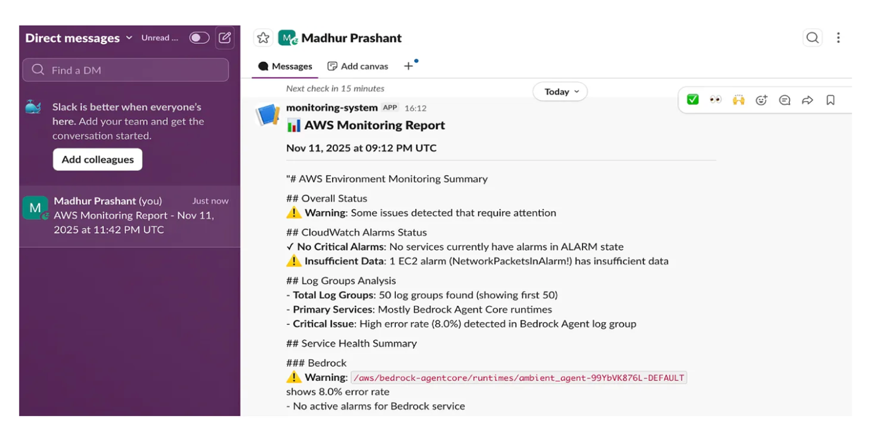
Figure 2: Scheduled monitoring report in Slack showing CloudWatch alarms, resource health, and critical issues
On-demand Interaction: You can ask specific questions through Slack slash commands to investigate issues or get real-time information. The agent processes your question and provides detailed, context-aware responses based on current AWS infrastructure state.
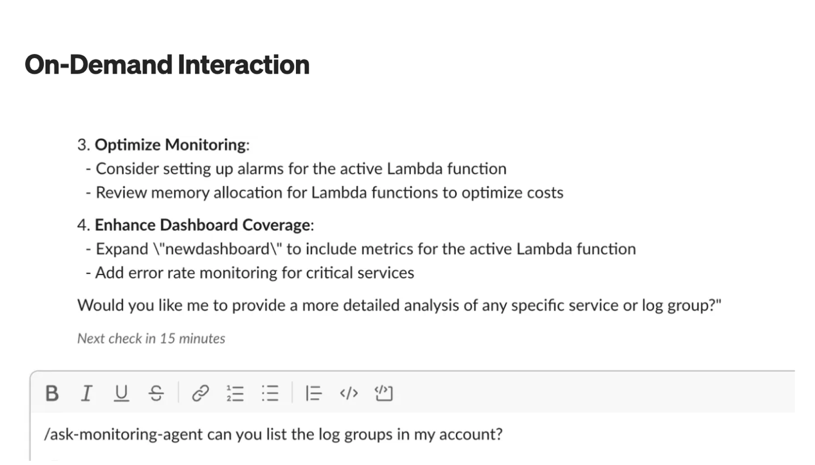
Figure 3: User asking a specific question via Slack slash command and receiving a detailed response
Beyond these operational examples, AgentWatch delivers broader value across your organization.
Use cases and benefits
AgentWatch delivers value across multiple operational scenarios. The solution identifies potential issues before they impact your users by continuously analyzing CloudWatch metrics, logs, and alarms across your AWS infrastructure. This proactive approach reduces operational overhead, so your team spends less time on routine monitoring tasks while maintaining visibility into system health through automated reports and intelligent alerting.
The Slack integration enhances team collaboration by supporting natural language queries and discussions about infrastructure issues, improving communication between your development and operations teams. For enterprise environments, cross-account support allows large organizations to monitor distributed AWS infrastructures from a centralized intelligent agent
Getting started
To get started with AgentWatch, visit the GitHub repository for complete deployment instructions and implementation details.
Prerequisites
Before deploying AgentWatch, verify that you have an AWS account with CloudWatch, Lambda, and EventBridge permissions. You will need a Cognito User Pool configured for OAuth 2.0 authentication and a Slack Workspace where you have app creation permissions. For local development and customization, Python 3.11 or later is required.
Quick setup
Use the following commands for quick steup.
- Configure Identity Provider
- Deploy Agent to AgentCore Runtime
- Deploy Infrastructure.
- Configure Slack Integration – Update your Slack app with the API Gateway endpoint from deployment output.
The deployment script automates the entire setup process. It configures your identity provider (Cognito), deploys the agent to AgentCore Runtime, and sets up the Lambda function, EventBridge rule, and API Gateway. After completion, the script provides the Slack webhook URL that you will need for your app configuration.
Testing the deployment
- Scheduled Monitoring: AgentWatch automatically posts reports every 15 minutes.
- On-Demand Queries: Use Slack slash commands for specific questions:
Post deployment, make sure your implementation follows these security and operational best practices.
Security and best practices
AgentWatch implements multiple security layers to protect your infrastructure. OAuth 2.0 with Cognito supports secure API access, while AWS Identity and Access Management (IAM) role assumption provides fine-grained cross-account permissions. AgentCore Runtime adds enterprise-grade security and compliance capabilities. For operational safety, the HITL patterns help prevent inappropriate autonomous actions. The agent’s conversation memory maintains context while respecting session boundaries, and logging provides audit trails and troubleshooting capabilities.
Extending AgentWatch
The ambient agent architecture that we’ve built for monitoring can be extended to other operational domains.
- Cost optimization: Add tools for analyzing spending patterns and recommending optimization opportunities.
- Security monitoring: Integrate with AWS Security Hub and Amazon GuardDuty for threat detection.
- Compliance reporting: Automate compliance checks across AWS Config and AWS CloudTrail.
- Performance analysis: Enhance with application performance monitoring and optimization recommendations.
Conclusion
In this post, we showed you how AgentWatch improves infrastructure monitoring by combining autonomous operations with appropriate human oversight. You saw how the solution performs infrastructure checks every 15 minutes, delivers actionable reports to Slack, and responds to natural language queries about your AWS environment. The three human-in-the-loop patterns i.e. notify, question, and review make sure you remain informed and in control while benefiting from continuous intelligent monitoring.
The architecture uses AWS Managed Services (AMS) and Amazon Bedrock AgentCore Runtime to provide a scalable, secure foundation for ambient agent deployment. You can apply this approach beyond AWS monitoring to other domains requiring continuous observation with selective human involvement, including cost optimization, security monitoring, compliance reporting, and performance analysis.
As AI agents become more sophisticated, ambient architectures like AgentWatch will help you operate more efficiently while maintaining the human judgment necessary for critical infrastructure decisions. To get started with AgentWatch, visit AgentWatch – GitHub the for complete deployment instructions and implementation details.