
Amazon Bedrock regularly releases new foundation model (FM) versions with better capabilities, accuracy, and safety. Understanding the model lifecycle is essential for effective planning and management of AI applications built on Amazon Bedrock. Before migrating your applications, you can test these models through the Amazon Bedrock console or API to evaluate their performance and compatibility.
This post shows you how to manage FM transitions in Amazon Bedrock, so you can make sure your AI applications remain operational as models evolve. We discuss the three lifecycle states, how to plan migrations with the new extended access feature, and practical strategies to transition your applications to newer models without disruption.
Amazon Bedrock model lifecycle overview
A model offered on Amazon Bedrock can exist in one of three states: Active, Legacy, or End-of-Life (EOL). Their current status is visible both on the Amazon Bedrock console and in API responses. For example, when you make a GetFoundationModel or ListFoundationModels call, the state of the model will be shown in the modelLifecycle field in the response.
The following diagram illustrates the details around each model state.
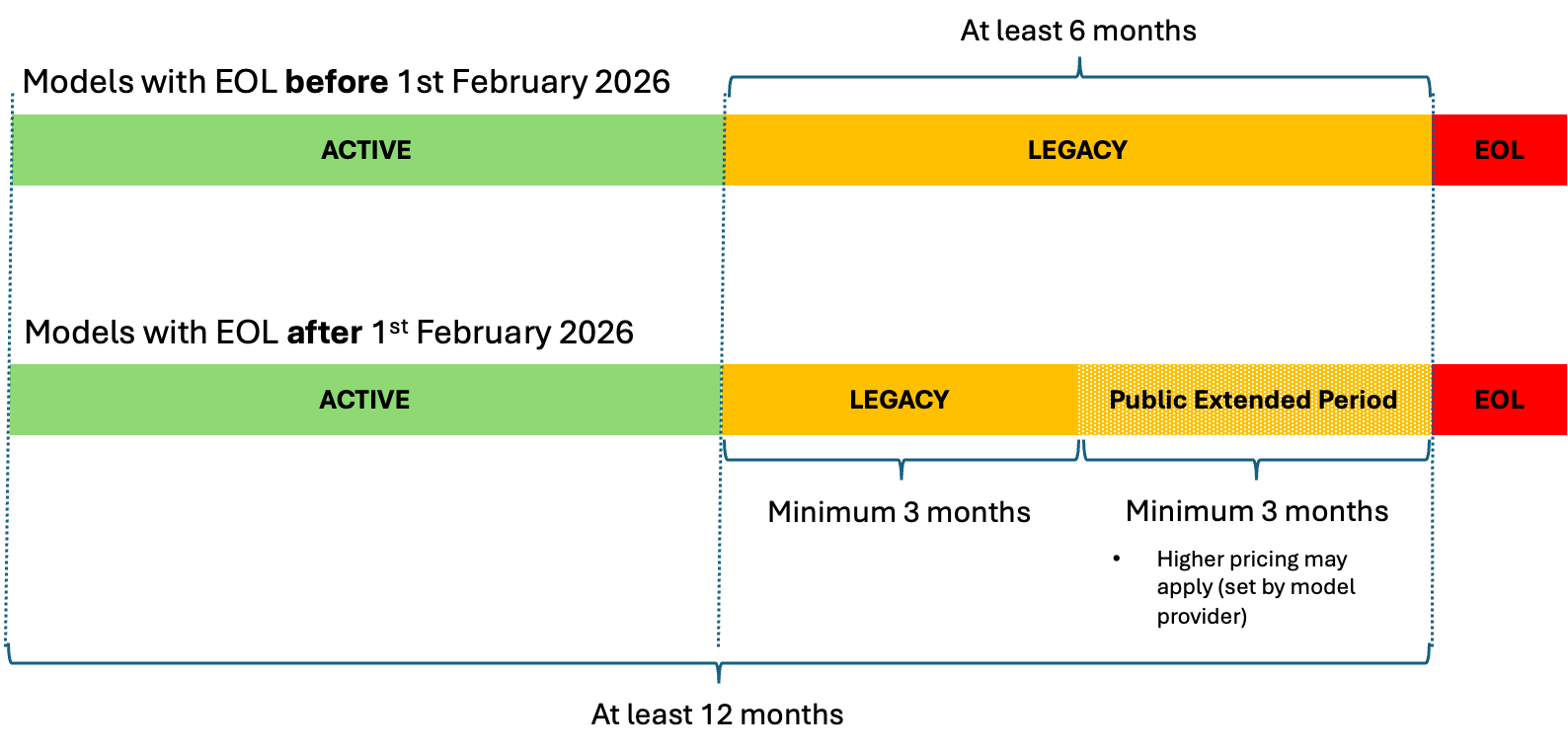
The state details are as follows:
- ACTIVE – Active models receive ongoing maintenance, updates, and bug fixes from their providers. While a model is
Active, you can use it for inference through APIs likeInvokeModelorConverse, customize it (if supported), and request quota increases through AWS Service Quotas. - LEGACY – When a model provider transitions a model to
Legacystate, Amazon Bedrock will notify customers with at least 6 months’ advance notice before the EOL date, providing essential time to plan and execute a migration to newer or alternative model versions. During theLegacyperiod, existing customers can continue using the model, though new customers might be unable to access it, and existing customers might lose access for inactive accounts if they do not call the model for a period of 15 days or more. Organizations should note that creating new provisioned throughput by model units becomes unavailable, and model customization capabilities might face restrictions. For models with EOL dates after February 1, 2026, Amazon Bedrock introduces an additional phase within theLegacystate:- Public extended access period – After spending a minimum of 3 months in
Legacystatus, the model enters this extended access phase. Active users can continue using it for at least another 3 months until EOL. During extended access, quota increase requests through AWS Service Quotas are not expected to be approved, so plan your capacity needs before a model enters this phase. During this period, pricing may be adjusted (see Pricing during extended access below), and customers will receive notifications about the transition date and any changes.
- Public extended access period – After spending a minimum of 3 months in
- END-OF-LIFE (EOL) – When a model reaches its EOL date, it becomes completely inaccessible across all AWS Regions unless specifically noted in the EOL list. API requests to EOL models will fail, rendering them unavailable to most customers unless special arrangements exist between the customer and provider for continued access. The transition to EOL requires proactive customer action—migration doesn’t happen automatically. Organizations must update their application code to use alternative models before the EOL date arrives. When EOL is reached, the model becomes completely inaccessible for most customers.
After a model launches on Amazon Bedrock, it remains available for at least 12 months after launch and stays in Legacy state for at least 6 months before EOL. This timeline helps customers plan migrations without rushing.
Pricing during extended access
During the extended access period, pricing may be adjusted by the model provider. If pricing changes are planned, you will be notified in the initial legacy announcement and before any subsequent changes take effect, so there will be no surprise retroactive price increases. Customers with existing private pricing agreements with model providers or those using provisioned throughput will continue to operate under their current pricing terms during the extended access period. This makes sure customers who have made specific arrangements with model providers or invested in provisioned capacity will not be unexpectedly affected by any pricing changes.
Communication Process for Model State Changes
Customers will receive a notification 6 months prior to a model’s EOL date when the model provider transitions a model to Legacy state. This proactive communication approach ensures that customers have sufficient time to plan and execute their migration strategies before a model becomes EOL.
Notifications include details about the model being deprecated, important dates, extended access availability, and when the model will be EOL. AWS uses multiple channels to ensure these important communications reach the right people, including:
- Email notifications
- AWS Health Dashboard
- Alerts in the Amazon Bedrock console
- Programmatic access through the API.
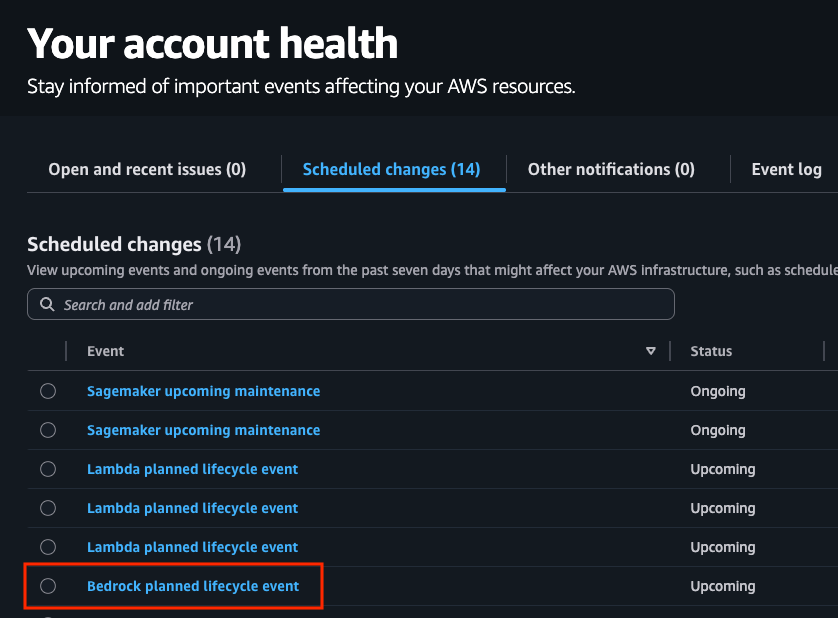
To make sure you receive these notifications, verify and configure your account contact email addresses. By default, notifications are sent to your account’s root user email and alternate contacts (operations, security, and billing). You can review and update these contacts on your AWS Account page in the Alternate contacts section. To add additional recipients or delivery channels (such as Slack or email distribution lists), go to the AWS User Notifications console and choose AWS managed notifications subscriptions to manage your delivery channels and account contacts. If you are not receiving expected notifications, check that your email addresses are correctly configured in these settings and that notification emails from health@aws.com are not being filtered by your email provider.
Migration strategies and best practices
When migrating to a newer model, update your application code and check that your service quotas can handle expected volume. Planning ahead helps you transition smoothly with minimal disruption.
Planning your migration timeline
Start planning as soon as a model enters Legacy state:
- Assessment phase – Evaluate your current usage of the legacy model, including which applications depend on it, typical request patterns, and specific behaviors or outputs that your applications rely on.
- Research phase – Investigate the recommended replacement model, understanding its capabilities, differences from the legacy model, new features that could enhance your applications, and the new model’s Regional availability. Review API changes and documentation.
- Testing phase – Conduct thorough testing with the new model and compare performance metrics between models. This helps identify adjustments needed in your application code or prompt engineering.
- Migration phase – Implement changes using a phased deployment approach. Monitor system performance during transition and maintain rollback capability.
- Operational phase – After migration, continuously monitor your applications and user feedback to make sure they’re performing as expected with the new model.
Technical migration steps
Test your migration thoroughly:
- Update API references – Modify your application code to reference the new model ID. For example, changing from
anthropic.claude-3-5-sonnet-20240620-v1:0toanthropic.claude-sonnet-4-5-20250929-v1:0or global cross-Region inferenceglobal.anthropic.claude-sonnet-4-5-20250929-v1:0. Update prompt structures according to new model’s best practices. For more detailed guidance, refer to Migrate from Anthropic’s Claude Sonnet 3.x to Claude Sonnet 4.x on Amazon Bedrock. - Request quota increases – Before fully migrating, make sure you have sufficient quotas for the new model by requesting increases through the AWS Service Quotas console if necessary.
- Adjust prompts – Newer models might respond differently to the same prompts. Review and refine your prompts accordingly to the new model specifications. You can also use tools such as the prompt optimizer in Amazon Bedrock to assist with rewriting your prompt for the target model.
- Update response handling – If the new model returns responses in a different format or with different characteristics, update your parsing and processing logic accordingly.
- Optimize token usage – Take advantage of efficiency improvements in newer models by reviewing and optimizing your token usage patterns. For example, models that support prompt caching can reduce the cost and latency of your invocations.
Testing strategies
Thorough testing is critical for a successful migration:
- Side-by-side comparison – Run the same requests against both the legacy and new models to compare outputs and identify any differences that might affect your application. For production environments, consider shadow testing—sending duplicate requests to the new model alongside your existing model without affecting end-users. With this approach, you can evaluate model performance, latency and errors rates, and other operational factors before full migration. Perform A/B testing for user impact assessment by routing a controlled percentage of live traffic to the new model while monitoring key metrics such as user engagement, task completion rates, satisfaction scores, and business KPIs.
- Performance testing – Measure response times, token usage, and other performance metrics to understand how the new model performs compared to the legacy version. Validate business-specific success metrics.
- Regression and edge case testing – Make sure existing functionality continues to work as expected with the new model. Pay special attention to unusual or complex inputs that might reveal differences in how the models handle challenging scenarios.
Conclusion
The model lifecycle policy in Amazon Bedrock gives you clear stages for managing FM evolution. Transition periods offer extended access options, and provisions for fine-tuned models help you balance innovation with stability.
Stay informed about model states through the AWS Health Dashboard, plan migrations when models enter the Legacy state, and test newer versions thoroughly. These guidelines can help you maintain continuity in your AI applications while using improved capabilities in newer models.
If you have further questions or concerns, reach out to your AWS team. We want to help you and facilitate a smooth transition as you continue to take advantage of the latest advancements in FM technology.
For continued learning and implementation support, explore the official AWS Bedrock documentation for comprehensive guides and API references. Additionally, visit the AWS Machine Learning Blog and AWS Architecture Center for real-world case studies, migration best practices, and reference architectures that can help optimize your model lifecycle management strategy.
About the authors
 Saurabh Trikande is a Senior Product Manager for Amazon Bedrock and Amazon SageMaker Inference. He is passionate about working with customers and partners, motivated by the goal of democratizing AI. He focuses on core challenges related to deploying complex AI applications, inference with multi-tenant models, cost optimizations, and making the deployment of generative AI models more accessible. In his spare time, Saurabh enjoys hiking, learning about innovative technologies, following TechCrunch, and spending time with his family.
 Melanie Li, PhD, is a Senior Generative AI Specialist Solutions Architect at AWS based in Sydney, Australia, where her focus is on working with customers to build solutions using state-of-the-art AI/ML tools. She has been actively involved in multiple generative AI initiatives across APJ, harnessing the power of LLMs. Prior to joining AWS, Dr. Li held data science roles in the financial and retail industries.
 Derrick Choo is a Senior Solutions Architect at AWS who accelerates enterprise digital transformation through cloud adoption, AI/ML, and generative AI solutions. He specializes in full-stack development and ML, designing end-to-end solutions spanning frontend interfaces, IoT applications, data integrations, and ML models, with a particular focus on computer vision and multi-modal systems.
 Jared Dean is a Principal AI/ML Solutions Architect at AWS. Jared works with customers across industries to develop machine learning applications that improve efficiency. He is interested in all things AI, technology, and BBQ.
 Julia Bodia is Principal Product Manager for Amazon Bedrock.
 Pooja Rao is a Senior Program Manager at AWS, leading quota and capacity management and supporting business development for the Bedrock Go-To-Market team. Outside of work, she enjoys reading, traveling, and spending time with her family.