
The rapid advancement of artificial intelligence (AI) has created unprecedented demand for specialized models capable of complex reasoning tasks, particularly in competitive programming where models must generate functional code through algorithmic reasoning rather than pattern memorization. Reinforcement learning (RL) enables models to learn through trial and error by receiving rewards based on actual code execution, making it particularly well-suited for developing genuine problem-solving capabilities in algorithmic domains.
However, implementing distributed RL training for code generation presents significant infrastructure challenges such as orchestrating multiple heterogeneous components, coordinating parallel code compilation across nodes, and maintaining fault tolerance for long-running processes. Ray is one of the frameworks for distributed workloads that address these challenges, due to its unified system that handles the entire AI pipeline, GPU-first architecture, and seamless integration with tools like Hugging Face Transformers and PyTorch.
Workloads can be run with Ray framework on SageMaker training jobs by using the Ray on Amazon SageMaker Training jobs solution, which combines Ray’s distributed computing framework with SageMaker’s fully managed infrastructure. This solution automatically handles Ray cluster initialization, multi-node coordination, and distributed resource management, enabling developers to focus on model development while benefiting from SageMaker’s enterprise-grade features.
In this post, we demonstrate how to train CodeFu-7B, a specialized 7-billion parameter model for competitive programming, using Group Relative Policy Optimization (GRPO) with veRL, a flexible and efficient training library for large language models (LLMs) that enables straightforward extension of diverse RL algorithms and seamless integration with existing LLM infrastructure, within a distributed Ray cluster managed by SageMaker training jobs. We walk through the complete implementation, covering data preparation, distributed training setup, and comprehensive observability, showcasing how this unified approach delivers both computational scale and developer experience for sophisticated RL training workloads.
About CodeFu-7B
CodeFu-7B-v0.1 is a 7B parameter language model specifically trained for solving Competitive Programming (CP) problems. Built upon the DeepSeek-R1-Distill-Qwen-7B base model, CodeFu demonstrates how reinforcement learning can develop capabilities in algorithmic reasoning and efficient C++ code generation beyond traditional supervised fine-tuning approaches.
The model is trained using problem statements from the DeepMind CodeContest dataset without access to ground-truth solutions during training, forcing it to learn through trial and error based on code execution feedback. This approach enables the development of genuine problem-solving capabilities rather than pattern memorization
CodeFu is publicly available on HuggingFace and released under the MIT license, making it accessible for researchers and practitioners interested in code generation and algorithmic reasoning. The model’s training methodology demonstrates the potential for applying reinforcement learning techniques to complex reasoning tasks beyond competitive programming.
Ray in SageMaker training jobs solution
Ray on Amazon SageMaker Training jobs is a solution that enables distributed data processing and model training using Ray within SageMaker’s managed training environment. The solution provides key capabilities including universal launcher architecture for automatic Ray cluster setup, multi-node cluster management with intelligent coordination, heterogeneous cluster support for mixed instance types, and integrated observability through Ray Dashboard, Prometheus, Grafana, and Amazon CloudWatch integration.
The solution seamlessly integrates with the SageMaker Python SDK using the modern ModelTrainer API. This publicly available solution on GitHub enables developers to use Ray’s distributed computing capabilities while benefiting from SageMaker’s managed infrastructure, making it ideal for complex workloads like reinforcement learning training that require sophisticated distributed coordination and resource management.
Solution overview
The workflow for training CodeFu 7B with veRL and Ray on SageMaker training jobs, as illustrated in the accompanying diagram, consists of the following steps:
- Data preparation: Upload the preprocessed DeepMind CodeContest dataset and training configuration.
- Training job submission: Submit a SageMaker training job API request through the ModelTrainer class from the SageMaker Python SDK.
- Monitoring and observability: Monitor training progress in real-time through Ray Dashboard, and optionally with Prometheus metrics collection, Grafana visualization, and experiment tracking.
- Automatic cleanup: Upon training completion, SageMaker automatically saves the trained model to S3, uploads training logs to CloudWatch, and decommissions the compute cluster.
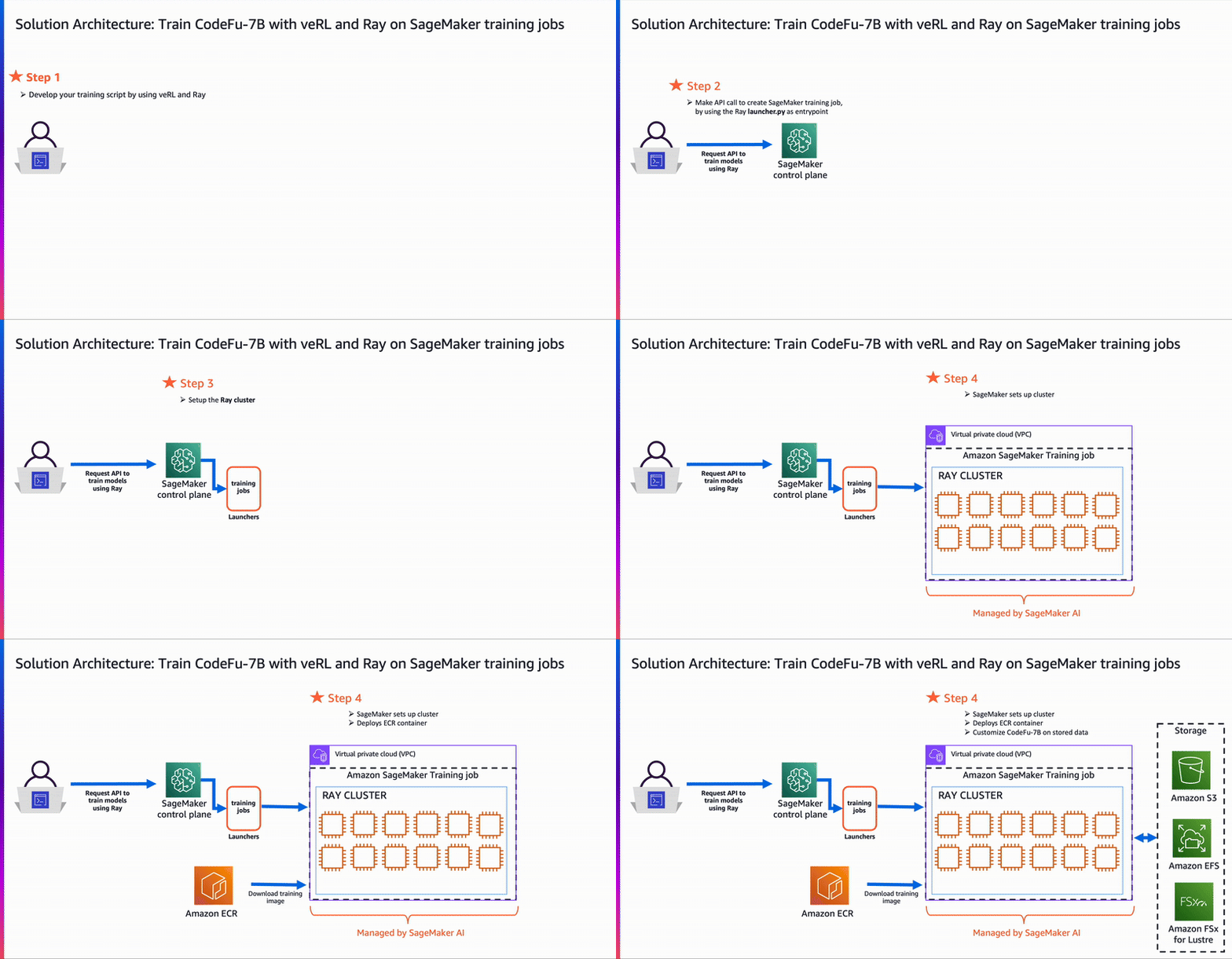
This streamlined architecture delivers a fully managed reinforcement learning training experience, enabling developers to focus on model development while SageMaker and Ray handle the complex distributed infrastructure orchestration—within a pay-as-you-go pricing model that bills only for actual compute time.
Prerequisites
The following prerequisites must be complete before the notebook can be run:
- Make the following quota increase requests for SageMaker AI. For this use case, request a minimum of 2
p4de.24xlargeinstances (with 8 x NVIDIA A100 GPUs) and scale to morep4de.24xlargeinstances (depending on time-to-train and cost-to-train trade-offs for your use case). P5 instances (with 8 x NVIDIA H100 GPUs) are also supported. On the Service Quotas console, request the following SageMaker AI quotas:- p4de instances (
p4de.24xlarge) for training job usage: 2
- p4de instances (
- Create an AWS Identity and Access Management (IAM) role with managed policies
AmazonSageMakerFullAccess,AmazonS3FullAccess,AmazonSSMFullAccessto give required access to SageMaker AI to run the examples. - Assign the following policy as the trust relationship to created IAM role:
- (Optional) Create an Amazon SageMaker Studio domain (refer to Use quick setup for Amazon SageMaker AI) to access Jupyter notebooks for running the training code. Alternatively, JupyterLab can be used in a local setup or another Python development environment to execute the notebook and submit the SageMaker training job.
Note: These permissions grant broad access and are not recommended for use in production environments. See the SageMaker Developer Guide for guidance on defining more fine-grained permissions
The code example can be found at this GitHub repository.
Prepare the dataset
The data preparation pipeline transforms the raw DeepMind CodeContest dataset into a format suitable for reinforcement learning training. We apply systematic filters to identify suitable problems, removing those with Codeforces ratings below 800 and implementing quality validation checks for missing test cases, malformed descriptions, and invalid constraints.
We categorize problems into three difficulty tiers: Easy (800-1000 points), Hard (1100-2200 points), and Expert (2300-3500 points). This post uses only the Easy dataset for training. Each problem is formatted with two components: a user prompt containing the problem statement, and a reward_model specification with test cases, time limits, and memory constraints. Crucially, the ground_truth field contains no solution code — only test cases, forcing the model to learn through reward signals rather than memorizing solutions.
For this post, we provide a pre-processed subset of the Easy difficulty dataset in the code sample to streamline the training example, accessible from the GitHub repository.
GRPO training using veRL
The training process uses Ray to orchestrate the distributed execution and synchronization of vLLM rollout, reward evaluation (code compilation and execution), FSDP model parallelism, and Ulysses sequence parallelism. We set the degree of sequence parallelism to 4 for long-form reasoning and code generations.
The veRL framework implements a sophisticated multi-component architecture through its main_ppo.py orchestrator, which coordinates three primary distributed worker types: ActorRolloutRefWorker for policy inference and rollouts, CriticWorker for value function estimation, and RewardModelWorker for scoring generated solutions.
The GRPO algorithm enhances traditional proximal policy optimization (PPO) by computing advantages using group-relative baselines, which helps stabilize training by reducing variance in policy gradient estimates.
We extended the TinyZero code repository by using Ray to manage and distribute reward function calculation. This enables parallel C++ code compilation and evaluation across the same cluster to address the compute-intensive and latency-bound nature of code execution. The entire pipeline is executed as a SageMaker training job running on ml.p4de.24xlarge instances. The training pipeline consists of the following steps as shown in the following architecture:
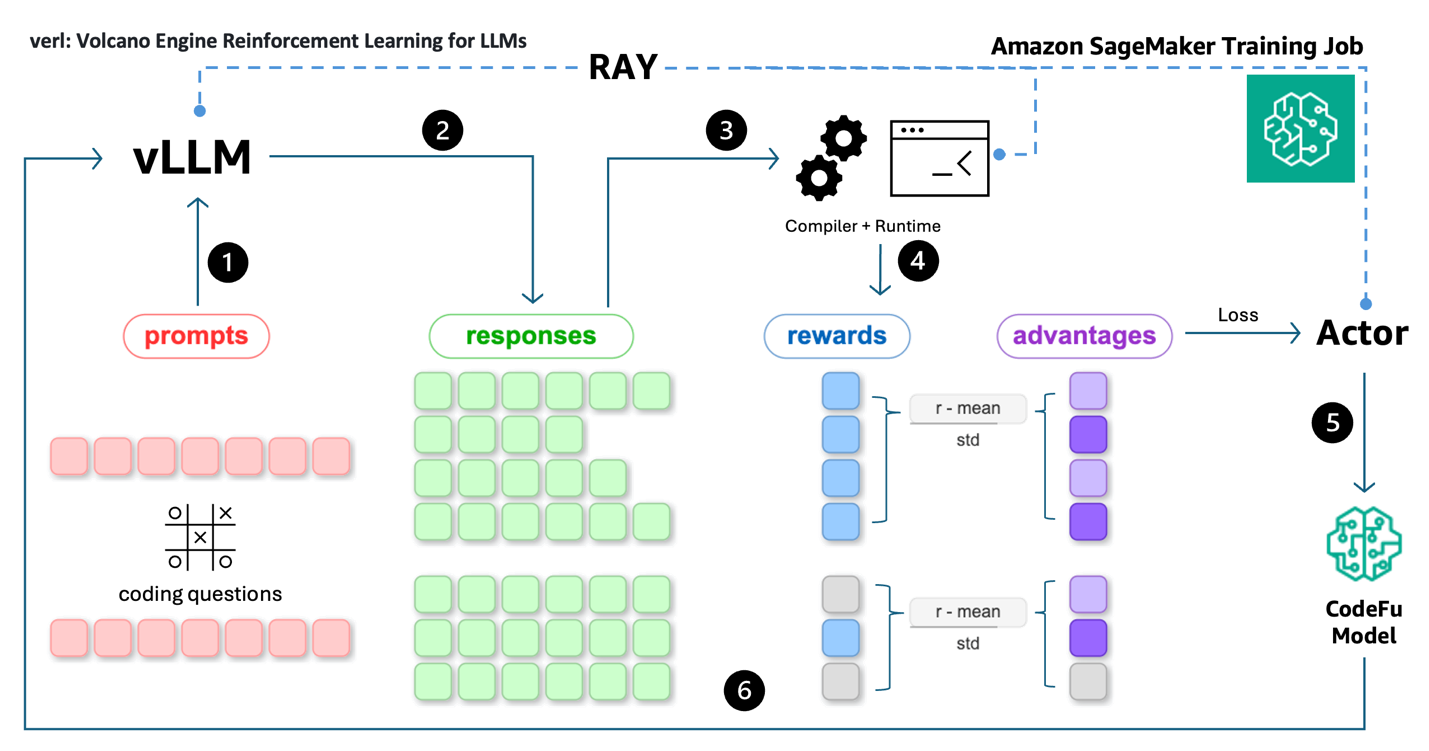
- Rollout: Coding problem prompts are fed into the vLLM inference engine for rolling out potential solutions.
- Response generation: vLLM generates multiple responses (reasoning + code) for each prompt.
- Code execution: Code solutions are extracted from responses and are compiled and executed by distributed workers (compilers and runtime) managed by Ray.
- Reward calculation: Execution outcomes are used to calculate rewards (i.e. testcase pass ratios) and advantages are computed using group-relative baselines.
- Policy update: The Actor uses advantages and token probabilities to compute the PPO loss, which is used to update CodeFu’s parameters through gradient descent.
- Iteration: The process repeats with batches of prompt-response-reward cycles, with Ray managing the distributed sampling, execution, and training synchronization across the pipeline.
The training process orchestration involves several key components implemented across multiple modules. The core veRL training loop is implemented in main_ppo.py, which initializes Ray workers and manages the distributed training process:
The reward evaluation system implements parallel code execution through Ray remote functions, handling C++ compilation and test case execution:
The parallel test case execution system optimizes evaluation efficiency by sampling test cases and using process pools:
This implementation enables efficient distributed training by separating concerns: the main_ppo.py orchestrator manages Ray worker coordination, while the reward system provides scalable code evaluation through parallel compilation and execution across the SageMaker cluster.
Below is the pseudocode for the reward calculation used in this post to train a competitive programming coding model. The reward function is the most important part of reinforcement learning as it defines what the model is encouraged to achieve and what it should avoid. This implementation uses a hierarchical penalty system that first checks for fundamental code execution issues, assigning severe penalties for non-executable code (-1) and moderate penalties for compilation failures (-0.5). Extracted code solutions are executed with strict time limit enforcement – code exceeding the problem’s specified time limit is given zero reward, facilitating realistic competitive programming conditions. For a successfully executed C++ solution, its reward is calculated as a linear function based on the fraction of private test cases passed, encouraging the model to solve as many private test cases as possible while avoiding overfitting to publicly visible tests. This design prioritizes code correctness and execution validity, with the private test performance serving as the sole signal for learning optimal coding solutions.
Refer to scripts/verl/utils/reward_score/code_contests.py for the complete Python code. Executing generated code in production environments requires appropriate sandboxing. In this controlled demonstration setting, we execute the code as a quick example to evaluate its correctness to assign rewards.
Ray workload with SageMaker training jobs
To train CodeFu-7B using veRL and Ray on SageMaker training jobs, we use the ModelTrainer class from the SageMaker Python SDK. Start by setting up the distributed training workload with the following steps:
- Select the instance type and container image for the training job:
The training uses a custom Docker container that includes veRL, Ray, and the necessary dependencies for distributed RL training. Refer to the GitHub repository for the complete container definition and build instructions.
- Create the ModelTrainer to encapsulate the Ray-based training setup:
The ModelTrainer class provides flexible execution options through its SourceCode configuration, allowing users to customize their training workflows with different frameworks and launchers. Specify either an entry_script for direct Python script execution or use the command parameter for custom execution commands, enabling integration with specialized frameworks such as Ray, Hugging Face Accelerate, or custom distributed training solutions.
The launcher.py script serves as the universal entry point that detects the SageMaker environment (single-node or multi-node, homogeneous or heterogeneous cluster), initializes the Ray cluster with proper head/worker node coordination, and executes your custom training script. Key launcher.py functionalities are:
- Ray cluster setup: Automatically detects the cluster environment and initializes Ray with proper head node selection.
- Node coordination: Manages communication between head and worker nodes across SageMaker instances.
- Script execution: Executes the specified
--entrypointscript (train.py) within the Ray cluster context. - Prometheus and grafana connectivity: Configures Ray to export metrics and establishes connection to external Prometheus and Grafana servers specified by
RAY_PROMETHEUS_HOSTandRAY_GRAFANA_HOSTfor comprehensive cluster monitoring. For additional information, refer to Ray on SageMaker training jobs – Observability with Prometheus and Grafana.
For the complete implementation of the Ray cluster setup with SageMaker training jobs, refer to launcher.py.
The train.py script serves as the actual training orchestrator that:
- Loads the veRL configuration from the provided YAML file
- Sets up the distributed training environment with proper tokenizer and model initialization
- Constructs and executes the veRL training command with the necessary parameters
- Handles environment variable configuration for Ray workers and NVIDIA Collective Communications Library (NCCL) communication
- Manages the complete training lifecycle from data loading to model checkpointing
For the complete implementation of the entry point script, refer to train.py.
- Set up the input channels for the ModelTrainer by creating
InputDataobjects from the S3 bucket paths:
- Submit the training job using the train function call on the created ModelTrainer:
The job can be monitored directly from the notebook output or through the SageMaker console, which shows the job status and corresponding CloudWatch logs.
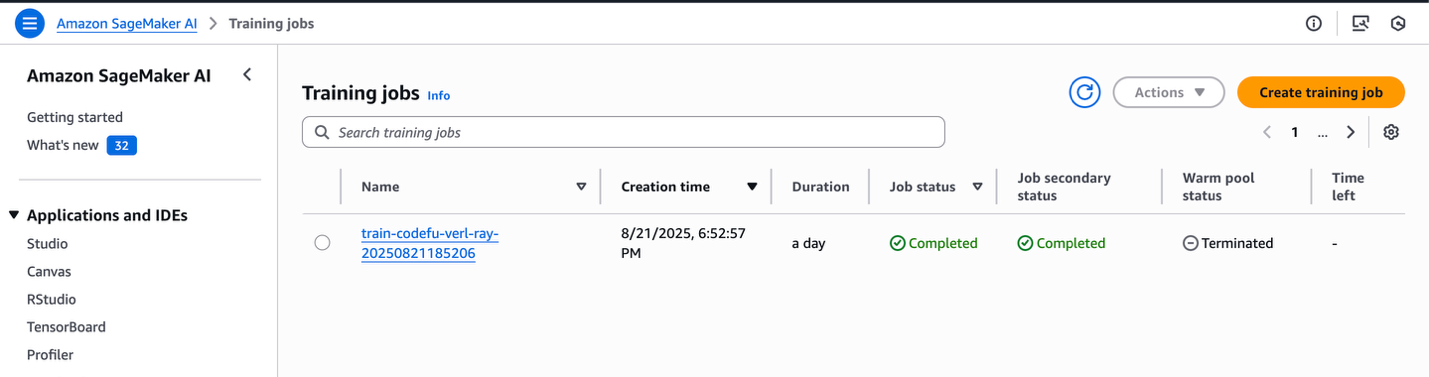
SageMaker training jobs console
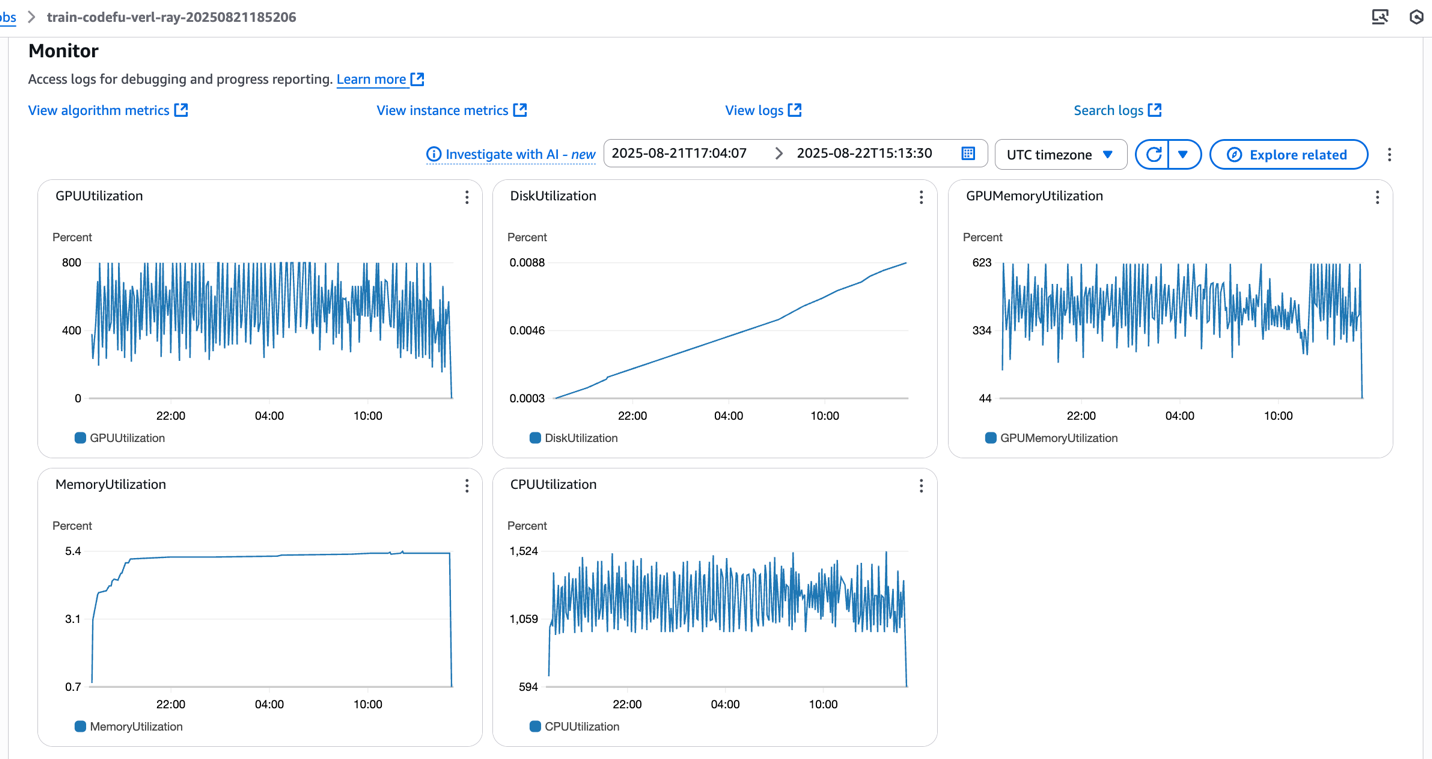
SageMaker training jobs system metrics
The launcher.py script orchestrates the Ray cluster initialization through the following automated steps, which can be monitored in real-time through CloudWatch logs:
- Setup SageMaker training jobs and Ray environment variables: Configures necessary environment variables for both SageMaker integration and Ray cluster communication:
- Identify the SageMaker training job cluster type: Detects whether the deployment is single-node or multi-node, and determines a single or multi-node cluster, and if it’s a homogeneous or heterogeneous cluster configuration:
- Setup head and worker nodes: Identifies which instance serves as the Ray head node and configures the remaining instances as worker nodes:
- Start Ray node: Initializes the Ray head node and worker nodes with appropriate resource allocation and dashboard configuration, by verifying that the worker nodes successfully connect to the head node before proceeding:
- Execute the training script: Launches the specified entrypoint script (train.py) within the fully initialized Ray cluster context:
After the job completes, the trained model weights and checkpoints will be available in the specified S3 output path, ready for deployment or further evaluation.
Experiment tracking
The CodeFu training pipeline integrates seamlessly with Managed MLflow on Amazon SageMaker AI as well as third party solutions, for comprehensive experiment tracking and visualization of reinforcement learning metrics.
The following image shows the metrics that are particularly useful to monitor during CodeFu training.
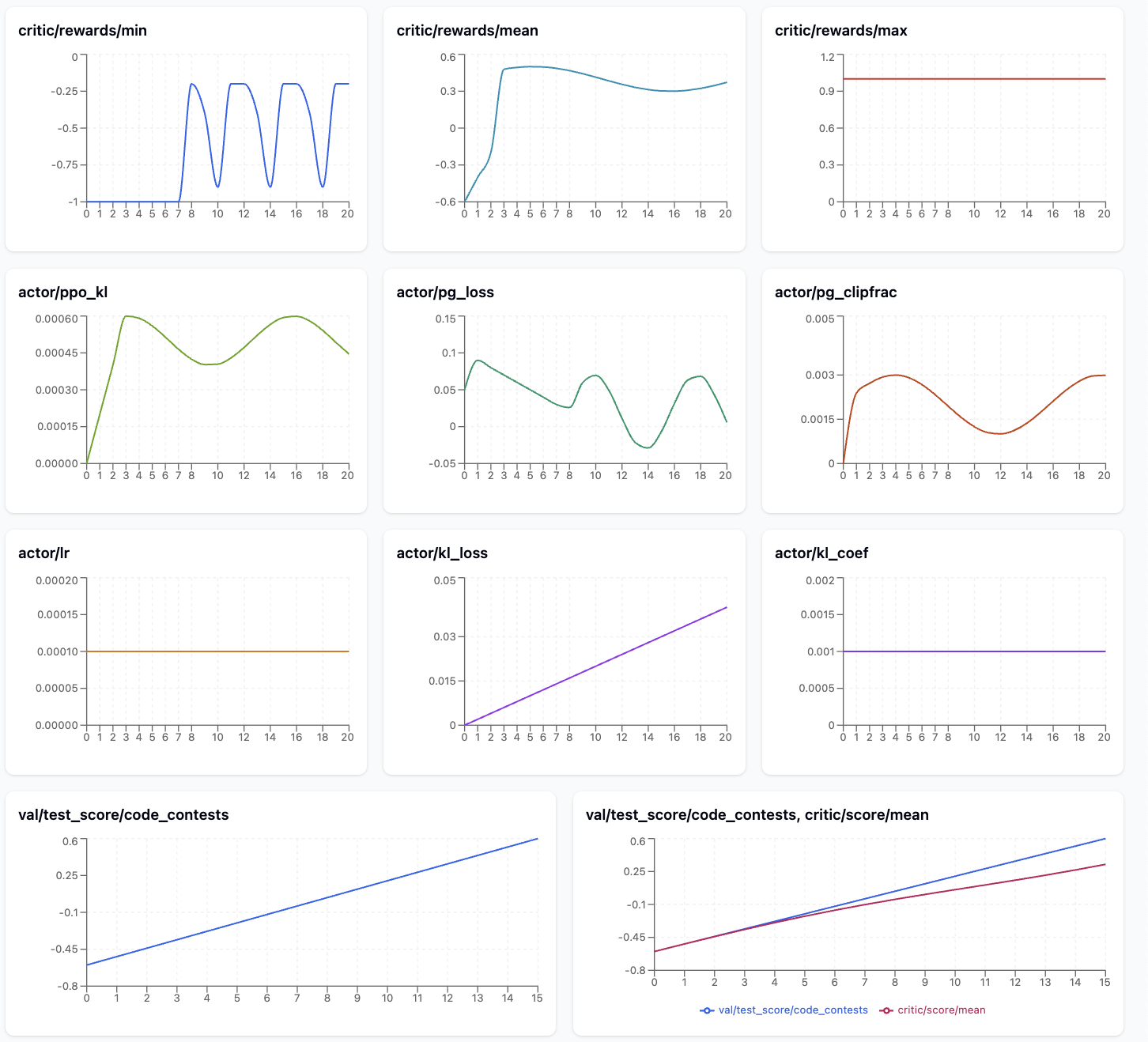
The metrics plot shows a promising GRPO/PPO learning progression for the competitive programming model. The reward signals demonstrate clear improvement, with critic/reward/mean rising from -0.8 to 0.6 and critic/reward/min recovering from initial failures -1.0 to moderate performance -0.5, while critic/reward/max maintains perfect scores 1.0 throughout training, indicating the model can achieve optimal solutions.
The Actor metrics reveal healthy training dynamics: actor/ppo_kl remains low ~0.0002 after an initial spike, confirming stable policy updates, while actor/pg_clipfrac stays in a reasonable range ~0.002-0.004, suggesting appropriately sized learning steps.
The increasing actor/kl_loss trend indicates growing divergence from the reference model as expected during RL fine-tuning. Most importantly, val/test_score/code_contests shows consistent improvement from -0.6 to ~0.5, and the train-validation comparison reveals good generalization with both curves tracking closely, indicating the model is learning to solve coding problems effectively without overfitting.
The table below explains key GRPO training metrics and why monitoring each one matters for diagnosing training health and performance:
| Metric | Description | Purpose |
| critic/reward/min | Minimum reward achieved on the training set | Detect catastrophic failures: Extremely negative rewards indicate the model is producing poor outputs that need attention |
| critic/reward/mean | Average reward across the training set | Primary progress indicator: Shows overall model performance improvement; should generally trend upward during successful training |
| critic/reward/max | Maximum reward achieved on the training set | Track best-case performance: Shows the model’s peak capability; helps identify if the model can achieve excellent results even if average is low |
| actor/ppo_kl | KL divergence between current and previous policy iteration | Training stability monitoring: High values indicate rapid policy changes that may destabilize training; should stay moderate |
| actor/pg_clipfrac | Fraction of policy updates hitting the clipping boundary | Update aggressiveness gauge: Moderate values indicate healthy learning; too high suggests overly aggressive updates that may destabilize training, too low (e.g. zero) suggests inefficient learning. This is valid only during off-policy PPO updates. |
| actor/kl_loss | KL divergence between current policy and fixed reference model | Reference drift prevention: Helps prevent the model from deviating too far from original behavior; important for maintaining coding capabilities |
| val/test_score/code_contests | Reward/performance on held-out validation set | Generalization check: Most important metric for real performance; detects overfitting and measures true model improvement |
(Optional) Observability with Ray dashboard and Grafana
To access the Ray Dashboard and enable Grafana visualization during training, establish port forwarding using AWS Systems Manager (SSM). To learn more about the setup of AWS SSM, please refer to AWS Systems Manager Quick Setup.
- First, identify the head node in your multi-node cluster by examining the CloudWatch logs:
- Access the Ray Dashboard by forwarding port 8265 from the head node:
- Enable Grafana to collect Ray metrics by forwarding port 8080 (Ray metrics export port):
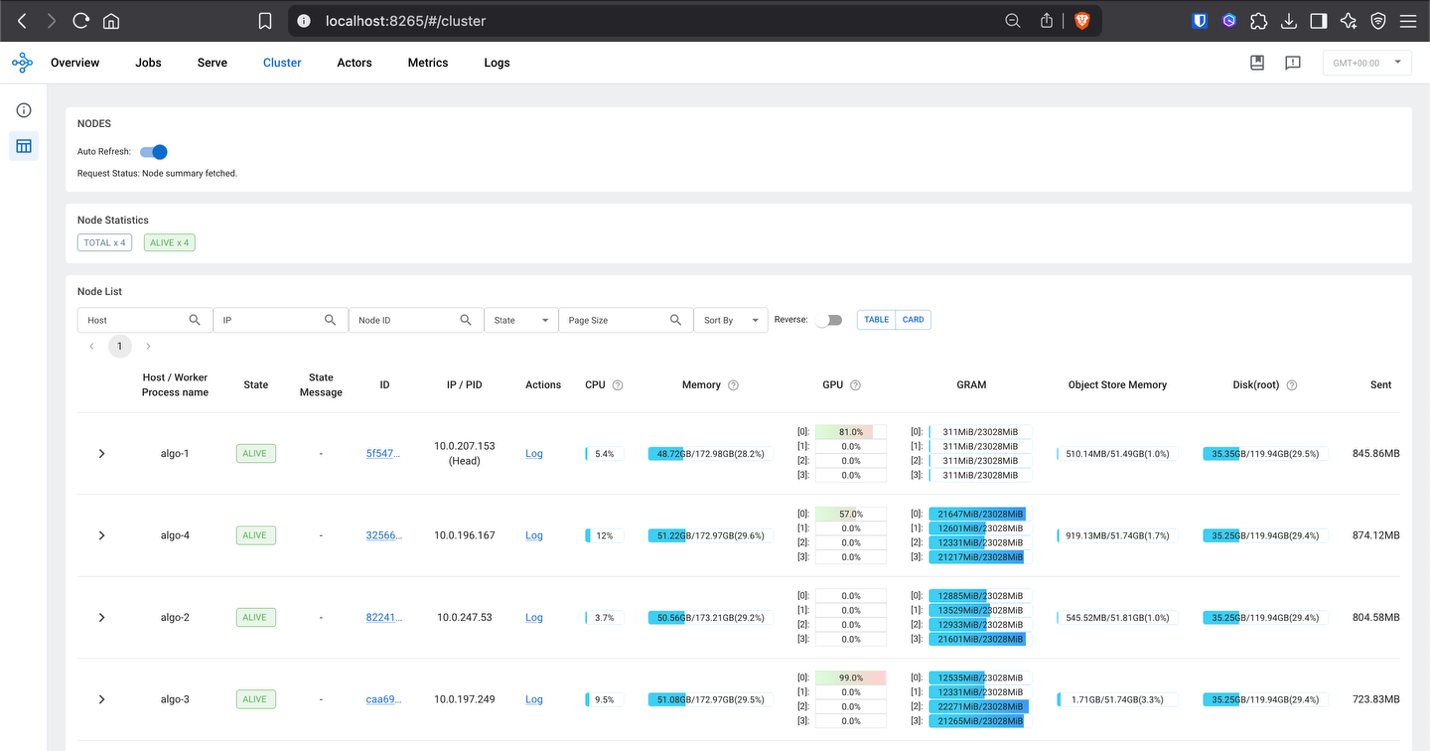
Once port forwarding is established, the Ray Dashboard can be accessed at localhost:8265 in your browser, providing detailed insights into:
- Worker utilization across the distributed cluster
- Task execution status and performance metrics
- Resource consumption including GPU and memory usage
- Actor and task scheduling across Ray workers
The integrated Grafana dashboards provide comprehensive visualization of the training metrics, system performance, and cluster health in real-time:
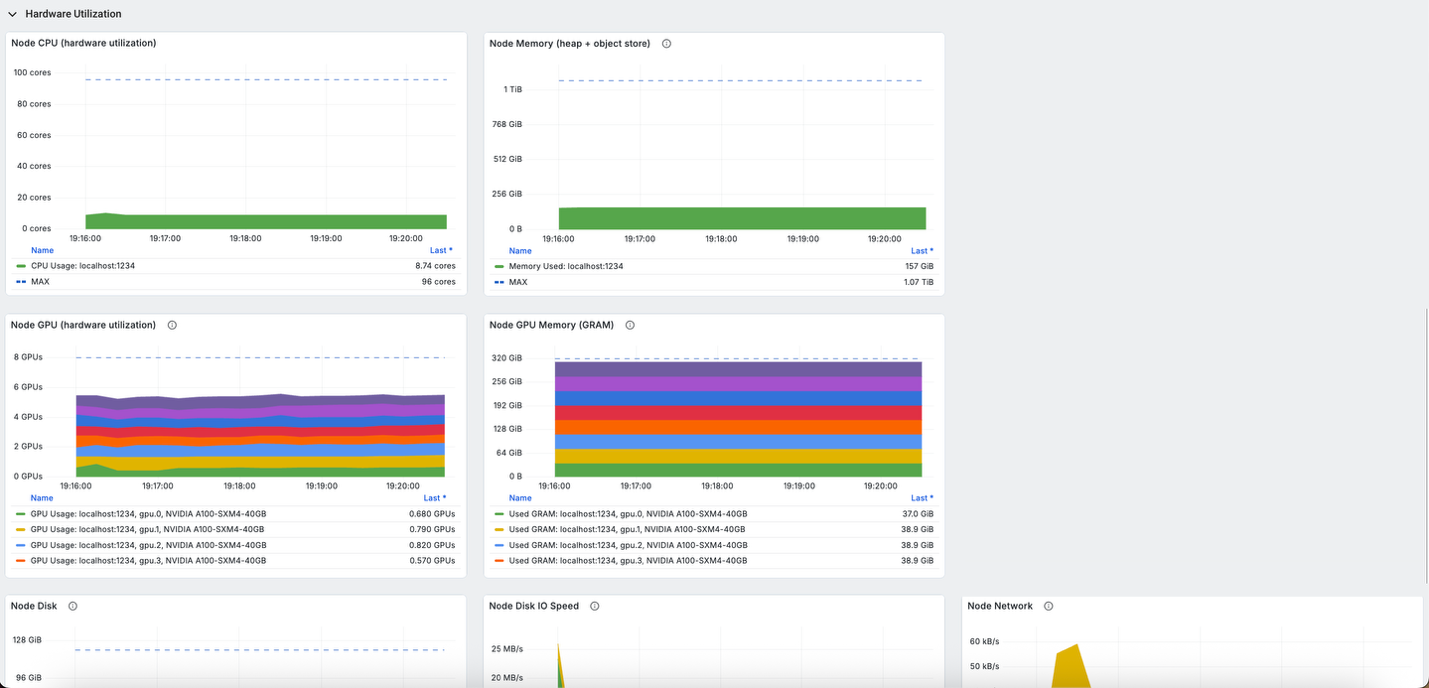
This observability setup is crucial for debugging distributed RL training issues, optimizing resource allocation, and making sure the training process progresses efficiently across the multi-node SageMaker cluster.
Clean up
To clean up your resources and avoid ongoing charges, follow these steps:
- Delete unused SageMaker Studio resources
- (Optional) Delete the SageMaker Studio domain
- On the SageMaker console, choose Training in the navigation pane and verify that your training job isn’t running anymore.
Conclusions
This post demonstrates how to train specialized reasoning models for competitive programming using the Ray on Amazon SageMaker Training jobs solution combined with veRL’s reinforcement learning framework.
The Ray on SageMaker training jobs solution simplifies the complexity of orchestrating distributed RL workloads by automatically handling Ray cluster initialization, multi-node coordination, and resource management across heterogeneous compute environments. This integration enables organizations to use Ray’s advanced distributed computing capabilities—including support for complex multi-component architectures, dynamic resource allocation, and fault-tolerant execution—while benefiting from SageMaker’s fully managed infrastructure, enterprise-grade security, and pay-as-you-go pricing model.
The detailed metrics analysis demonstrated how to monitor training health through reward progression, policy stability indicators, and generalization performance, enabling practitioners to identify optimal training configurations and troubleshoot distributed training issues effectively.
To begin implementing distributed RL training with Ray on SageMaker, visit the Ray on Amazon SageMaker Training jobs GitHub repository for the foundational solution framework. The complete CodeFu-7B training implementation, including veRL integration and configuration examples, is available at this GitHub repository.