
Evaluating single-turn agent interactions follows a pattern that most teams understand well. You provide an input, collect the output, and judge the result. Frameworks like Strands Evaluation SDK make this process systematic through evaluators that assess helpfulness, faithfulness, and tool usage. In a previous blog post, we covered how to build comprehensive evaluation suites for AI agents using these capabilities. However, production conversations rarely stop at one turn.
Real users engage in exchanges that unfold over multiple turns. They ask follow-up questions when answers are incomplete, change direction when new information surfaces, and express frustration when their needs go unmet. A travel assistant that handles “Book me a flight to Paris” well in isolation might struggle when the same user follows up with “Actually, can we look at trains instead?” or “What about hotels near the Eiffel Tower?” Testing these dynamic patterns requires more than static test cases with fixed inputs and expected outputs.
The core difficulty is scale because you can’t manually conduct hundreds of multi-turn conversations every time your agent changes, and writing scripted conversation flows locks you into predetermined paths that miss how real users behave. What evaluation teams need is a way to generate realistic, goal-driven users programmatically and let them converse naturally with an agent across multiple turns. In this post, we explore how ActorSimulator in Strands Evaluations SDK addresses this challenge with structured user simulation that integrates into your evaluation pipeline.
Why multi-turn evaluation is fundamentally harder
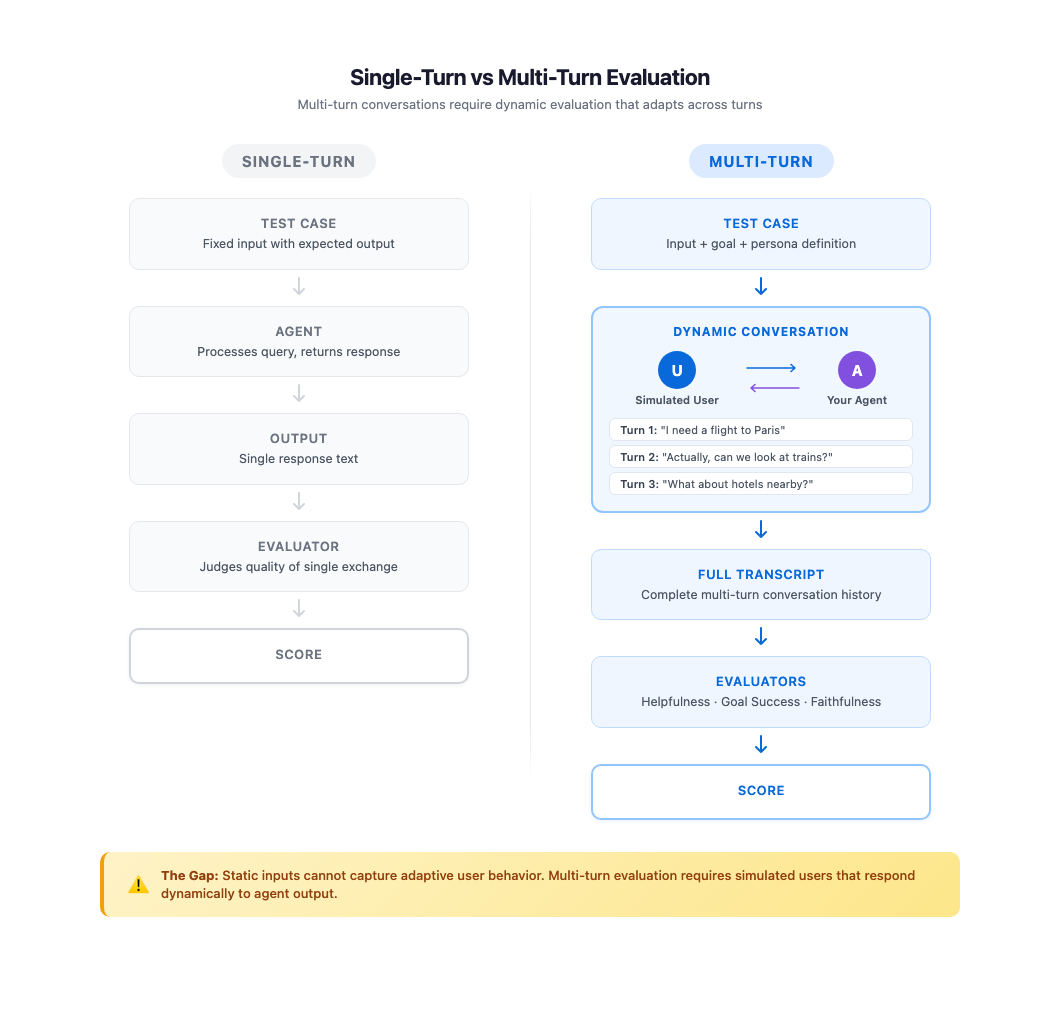
Single-turn evaluation has a straightforward structure. The input is known ahead of time, the output is self-contained, and the evaluation context is limited to that single exchange. Multi-turn conversations break every one of these assumptions.
In a multi-turn interaction, each message depends on everything that came before it. The user’s second question is shaped by how the agent answered the first. A partial answer draws a follow-up about whatever was left out, a misunderstanding leads the user to restate their original request, and a surprising suggestion can send the conversation in a new direction.
These adaptive behaviors create conversation paths that can’t be predicted at test-design time. A static dataset of I/O pairs, no matter how large, can’t capture this dynamic quality because the “correct” next user message depends on what the agent just said.
Manual testing covers this gap in theory but fails in practice. Testers can conduct realistic multi-turn conversations, but doing so for every scenario, across every persona type, after every agent change is not sustainable. As the agent’s capabilities grow, the number of conversation paths grows combinatorially, well beyond what teams can explore manually.
Some teams turn to prompt engineering as a shortcut, asking a large language model (LLM) to “act like a user” during testing. Without structured persona definitions and explicit goal tracking, these approaches produce inconsistent results. The simulated user’s behavior drifts between runs, making it difficult to compare evaluations over time or identify genuine regressions versus random variation. A structured approach to user simulation can bridge this gap by combining the realism of human conversation with the repeatability and scale of automated testing.
What makes a good simulated user
Simulation-based testing is well established in other engineering disciplines. Flight simulators test pilot responses to scenarios that would be dangerous or impossible to reproduce in the real world. Game engines use AI-driven agents to explore millions of player behavior paths before release. The same principle applies to conversational AI. You create a controlled environment where realistic actors interact with your system under conditions you define, then measure the outcomes.
For AI agent evaluation, a useful simulated user starts with a consistent persona. One that behaves like a technical expert in one turn and a confused novice in the next produces unreliable evaluation data. Consistency means to maintain the same communication style, expertise level, and personality traits through every exchange, just as a real person would.
Equally important is goal-driven behavior. Real users come to an agent with something they want to accomplish. They persist until they achieve it, adjust their approach when something is not working, and recognize when their goal has been met. Without explicit goals, a simulated user tends to either end conversations too early or continue asking questions indefinitely, neither of which reflects real usage.
The simulated user must also respond adaptively to what the agent says, not follow a predetermined script. When the agent asks a clarifying question, the actor should answer it in character. If the response is incomplete, the actor follows up on whatever was left out rather than moving on. If the conversation drifts off topic, the actor steers it back toward the original goal. These adaptive behaviors make simulated conversations valuable as evaluation data because they exercise the same conversation dynamics your agent faces in production.
Building persona consistency, goal tracking, and adaptive behavior into a simulation framework is what differentiates structured user simulation from ad-hoc prompting. ActorSimulator in Strands Evals is designed around exactly these principles.
How ActorSimulator works
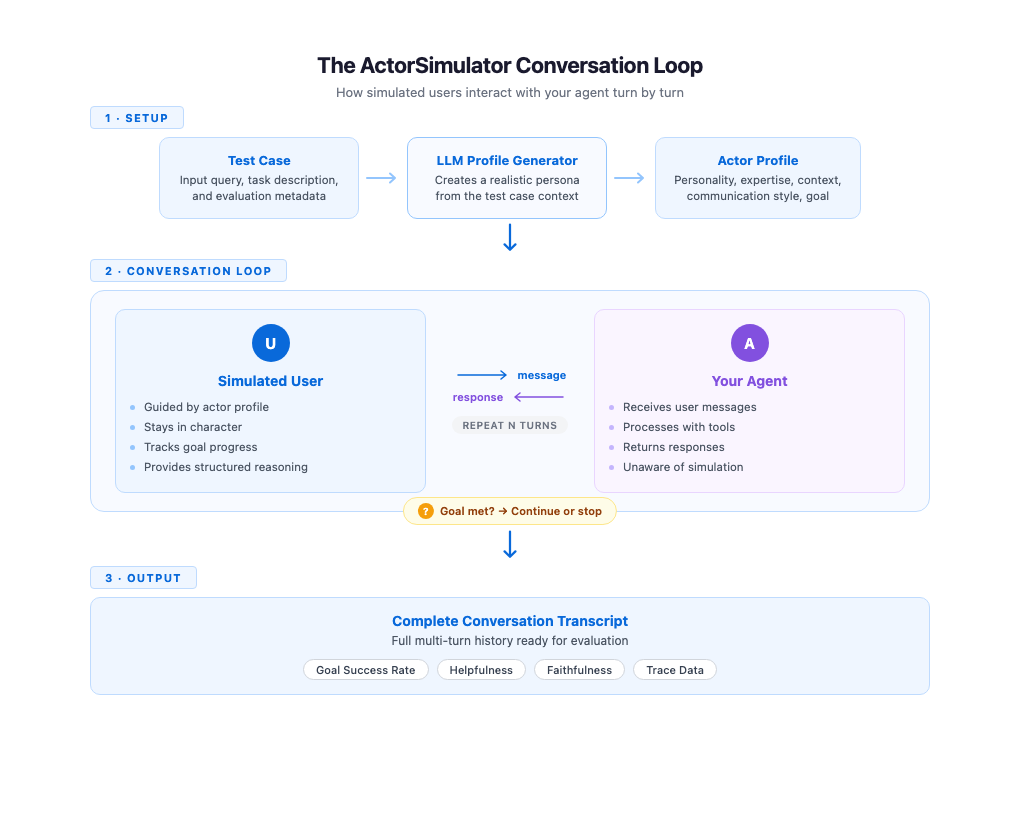
ActorSimulator implements these simulation qualities through a system that wraps a Strands Agent configured to behave as a realistic user persona. The process begins with profile generation. Given a test case containing an input query and an optional task description, ActorSimulator uses an LLM to create a complete actor profile. A test case with input “I need help booking a flight to Paris” and task description “Complete flight booking under budget” might produce a budget-conscious traveler with beginner-level experience and a casual communication style. Profile generation gives each simulated conversation a distinct, consistent character.
With the profile established, the simulator manages the conversation turn by turn. It maintains the full conversation history and generates each response in context, keeping the simulated user’s behavior aligned with their profile and goals throughout. When your agent addresses only part of the request, the simulated user naturally follows up on the gaps. A clarifying question from your agent gets a response that stays consistent with the persona. The conversation feels organic because every response reflects both the actor’s persona and everything said so far.
Goal tracking runs alongside the conversation. ActorSimulator includes a built-in goal completion assessment tool that the simulated user can invoke to evaluate whether their original objective has been met. When the goal is satisfied or the simulated user determines that the agent cannot complete their request, the simulator emits a stop signal and the conversation ends. If the maximum turn count is reached before the goal is met, the conversation also stops. This gives you a signal that the agent might not be resolving user needs efficiently. This mechanism makes sure conversations have a natural endpoint rather than running indefinitely or cutting off arbitrarily.
Each response from the simulated user also includes structured reasoning alongside the message text. You can inspect why the simulated user chose to say what they said, whether they were following up on missing information, expressing confusion, or redirecting the conversation. This transparency is valuable during evaluation development because you can see the reasoning behind each turn, making it more straightforward to trace where conversations succeed or go off track.
Getting started with ActorSimulator
To get started, you will need to install the Strands Evaluation SDK using: pip install strands-agents-evals. For a step-by-step setup, you can refer to our documentation or our previous blog for more details. Putting these concepts into practice requires minimal code. You define a test case with an input query and a task description that captures the user’s goal. ActorSimulator handles profile generation, conversation management, and goal tracking automatically.
The following example evaluates a travel assistant agent through a multi-turn simulated conversation.
from strands import Agent
from strands_evals import ActorSimulator, Case, Experiment

# Define your test case
case = Case(
    input="I want to plan a trip to Tokyo with hotel and activities",
    metadata={"task_description": "Complete travel package arranged"}
)

# Create the agent you want to evaluate
agent = Agent(
    system_prompt="You are a helpful travel assistant.",
    callback_handler=None
)

# Create user simulator from test case
user_sim = ActorSimulator.from_case_for_user_simulator(
    case=case,
    max_turns=5
)

# Run the multi-turn conversation
user_message = case.input
conversation_history = []

while user_sim.has_next():
    # Agent responds to user
    agent_response = agent(user_message)
    agent_message = str(agent_response)
    conversation_history.append({
        "role": "assistant",
        "content": agent_message
    })

    # Simulator generates next user message
    user_result = user_sim.act(agent_message)
    user_message = str(user_result.structured_output.message)
    conversation_history.append({
        "role": "user",
        "content": user_message
    })

print(f"Conversation completed in {len(conversation_history) // 2} turns")
The conversation loop continues until has_next() returns False, which happens when the simulated user’s goals are met or simulated user determines that the agent cannot complete the request or the maximum turn limit is reached. The resulting conversation_history contains the full multi-turn transcript, ready for evaluation.
Integration with evaluation pipelines
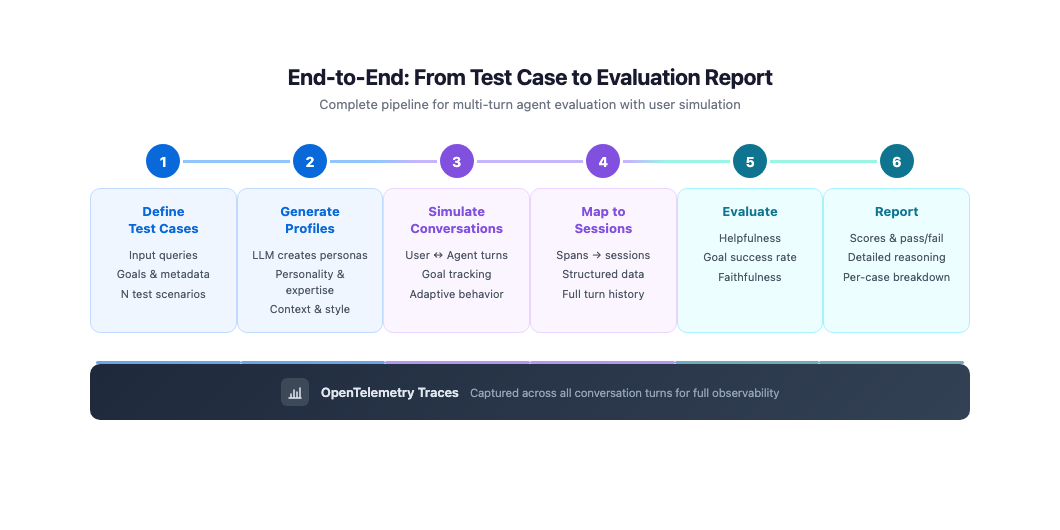
A standalone conversation loop is useful for quick experiments, but production evaluation requires capturing traces and feeding them into your evaluator pipeline. The next example combines ActorSimulator with OpenTelemetry telemetry collection and Strands Evals session mapping. The task function runs a simulated conversation and collects spans from each turn, then maps them into a structured session for evaluation.
from opentelemetry.sdk.trace.export import BatchSpanProcessor
from opentelemetry.sdk.trace.export.in_memory_span_exporter import InMemorySpanExporter
from strands import Agent
from strands_evals import ActorSimulator, Case, Experiment
from strands_evals.evaluators import HelpfulnessEvaluator
from strands_evals.telemetry import StrandsEvalsTelemetry
from strands_evals.mappers import StrandsInMemorySessionMapper

# Setup telemetry for capturing agent traces
telemetry = StrandsEvalsTelemetry()
memory_exporter = InMemorySpanExporter()
span_processor = BatchSpanProcessor(memory_exporter)
telemetry.tracer_provider.add_span_processor(span_processor)

def evaluation_task(case: Case) -> dict:
    # Create simulator
    user_sim = ActorSimulator.from_case_for_user_simulator(
        case=case,
        max_turns=3
    )

    # Create agent
    agent = Agent(
        system_prompt="You are a helpful travel assistant.",
        callback_handler=None
    )

    # Accumulate spans across conversation
    all_target_spans = []
    user_message = case.input

    while user_sim.has_next():
        memory_exporter.clear()
        agent_response = agent(user_message)
        agent_message = str(agent_response)

        # Capture telemetry
        turn_spans = list(memory_exporter.get_finished_spans())
        all_target_spans.extend(turn_spans)

        # Generate next user message
        user_result = user_sim.act(agent_message)
        user_message = str(user_result.structured_output.message)

    # Map to session for evaluation
    mapper = StrandsInMemorySessionMapper()
    session = mapper.map_to_session(
        all_target_spans,
        session_id="test-session"
    )

    return {"output": agent_message, "trajectory": session}

# Create evaluation dataset
test_cases = [
    Case(
        name="booking-simple",
        input="I need to book a flight to Paris next week",
        metadata={
            "category": "booking",
            "task_description": "Flight booking confirmed"
        }
    )
]

evaluator = HelpfulnessEvaluator()
dataset = Experiment(cases=test_cases, evaluator=evaluator)

# Run evaluations
report = Experiment.run_evaluations(evaluation_task)
report.run_display()
This approach captures complete traces of your agent’s behavior across conversation turns. The spans include tool calls, model invocations, and timing information for every turn in the simulated conversation. By mapping these spans into a structured session, you make the full multi-turn interaction available to evaluators like GoalSuccessRateEvaluator and HelpfulnessEvaluator, which can then assess the conversation as a whole, rather than isolated turns.
Custom actor profiles for targeted testing
Automatic profile generation covers most evaluation scenarios well, but some testing goals require specific personas. You might want to verify that your agent handles an impatient expert user differently from a patient beginner, or that it responds appropriately to a user with domain-specific needs. For these cases, ActorSimulator accepts a fully defined actor profile that you control.
from strands_evals.types.simulation import ActorProfile
from strands_evals import ActorSimulator
from strands_evals.simulation.prompt_templates.actor_system_prompt import (
    DEFAULT_USER_SIMULATOR_PROMPT_TEMPLATE
)

# Define a custom actor profile
actor_profile = ActorProfile(
    traits={
        "personality": "analytical and detail-oriented",
        "communication_style": "direct and technical",
        "expertise_level": "expert",
        "patience_level": "low"
    },
    context="Experienced business traveler with elite status who values efficiency",
    actor_goal="Book business class flight with specific seat preferences and lounge access"
)

# Initialize simulator with custom profile
user_sim = ActorSimulator(
    actor_profile=actor_profile,
    initial_query="I need to book a business class flight to London next Tuesday",
    system_prompt_template=DEFAULT_USER_SIMULATOR_PROMPT_TEMPLATE,
    max_turns=10
)
By defining traits like patience level, communication style, and expertise, you can systematically test how your agent performs across different user segments. An agent that scores well with patient, non-technical users but poorly with impatient experts reveals a specific quality gap that you can address. Running the same goal across multiple persona configurations turns user simulation into a tool for understanding your agent’s strengths and weaknesses by user type.
Best practices for simulation-based evaluation
These best practices help you get the most out of simulation-based evaluation:
- Set
max_turnsbased on task complexity, using 3-5 for focused tasks and 8-10 for multi-step workflows. If most conversations reach the limit without completing the goal, increase it. - Write specific task descriptions that the simulator can evaluate against. “Help the user book a flight” is too vague to judge completion reliably, while “flight booking confirmed with dates, destination, and price” gives a concrete target.
- Use auto-generated profiles for broad coverage across user types and custom profiles to reproduce specific patterns from your production logs, such as an impatient expert or a first-time user.
- Focus on patterns across your test suite rather than individual transcripts. Consistent redirects from the simulated user suggests that the agent is drifting off topic, and declining goal completion rates after an agent change points to a regression.
- Start with a small set of test cases covering your most common scenarios and expand to edge cases and additional personas as your evaluation practice matures.
Conclusion
We showed how ActorSimulator in Strands Evals enables systematic, multi-turn evaluation of conversational AI agents through realistic user simulation. Rather than relying on static test cases that capture only single exchanges, you can define goals and personas and let simulated users interact with your agent across natural, adaptive conversations. The resulting transcripts feed directly into the same evaluation pipeline that you use for single-turn testing, giving you helpfulness scores, goal success rates, and detailed traces across every conversation turn.
To get started, explore the working examples in the Strands Agents samples repository. For teams evaluating agents deployed through Amazon Bedrock AgentCore, the following AgentCore evaluations sample demonstrate how to simulate interactions with deployed agents. Start with a handful of test cases representing your most common user scenarios, run them through ActorSimulator, and evaluate the results. As your evaluation practice matures, expand to cover more personas, edge cases, and conversation patterns.